I had to login to a Windows host, after a friend handed in his Teamviewer ID and pass. I tried connecting few times and connection failed every time. It was not very likely it is a network problem as I have pretty good internet bandwidth here. I ask him what is his teamviewer, release and it turned out he is using TeamViewer 8. Just few months ago I've updated my teamviewer from TV 6 to TV 7 after finally Teamviewer 7 was launched for Linux. I check immediately TeamViewer website, but this time (TeamViewer GmbH – the vendor company of TV) has launched TV 8 for Linux in parallel with launching TV 8 for Windows.
Of course like often in Linux it is not all perfect TeamViewer 8 version is still in beta testing stage. I've downloaded and updated my (64 bit) teamviewer 7 to teamviewer 8 using the Deb binary, i.e.:
# wget http://www.teamviewer.com/download/version_8x/teamviewer_linux_x64.deb

.....

# dpkg -i teamviewer_linux_x64.deb

...

....
Just like previous TeamViewer, releases, the program launches via wine, so teamviewer_linux_x64.deb depends on working wine Windows emulator.
There are minor difference in graphic interface but no so significant changes from previous release.
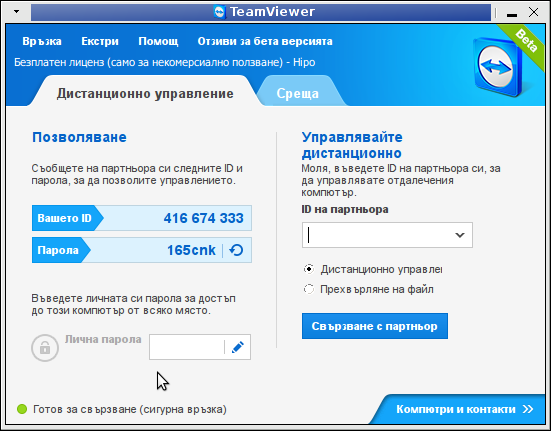
I used it to connect to remote Windows 8 host and experienced random issues with typing some characters from keyboard remotely, though I'm not sure if this was due to some bug of the TV 8 beta release or it is due to fact the Win host was infested with viruses.
Just for some convenience if I further need it, I've also made mirror of 32 bit TeamViewer 8 beta here and 64 bit TeamViewer 8 beta mirror here.


More helpful Articles

Tags: beta mirror, beta release, beta testing, convenience, graphic interface, internet bandwidth, keyboard, previous release, TeamViewer, tv 29, tv 6, tv 7, tv 8, wget, wine windows








Mozilla/5.0 (X11; Linux x86_64) AppleWebKit/537.17 (KHTML, like Gecko) Chrome/24.0.1350.0 Iron/24.0.1350.0 Safari/537.17
THANKS for the mirror! as, currently(Mar17th 2013), all the linux downloads on teamviewer.com produce nothing but internal server error..
View CommentView CommentMozilla/5.0 (Windows; U; Windows NT 6.1; en-US; rv:1.9.2.3) Gecko/20100401 Firefox/3.6.3
hey very glad my mirror helped 🙂
Regards,
View CommentView CommentGeorgi