On every next computer I use as a Desktop or Laptop, I install with Debian GNU / Linux I install the following bunch of extra packages in order to turn the computer into a powerful Multimedia, User, Sys Admin army knife tools, A Programmer desktop and Hacker / Penetration Testing security auditting station.
The packages names might vary less or more across various Debian releases and should be similar or the same in Ubuntu / Linux Mint and the rest of Deb based distribtuions.
Also some of the package names might given in the article might change from time of writting this article just like some already changed in time from a release to release, nomatter that the general list is a collection of packages I have enjoyed for the last 8 years. And I believe anyone who is new to GNU / Linux and or even some experienced free software users in need of full featured computer system for remote system administration purposes or general software development and even small entertainment such as Movie Watching or Playing some unsophisticated basic games to kill some time might benefit from the list of programs collected from my experience as a Free Software GNU / Linux users over the last 12 years or so.
So here we go as you might know, once you have a Debian GNU / Linux, first thing to do is to add some extra repositories in /etc/apt/sources.list
For example my debian 9 Stretch sources.list looks like this:
cp -rpf /etc/apt/sources.list /etc/apt/sources.list-bak
vim /etc/apt/sources.list
And delete / substitute everything within with something as following:
deb http://deb.debian.org/debian stretch main non-free
deb-src http://deb.debian.org/debian stretch maindeb http://deb.debian.org/debian stretch-updates main
deb-src http://deb.debian.org/debian stretch-updates maindeb http://security.debian.org/ stretch/updates main
deb-src http://security.debian.org/ stretch/updates maindeb http://security.debian.org/debian-security stretch/updates main contrib
deb-src http://security.debian.org/debian-security stretch/updates main contribdeb http://download.virtualbox.org/virtualbox/debian stretch contrib
If you're using an older Debian release for example debian 7 or 8, the sources.list codename stretch word should be changed to wheezy for legacy debian 7 or jessie for debian 8, do it respectively for any future or older Deb releases.
Then proceed and update all current installed packages to their latest release with:
apt-get update && apt-get upgrade
If you're running on a very old Debian GNU / Linux release , you might encounter errors from above cmds, if that's your case just follow the online guides and update to a newer still supported Deb release.
Once all this is done assuming you have connected to the internet via LAN network or if on a laptop via Wireless, here are some useful stuff to install especially if you're planning to use your computer effectively in both console and graphics environment.
1. Install some basic packages necessery if you're planning to be using compilers on the freshly installed GNU / linux
apt-get install –yes gcc autoconf build-essential fakeroot devscripts equivs libncurses5-dev g++ make libc6-dev fontconfig gdc
The most notable package here is build-essential it provides the following collection of C / C++ programs on Deb package based distributions Debian / Ubuntu / Mint etc.
- libc6-dev – C standard library.
- gcc – C compiler.
- g++ – C++ compiler.
- make – GNU make utility to maintain groups of programs.
- dpkg-dev – Debian package development tools.
2. Install w3m lynx elinks text browsers
apt-get install –yes lynx elinks w3m-img w3m
3. Install wireless and networking tools
apt-get install –yes tcpdump vnstat wpasupplicant wpagui dnsutils
4. Install Network sniffing, penetration testing and network evaluation tools
apt-get install –yes wireshark nmap zenmap sniffit iptraf iptraf-ng tshark dsniff netsniff-ng netwox netwag sslsniff darkstat kismet netcat ngrep hashcat hydra hydra-gtk ophcrack ophcrack-cli
————–
wireshark – GUI network traffic analyzer
nmap – nmap port mapper and security audit tool
zenmap – GUI frontend to nmap
sniffit – console text based basic packet sniffer and monitoring tool very used tool to sniff servers authenticatoins in the past
iptraf-ng – Next Generation interactive colorful IP Lan mointor
tshark – another network traffic analyzer console version
dsniff – Various tools to sniff network traffic for cleartext insecurities
netsniff-ng – Linux network packet sniffer toolkit
netwox – Provides more than 200 tools to solve network problems with DNS, FTP, HTTP, IRC, NNTP, SMTP, SNMP, SYSLOG, TELNET, TFTP
netwag – graphical frontend to netwox
sslsniff – SSL/TLS man-in-the-middle attack tool
darkstat – network traffic analyzer
kismet – wireless sniffer and monitor (very useful in the past for sniffing passwords on a Wi-Fi network)
netcat – TCP / IP swiss army knife (good tool to listen and connect to local and remote ports)
ngrep – grep like tool for network traffic
hashcat – Claims to be world's fastest and most advanced password recovery utility, capable of attacking more than 160 highly optimized hashing algorithms, supports CPU and GPU (using the video card CPU to enhance password cracking speed), also could be used for distributed password cracking
hydra – Very fast network logon cracker, supports webforms works with dictionary attacks etc.
hydra-gtk – GTK GUI version of Hydra
ophcrack – Microsoft Windows password cracker using rainbow tables GUI
ophcrack-cli – Console version of Microsoft Windows password cracker using rainbow tables for speed
————
5. Install multimedia, entertainment few useful tools and other useful stuff
apt-get install –yes workrave xscreensaver xscreensaver-data xulrunner xutils zenity yelp zgv tracker-utils alltray ant apt-utils bsdutils aumix bwidget ca-certificates pulseaudio-module-jack aumix audacious ffmpeg bluefish bluefish-plugins blender blueman bluez cabextract bluez-firmware bsdmainutils dcraw dmidecode evtest file fonts-liberation fonts-stix fonts-uralic fonts-opensymbol fonts-lyx fonts-cantarell fuse gimp gimp-data-extras gimp-plugin-registry git gnupg gnupg2 imagemagick imwheel inkscape iw less
bsdutils – Provides some nice old school programs such as :
-=-=-=-=-=-
wall – a program to write to every logged in user console, used in old times on time sharing servers to notify all users about sys admin planning for a reboot or for some other update activity
renice – allows to renice priority over already prioritized process with (nice command)
script – Allows you to do a recorder like saves of user activity on a console / terminal
logger – send logging output from programs to syslog
-=-=-=-=-=-
alltray – A small program that allows you to bring to dock any program useful to make Thunderbird appear in Gnome / Mate / KDE Dock in a similar manner as Outlook does in m$ Windows
zgv – SVGAlib graphical (picture viewer) useful to view pictures from tty consoles
zenity – allows to display graphical dialog boxes by using shell scripts
aumix – Simple text based mixer control, useful to tune up sound values and mic recording volume from console
WorkRave – is a useful program to periodically remind you to stand out of the computer on a specified interval and shows you graphically some exercies to do to prevent your physical health to not deteriorate by standing all day immobilized
Bluefish – Is Advanced GTK+ HTML Editor useful if you're about to edit HTML / CSS and other Web files
dcraw – Decode raw digital images
dmidecode – Text program that reports your computer hardware
blueman, bluez – Programs to enable USB support on your Linux
evtest – evtest is a utility to monitor Linux input devices
file – little tool to determine file type based on "magic numbes"
fontsliberation – Fonts with same metrics as Times, Arial and Courier
—
6. Install Text based console Multimedia Mp3 / Mod / S3m players
apt-get install –yes mpg321 mpg123 cmus mp3blaster mplayer sox ogg123 mikmod cplay cdcd cdck eject
———
mpg321, mpg123 – Mp3 and Ogg Vorbis console player historically one of the earliest I used to play my music
cmus – Another awesome ncurses menu based small music player
mp3blaster – Full Screen ncurses text console mp3 and Ogg vorbis music player
mplayer – An awesome old school (the defacto standard) and still one of the best Music and Video player for GNU / Linux
sox – Swiss army knife of sound processing, contains (sox, play, rec and soxi commands), which could be used to play, rec and add effects to WAV and other popular old sound formats
ogg123 – Play Ogg Vorbis .OGG Free encoding file format in console
mikmod – The most famous Tracker (S3M, MOD, IT) music player for *NIX, play the old soundtracker formats on your GNU / Linux
cplay – A really nice text front end to music players, the cool thing about it it shows how much is left for the song to over using ASCII
cdcd – play Audio CDs from console
eject – eject your CD Drive from console
cdck – tool to verify the quality of written CDs/DVDs
———
7. Install Games
apt-get install –yes xpenguins frozen-bubble alex4 bsdgames bb ninvaders blobwars btanks chromium-bsu criticalmass figlet freetennis njam swell-foop dreamchess extremetuxracer gltron gnuchess wesnoth njam wing nikwi dreamchess gltron gnome-games swell-foop aisleriot prboom
———–
xpenguins – little penguins walk on your screen great to use as a screensaver
frozen-bubble – cool game with bubbles you have to pop out
blobwars – platform shooting game
njam – pacman like game with multiplayer support
extremetuxracer – 3D racing game featuring Tux the Linux penguin mascot
gltron – 3D remake of the good well known Tron Game
gnuchess – GNU remake of classic Chess game
wing – arcade Galaga like game for GNU / Linux
wesnoth – Fantasy turne based strategy game
dremachess – 3D chess game
swell-fool – Colored ball puzzle game
gnome-games – A collection of Games for the GNOME Desktop
nikwi – platform game with a goal to collect candies
aisleriot – GNOME solitaire card game
prboom – PrBoom, a remake of the Doom 3d shooter classic game using SDL (supports OpenGL), to play it you will need WAD files if you don't have it install (doom-wad-shareware) package
figlet – Make large character ASCII banners out of ordinary provided text (just provide any text and get a nice ASCII picture out of it)
———-
8. Install basic archivers such as rar, zip, arj etc.
apt-get install –yes zip unrar arj cpio p7zip unzip bzip2 file-roller
———–
cpio – GNU cpio, a program to manager archive files
bzip2 – BunZip2 block compressor decompressor utility (necessery to untar the .tar.bz2 tar balls)
unzip – De-archiver for .zip files console version
rar, unrar – Archiver Unarchiver for .rar files in terminal / console (unfortunately non-free software)
file-roller – Archive manager for gnome
gpg – gnu privacy guard to be able to generate gpg keys
————-
If you're looking for an advanced file archive, dearchive software GUI that be a substitute for Windows WinRar, WinZip there is also the proprietary software PeaZip for Linux, as I stay as much as possible away from non-free software I don't use PeaZip though. For me file-roller's default GNOME archiver / unarchiver does a pretty good job and if it fails someties I use the console versions of above programs
9. Install text and speech synthesizer festival freetts
apt-get install –yes festival festival-cmu festvox-kallpc16k festvox-ru mbrola-en1 speech-dispatcher-festival freetts flite yasr gnupg2
————-
Festival – Is the general multi-lingual speech synthesis system
yasr – is a basic console screen reader program
flite – a small run time speech synthesis engine alternative to festival, another free software synthesis tool based built using FestVox
————–
Festival is great if you want to listen to text files and can easily be used to convert basic PDFs or DOC files to listen them if you're lazy to read I've explained on how you can use festival to read speak for you PDFs and DOCs, ODF (Open Document Format) here
10. Install linux-header files for latest installed Debian kernel
apt-get install –yes linux-headers-$(uname -r)
You will need that package if you need to compile external usually DRM (Digital Rights Management) external modules that could be loaded to current Debian precompiled kernel, I recommend you abstain from it since most of the modules are DRMed and doesn't respect your freedom.
11. Install GUI programs and browsers
apt-get install –yes gnome-themes-standard gnome-themes-standard-data epiphany-browser dconf-tools gnome-tweak-tool
epiphany-browser – Intuitive GNOME web browser (I love this browser, though sometimes Crashing I prefer to use it as it is really fast and lightweight I think Mac OS's Safari has been partially based on its programming code)
dconf-tools – Dconf is a low-level key / value database designed for storing desktop environment variables (provides dconf-editor – which allows you to tune tons of gnome settings tunable only through this database it is something like Windows regedit registry editor tool but for GNOME)
gnome-themes-standard / gnome-themes-standard-data – The name says it all it provides beautiful gnome standard themes
gnome-tweak-tool – Graphic tool to adjust many advanced configuration settings in GNOME in GNOME 3.2, many of the old GNOME 3.0 and 2.X capabilities such as Desktop icons or Computer on the Desktop and many more useful gnome capabilities you might be used for historically can be enabled through that handy tool, it is a must for the GNOME user
12. Install text and GUI mail clients
apt-get install –yes mutt fetchmail bsd-mailx mailutils thunderbird aspell-bg aspell-en aspell-ru
I use primary 3 languages Russian, Bulgarian and English, so by installing the 3 packages aspell-bg, aspell-en, aspell-ru, that would add a possiility for Thunderbird and LibreOffice to have ability to spell check your mails and ODF documents, if your native language is different or you speak different languages do run:
apt-cache search aspell
And install whatever languages spell check support you need
13. Install filesystem mount, check and repair tools
apt-get install –yes ntfs-3g sshfs dosfstools ext3grep e2fsprogs e2fsck-static growisofs e2undel extundelete recover bleachbit
———–
ntfs-3g – read / write NTFS driver support for FUSE (Filesystem in UserSpace) or in other words install these to be able to mount in read/write mode NTFS filesystems
sshfs – filesystem client based on SSH File Transfer Protocol, that little nitty tool enables you to mount remotely SSH Filesystems to your local Linux Desktop, it is also useful to install across servers if you need to remotely mount SSH Filesystems
e2fsprogs – ext2 / ext3 / ext4 filesystem utilities to check, fix, tune, defragment resize and create etc. new filesystems (provides crucial commands such as fsck.ext2, fsck.ext3, fsck.ext4, e2label, lsattr, chattr, resize2fs, mkfs.ext2, mkfs.ext3, mkfs.ext4 …)
dosfstools – tool giving you ability to check, create and diagnose DOS and Windows FAT 32 Filesystems provides commands such as dosfsck, mkdosfs, dosfslabel, fsck.msdos, fsck.vfat, mkfs.msdos
growisofs – DVD+ RW / Read Only Recorder
ext3grep – tool to help recover deleted files on ext3 filesystems
e2undel – Undelete utility for ext2 filesystems
———–
14. Install emulators for PC OS Emuation (Qemu), DOS and Wine to run native Windows programs on GNU / Linux
apt-get install –yes qemu qemu-utils aqemu dosbox mame mame-extra os8 simh wine nestopia dgen
—————-
Qemu – Virtual Machine emulator with support UEFI firmware
Aqemu – Qemu QT VM GUI Frotend
Dosbox – Dos Emulator, great to have to play the good old DOS games on your GNU / Linux
Mame – Multiple Arcade Machine Emulator, great if you want to play the old arcade games of your youth such as The Punisher, Cadillacs and Dinosaurs, Captain America, Robocop, Captain Commando, Wonderboy and so on the list goes on and on …
simh – PDP-1 PDP-4 PDP-7, PDP-9, PDP-10, PDP-11, PDP-15 HP 2100, IBM System 3, IBM 1620, Interdata, SDS, LGP-21, LGP-30, DEC VaX emulator
nestopia – Nintendo Entertainment System / Famicom Emulator
dgen – Sega MegaDrive GNU / Linux Emulator
—————
15. Install Network Time protocol daemon and ntpdate (time synchronizing text client)
apt-get install –yes ntpdate ntp
16. Install Djview and CHM books reader
apt-get install –yes djview djview4 djvulibre-bin xchm kchmviewer chm2pdf
Install this packages to be able read DjView and CHM book formats
17. Install other text stuff
# Install text calculator I always prefer and use this console tool instead of the GUI gnome-calculator
apt-get install –yes bc
18. Install printing CUPs and printing utilities
apt-get install –yes cups-client cups-daemon cups-server-common hplip hplip-data printer-driver-hpcups printer-driver-hpijs ghostscript
A bunch of packages for your Linux Deskto po properly support printing, you might need to install some extra packages depending on the type of printer you need to use, perhaps you will have to take few minutes probably to configure CUPs.
19. Install text monitoring tools
apt-get install –yes htop atop dnstop iftop iotop jnettop ntopng pktstat powertop sntop mariadb-client iotop itop jnettop kerneltop logtop
pgtop powertop
—————–
htop – More interactive colorful process viewer similar to top
atop – Monitor for system resources and process activity
dnstop – Console tool for analyze DNS traffic
iftop – displays bandwidth usage information on a chosen network interface
iotop – simple top-like I/O (I / O) information output by the Linux kernel
jnettop – View hosts / ports taking up the most network traffic
ntopng – High-Speed Web-based Traffic analysis and Flow Collection tool
pktstat – top like utility for network connections usage
powertop – tool to diagnose issues with power consumption and management (useful for Linux running laptops)
sntop – A ncurses-based utility that polls hosts to determine connectivity
mariadb-client – this is the new name for the old mytop / mtop MySQL top package
kerneltop – shows Linux kernel usage in a style like top
pgtop – Show PostgreSQL queries in a top like style
lograte – real time log line rate analyzer
—————-
20. Install text command line tools for transferring data from Web sites and FTP
apt-get install –yes curl wget lftp filezilla gftp transmission linuxdcpp
———-
curl – command line tool for transferring data with URL syntax
wget – tool to retrvie files and html from the web
lftp – sophisticated command-line FTP/HTTP/BitTorrent client program
filezilla – Full-featured graphical FTP/FTPS/SFTP client
gftp – X/GTK+ and console FTP client
transmission – lightweight Bittorrent client
linuxdcpp – Port of the Windows file-sharing program DC++
———–
21. Install text based communication programs
apt-get install –yes irssi freetalk centerim finch
———-
Irssi – Great console IRC chat client with support for encryption
FreeTalk – console based jabber client
centerim – Console based ICQ client
finch – Multi protocol Text console client for AIM/ICQ, Yahoo!, MSN, IRC, Jabber / XMPP / Google Talk Sametime, MySpaceIM, Napster, Zephyr, Gadu-Gadu, Bonjour, GroupWise
———-
22. Install Apache Webserver and MySQL
This two are necessery if you're about to use your computer as a PHP / MySQL develment station
apt-get install –yes mysql-server phpmyadmin apache2 libapache2-mod-php php-pear php php-mysql ant ant-contrib apache2-dev apache2-ssl-dev
———-
mysql-server – MySQL community edition
ant – Java based build tool like make (necessery for building many third party apache modules and code)
libapache2-mod-php5 – the php module loaded into apache
phpmyadmin – Webtool admin to manage your MySQL database
——–
23. Install mouse support for consoles
apt-get install –yes gpm
———–
gpm – is the general purpose mouse interface, if you want to have support for your mouse in TTY consoles (the ones you go to with CTRL + ALT + F2, CTRL + ALT + F3 and so on install it).
———–
24. Install various formats converter tools
apt-get install –yes html2text pdf2djvu unoconv oggconvert webkit2pdf img2pdf gsscan2pdf netpbm dir2ogg soundconverter
————
gsscan2pdf – GUI program to produce PDF or DJVU from scanned documents
img2pdf – Lossless conversion of raster images to PDF
webkit2pdf – export web pages to PDF files or printer
html2text – Advanced HTML to text converter
oggcconvert – convert media files to free format
netpbm – Graphics conversion tools between image formats
dir2ogg – converts MP3, M4A, WMA, FLAC, WAV files and Audio CDs to the open-source OGG format.
soundconverter – GNOME application to convert audio files into other formats
————
There are probably a lot of more handy packages that other Free Software users like to install to make the GNU / Linux desktop notebook even more entertaining and fulfillful for daily work. If you can think of other useful packages not mentioned here you tend to use on a daily basis no matter where Debian based or other distro, please share that would help me too to learn a new thing and I'll be greateful.
Enjoy !
UPDATE: If you get errors with missing packages, just delete them out of the apt-get lines. The reason is some packages are beying removed from .deb repositories or the software package name has changed due to some reason.


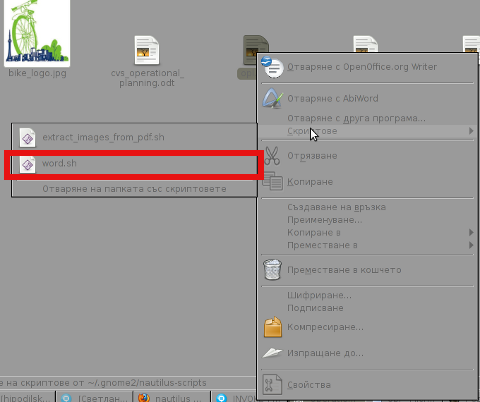 My GNOME env is configured in Bulgarian language so on below script you see the bulgarian translated word for Scripts (Скриптове).