Posts Tagged ‘project’

How to count lines of PHP source code in a directory (recursively)

Saturday, July 14th, 2012

Count PHP and other programming languages lines of source code (source code files count) recursively

Being able to count the number of PHP source code lines for a website is a major statistical information for timely auditting of projects and evaluating real Project Managment costs. It is inevitable process for any software project evaluation to count the number of source lines programmers has written.
In many small and middle sized software and website development companies, it is the system administrator task to provide information or script quickly something to give info on the exact total number of source lines for projects.

Even for personal use out of curiousity it is useful to know how many lines of PHP source code a wordpress or Joomla website (with the plugins) contains.
Anyone willing to count the number of PHP source code lines under one directory level, could do it with:::

serbver:~# cd /var/www/wordpress-website
server:/var/www/wordpress-website:# wc -l *.php
17 index.php
101 wp-activate.php
1612 wp-app.php
12 wp-atom.php
19 wp-blog-header.php
105 wp-comments-post.php
12 wp-commentsrss2.php
90 wp-config-sample.php
85 wp-config.php
104 wp-cron.php
12 wp-feed.php
58 wp-links-opml.php
59 wp-load.php
694 wp-login.php
236 wp-mail.php
17 wp-pass.php
12 wp-rdf.php
15 wp-register.php
12 wp-rss.php
12 wp-rss2.php
326 wp-settings.php
451 wp-signup.php
110 wp-trackback.php
109 xmlrpc.php
4280 total

This will count and show statistics, for each and every PHP source file within wordpress-website (non-recursively), to get only information about the total number of PHP source code lines within the directory, one could grep it, e.g.:::

server:/var/www/wordpress-website:# wc -l *.php |grep -i '\stotal$'
4280 total

The command grep -i '\stotal$' has \s in beginning and $ at the end of total keyword in order to omit erroneously matching PHP source code file names which contain total in file name; for example total.php …. total_blabla.php …. blabla_total_bla.php etc. etc.

The \s grep regular expression meaning is "put empty space", "$" is placed at the end of tital to indicate to regexp grep only for words ending in string total.

So far, so good … Now it is most common that instead of counting the PHP source code lines for a first directory level to count complete number of PHP, C, Python whatever source code lines recursively – i. e. (a source code of website or projects kept in multiple sub-directories). To count recursively lines of programming code for any existing filesystem directory use find in conjunction with xargs:::

server:/var/www/wp-website1# find . -name '*.php' | xargs wc -l
1079 ./wp-admin/includes/file.php
2105 ./wp-admin/includes/media.php
103 ./wp-admin/includes/list-table.php
1054 ./wp-admin/includes/class-wp-posts-list-table.php
105 ./wp-admin/index.php
109 ./wp-admin/network/user-new.php
100 ./wp-admin/link-manager.php
410 ./wp-admin/widgets.php
108 ./wp-content/plugins/akismet/widget.php
104 ./wp-content/plugins/google-analytics-for-wordpress/wp-gdata/wp-gdata.php
104 ./wp-content/plugins/cyr2lat-slugs/cyr2lat-slugs.php
,,,,
652239 total

As you see the cmd counts and displays the number of source code lines encountered in each and every file, for big directory structures the screen gets floated and passing | less is nice, e.g.:

find . -name '*.php' | xargs wc -l | less

Displaying lines of code for each file within the directories is sometimes unnecessery, whether just a total number of programming source code line is required, hence for scripting purposes it is useful to only get the source lines total num:::

server:/var/www/wp-website1# find . -name '*.php' | xargs wc -l | grep -i '\stotal$'

Another shorter and less CPU intensive one-liner to calculate the lines of codes is:::

server:/var/www/wp-website1# ( find ./ -name '*.php' -print0 | xargs -0 cat ) | wc -l

Here is one other shell script which displays all file names within a directory with the respective calculated lines of code

For more professional and bigger projects using pure Linux bash and command line scripting might not be the best approach. For counting huge number of programming source code and displaying various statistics concerning it, there are two other tools – SLOCCount
as well as clock (count lines of code)

Both tools, are written in Perl, so for IT managers concerned for speed of calculating projects source (if too frequent source audit is necessery) this tools might be a bit sluggish. However for most projects they should be of a great add on value, actually SLOCCount was already used for calculating the development costs of GNU / Linux and other projects of high importance for Free Software community and therefore it is proven it works well with ENORMOUS software source line code calculations written in programming languages of heterogenous origin.

sloccount and cloc packages are available in default Debian and Ubuntu Linux repositories, so if you're a Debilian user like me you're in luck:::

server:~# apt-cache search cloc$
cloc - statistics utility to count lines of code
server:~# apt-cache search sloccount$
sloccount - programs for counting physical source lines of code (SLOC)

Well that's all folks, Cheers en happy counting ;)

Share this on

How to run your Own / Personal Domain Web WHOIS service in a minute with SpeedyWHOIS

Thursday, April 5th, 2012

Running your own personal WHOIS service speedy whois in browser screenshot

I've been planning to run my own domain WHOIS service, for quite sime time and I always postpone or forgot to do it.
If you wonder, why would I need a (personal) web whois service, well it is way easier to use and remember for future use reference if you run it on your own URL, than wasting time in search for a whois service in google and then using some other's service to get just a simple DOMAIN WHOIS info.

So back to my post topic, I postpopned and postponed to run my own web whois, just until  yesterday, whether I have remembered about my idea to have my own whois up and running and proceeded wtih it.

To achieve my goal I checked if there is free software or (open source) software that easily does this.
I know I can write one for me from scratch, but since it would have cost me some at least a week of programming and testing and I didn't wanted to go this way.

To check if someone had already made an easy to install web whois service, I looked through in the "ultimate source for free software" sourceforge.net

Looking for the "whois web service" keywords, displayed few projects on top. But unfortunately many of the projects sources was not available anymore from http://sf.net and the project developers pages..
Thanksfully in a while, I found a project called SpeedyWhois, which PHP source was available for download.

With all prior said about project missing sources, Just in case if SpeedyWhois source  disappears in the future (like it probably) happened with, some of the other WHOIS web service projects, I've made SpeedyWhois  mirror for download here

 
Contrary to my idea that installing the web whois service might be a "pain in the ass", (like is the case  with so many free software php scripts and apps) – the installation went quite smoothly.
 
To install it I took the following 4 steps:
 
1. Download the source (zip archive) with wget 
 
# cd /var/www/whois-service;
/var/www/whois-service# wget -q http://www.pc-freak.net/files/speedywhois-0.1.4.zip
 
2. Unarchive it with unzip command 
 
 
/var/www/whois-service# unzip speedywhois-0.1.4.zip
3. Set the proper DNS records

My NS are using Godaddy, so I set my desired subdomain record from their domain name manager.
 

4. Edit Apache httpd.conf to create VirtualHost
 
This step is not mandatory, but I thought it is nice if I put the whois service under a subdomain, so add a VirtualHost to my httpd.conf
 
The Virtualhost Apache directives, I used are:
 
<VirtualHost *:80>
        ServerAdmin hipo_aT_pc-freak.net
        DocumentRoot /var/www/whois-service
        ServerName whois.pc-freak.net
        &lt;Directory /var/www/whois-service
        AllowOverride All
        Order Allow,Deny
        Allow from All
        </Directory>
</VirtualHost>
 
Onwards to take effect of new Webserver configs, I did Apache restart
 
# /usr/local/etc/rc.d/apache2 restart
 
Further on You can test whois a domain using my new installed SpeedyWHOISWeb WHOIS service  on http://whois.pc-freak.net
Whenever I have some free time, maybe I will work on the code, to try to add support for logging of previous whois requests and posting links pointing to the previous whois done via the web WHOIS service on the main whois page.
 
One thing that I disliked about how SpeedyWHOIS is written is, if there is no WHOIS information returned for a domain request (e.g.) a:
 
# whois domainname.com
 
returns an empty information, the script doesn't warn with a message there is no WHOIS data available for this domain or something.
 
 
This is not so important as this kind of behaviour of 'error' handling can easily be changed with minimum changes in the php code.
If you wonder, why do I need the web whois service, the answer is it is way easier to use.
I don't have more time to research a bit further on the alternative open source web whois services, so I would be glad to hear from anyone who tested other web whois service that is free comes under a FOSS license.
In the mean time, I'm sure people with a small internet websites like mine who are looking to run their OWN (personal) whois service SpeedyWHOIS does a great job.

Share this on

What is the Pirate Party / Interview with Peter Sunde – The co-founder of ThePirateBay on CeBIT 2011

Monday, February 20th, 2012

The Piratebay website logo

Many people are using ThePiratebay to get all kind of data and share Movies, Games, Programs etc.)

ThePirateBay has become like a standard media for file sharing and still not many people are aware of who is behind ThePirateBay.
This is why I thought, by posting this article I can "rant" on the existence of the Swedish Pirate Party
The Pirate Party – Is a party fighting on behalf of information sharing freedom (or in other words a party fighting for our freedom as individuals in the digital era).

Swedish Pirate Party Official Party mascot
Pirate Party (Sweden) party official mascot

The Pirate party are swedish political party established in 2006, its members are activists lobbying on freedom of information as well as pointing at threats to our human freedoms imposed by new legislations and anti-freedom agreements like the recent ACTA treaty.

Since there creation in 2006, they have grown from a local Swedish party to an international party, locally existing in 33 countries arount the world.The ideology behind the Swedish PirateParty as well as the rest of existing Pirate Parties international is as I prior said Freedom of Information on the internet. PP is a party phenomenon, as they are neither a left or a right oriented party (on the traditional left-right scale). PP are independent bloc pursuing their political agenda colabborating with all mainstream parties, which stand behind the ideologies the party fights for.

After last European Parliament elections, PP received 7% of all Swedish votes for a country EU representative.
As of today according to Wikipedia , the party holds 2 EU deputee seats in EU parliament.

I've a friend who is taking membership in the Pirate Party and from him I know the PP party are big supporters of Free Software.

One major key figure part of Pirate Party is the swedish Peter Sunde. He is a front person who is behind ThePirateBay project as well as holds a very interesting revolutionary ideas. Many of his ideas are close to "the father of all free software" – Richard Mathew Stallman (RMS). Therefore the PP would be probably of interest to anyone who is interested in Free Software. Here is an interview with Peter Sunde's taken in Cebit 2011:

As long as I know the Pirate Party are along the only few organizations in the whole world, who are trying to fight on behalf of human freedom.I'll be glad to hear if someone know about other ornigazations apart from Pirate Party the Free Software Foundation – (FSF) lobbying on present worsening conditions of invidual human freedom.

Here is few curious facts proving how BIG and important thepiratebay.org is, the text below is again quote from Wikipedia

Currently ThePirateBay.org is ranked as the 80th most visited website in the world and 20th in Sweden by Alexa Internet, has over 5.5 million registered users and, as of February 2012, hosts more than 4 million torrent files.

According to the Los Angeles Times, The Pirate Bay is "one of the world's largest facilitators of illegal downloading" and "the most visible member of a burgeoning international anti-copyright or pro-piracy movement"

If you want to further check on what is today the Pirate Party standing for be sure to check ThePirateParty.Com – PP’s official website .

Share this on

How to install OpenNTPD NTP server to synchronize system clock on FreeBSD for better security

Sunday, February 12th, 2012

FreeBSD, OpenBSD, NetBSD and Linux ntpd alternative server to synchronize server system time

Lately I've been researching on ntpd and wrote a two articles on how to install ntpd on CentOS, Fedora and how to install ntpd on FreeBSD and during my research on ntpd, I've come across OpenNTPD and decided to give it a go on my FreeBSD home router.
OpenBSD project is well known for it is high security standards and historically has passed the test of time for being a extraordinary secure UNIX like free operating system.
OpenBSD is developed in parallel with FreeBSD, however the development model of the two free operating systems are way different.

As a part of the OpenBSD to be independant in its basis of software from other free operating systems like GNU / Linux and FreeBSD. They develop the all around free software realm known OpenSSH. Along with OpenSSH, one interesting project developed for the main purpose of OpenBSD is OpenNTPD.

Here is how openntpd.org describes OpenNTPD:

"a FREE, easy to use implementation of the Network Time Protocol. It provides the ability to sync the local clock to remote NTP servers and can act as NTP server itself, redistributing the local clock."

OpenNTPD's accent just like OpenBSD's accent is security and hence for FreeBSD installs which targets security openntpd might be a good choice. Besides that the so popular classical ntpd has been well known for being historically "insecure", remote exploits for it has been released already at numerous times.

Another reason for someone to choose run openntpd instead of ntpd is its great simplicity. openntpd configuration is super simple.

Here are the steps I followed to have openntpd time server synchronize clock on my system using other public accessible openntpd servers on the internet.

1. Install openntpd through pkg_add -vr openntpd or via ports tree

a) For binar install with pkg_add issue:

freebsd# pkg_add -vr openntpd
...

b) if you prefer to compile it from source

freebsd# cd /usr/ports/net/openntpd
freebsd# make install clean
...

2. Enable OpenNTPD to start on system boot:

freebsd# echo 'openntpd_enable="YES"' >> /etc/rc.conf

3. Create openntpd ntpd.conf configuration file

There is a default sample ntpd.conf configuration which can be straight use as a conf basis:

freebsd# cp -rpf /usr/local/share/examples/openntpd/ntpd.conf /usr/local/etc/ntpd.conf

Default ntpd.conf works just fine without any modifications, if however there is a requirement the openntpd server to listen and accept time synchronization requests from only certain hosts add to conf something like:

listen on 192.168.1.2
listen on 192.168.1.3
listen on 2607:f0d0:3001:0009:0000:0000:0000:0001
listen on 127.0.0.1

This configuration will enable only 192.168.1.2 and 192.168.1.3 IPv4 addresses as well as the IPv6 2607:f0d0:3001:0009:0000:0000:0000:0001 IP to communicate with openntpd.

4. Start OpenNTPD service

freebsd# /usr/local/etc/rc.d/openntpd

5. Verify if openntpd is up and running

freebsd# ps axuww|grep -i ntp
root 31695 0.0 0.1 3188 1060 ?? Ss 11:26PM 0:00.00 ntpd: [priv] (ntpd)
_ntp 31696 0.0 0.1 3188 1140 ?? S 11:26PM 0:00.00 ntpd: ntp engine (ntpd)
_ntp 31697 0.0 0.1 3188 1088 ?? S 11:26PM 0:00.00 ntpd: dns engine (ntpd)
root 31700 0.0 0.1 3336 1192 p2 S+ 11:26PM 0:00.00 grep -i ntp

Its also good idea to check if openntpd has succesfully established connection with its peer remote openntpd time servers. This is necessery to make sure pf / ipfw firewall rules are not preventing connection to remote 123 UDP port:

freebsd# sockstat -4 -p 123
USER COMMAND PID FD PROTO LOCAL ADDRESS FOREIGN ADDRESS
_ntp ntpd 31696 4 udp4 83.228.93.76:54555 212.70.148.15:123
_ntp ntpd 31696 6 udp4 83.228.93.76:56666 195.69.120.36:123
_ntp ntpd 31696 8 udp4 83.228.93.76:49976 217.75.140.188:123

By default openntpd is also listening to IPv6 if IPv6 support is enabled in freebsd kernel.

6. Resolve openntpd firewall filtering issues

If there is a pf firewall blocking UDP requests to in/out port 123 within /etc/pf.conf rule like:

block in log on $EXT_NIC proto udp all

Before the blocking rule you will have to add pf rules:

# Ipv4 Open outgoing port TCP 123 (NTP)
pass out on $EXT_NIC proto tcp to any port ntp
# Ipv6 Open outgoing port TCP 123 (NTP)
pass out on $EXT_NIC inet6 proto tcp to any port ntp
# Ipv4 Open outgoing port UDP 123 (NTP)
pass out on $EXT_NIC proto udp to any port ntp
# Ipv6 Open outgoing port UDP 123 (NTP)
pass out on $EXT_NIC inet6 proto udp to any port ntp

where $EXT_NIC is defined to be equal to the external lan NIC interface, for example:
EXT_NIC="ml0"

Afterwards to load the new pf.conf rules firewall has to be flushed and reloaded:

freebsd# /sbin/pfctl -f /etc/pf.conf -d
...
freebsd# /sbin/pfctl -f /etc/pf.conf -e
...

In conclusion openntpd should be more secure than regular ntpd and in many cases is probably a better choice.
Anyhow bear in mind on FreeBSD openntpd is not part of the freebsd world and therefore security updates will not be issued directly by the freebsd dev team, but you will have to regularly update with the latest version provided from the bsd ports to make sure openntpd is 100% secure.

For anyone looking for more precise system clock synchronization and not so focused on security ntpd might be still a better choice. The OpenNTPD's official page states it is designed to reach reasonable time accuracy, but is not after the last microseconds.
 

Share this on

Plamenko and his project Symphology – One of the greatest composer guitarists in Bulgaria presently

Thursday, September 8th, 2011

A friend of mine Plamen Panayotov is one of the best guitarists, I’ve ever watched live.
He is self-taught musician and is one of the notable guitar composers of our times (in my view).
As every genious he is not recognized on time and his music is not well known in Bulgaria.
Plamenko , he uses unique tunings not to be find in musicians official books.
Plamenko’s music is highly charged with positivism and goodness as it also reflects his life as a Christian and his Christian views.
He tried hard to make living with music and has issued a couple of music albums which are available for purchase in Amazon (just in case if you like his works).

Plamenko’s living is very interesting and he was actually the first person, I’ve met to publicly confess his faith in Christ.
I found it nice to share some of his inspirational and highly spiritual songs here in hope they will bring some peace and spiritual joy to my readers.

Plamenko – The Wisdom from Abvove

Plamenko – Renewal / Revival

Plamenko – First is Pure

Plamenko’s music is very unusual and I believe it would not be of an interest to people, who are after pop culture. Also his music is not a music one can listen everyday, (because of its high music diversity and complexity of composings is not easy for to be comprehended by the unskillful eye), however I’m sure his music can be appreciated well by professional musicians, spiritual seekers and unique music connoisseurs.

Plamenko’s living is as unsual as his music. He spend many of his years playing his guitar and traveling throughout Bulgaria’s mountain areas, waterfall regions and the wildest places in the country.

He shared with me his stories on how he lived, almost like a hermit for few weeks in abandoned old houses, vineyeards, meadows located in the wild.
During his tiny periods of “hermitage”, he told me how much he enjoyed the birds singing, crickets voices at night, the winds etc., while wandering in the mountain goaty pathways.
The most unique story, I’ve heard from his mouth comes like this. He was travelling in the mountain as always and once loved a certain mountain area place, he liked an abandoned house nearby and stayed and lived there (in high ridges of Rodopi Mountains) for two weeks time. During the two weeks he spend there his food was wild blueberrys and other kind of fruits many of which wild foods located he can find naturally growing nearby the place.

There is no doubt Plamenko like kind of people, are hard to meet in todays crazy life, when money are considered the highest good and people forgot that the essence of life is not in eating and drinking as our saviour Jesus Christ told in the gospels.

People like Paca are probably almost impossible to find in the developed Western Countries.
If you like Plamenko’s works and you have the financial wellness to afford buying his works, support him and help him to continue making and producing his wonderful music by buying some of his albums in Amazon.

Plamenko is currently living and working in Copenhagen Denmark, as he found it’s nearly impossible to earn enough money in a legal way in Bulgaria to afford fulfilling his dream of buyig a house situated in the mountain.
In Copenhagen presently he is working as a postman, distributing newspapers at night with bike.
Last time, I saw him just about few weeks ago he went back for a Holiday in Bulgaria and said he haven’t seriously played his guitar for about a year because of being busy with his distributing newspapers works. He also told me doesn’t feel passion for playing.
This is quite normal, I guess since he couldn’t find appreciators of his music. Plamenko’s music is produced without any company label under by himself. He is manually copying his music to CDs producing CD covers etc. This kind of music producing is quite unique for today’s world, where most of the music is only done via mass production in factories.
If you’re living in Copenhagen, you can see Plamenko on the streets and tell say Hi.
Plamenko’s artistic pseudonim (Plamenko) comes after his passion to play Flamenco music and mix it with other music styles.
Plamenko’s band in which he is the only member is called Symphology and means Logic of the Somphony.
He works in city center of Copenhagen an unusual job just like his music.
His daily job there consists of standing still for hours, holding a big Advertising sign of a famous Copenhagen Tatoo Studio.

Enjoy his great music!

Share this on

Runing sudo command simultaneously on multiple servers with SSHSUDO

Tuesday, June 21st, 2011

ssh multiple server command execute
I just was recommended by a friend a nifty tool, which is absoutely nifty for system administrators.

The tool is called sshsudo and the project is hosted on http://code.google.com/p/sshsudo/.

Let’s say you’re responsible for 10 servers with the same operating system let’s say; CentOS 4 and you want to install tcpdump and vnstat on all of them without logging one by one to each of the nodes.

This task is really simple with using sshsudo.
A typical use of sshsudo is:


[root@centos root]# sshsudo -u root \
comp1,comp2,comp3,comp4,comp5,comp6,comp7,comp8,comp9,comp10 yum install tcpdump vnstat

Consequently a password prompt will appear on the screen;
Please enter your password:

If all the servers are configured to have the same administrator root password then just typing one the root password will be enough and the command will get issued on all the servers.

The program can also be used to run a custom admin script by automatically populating the script (upload the script), to all the servers and issuing it next on.

One typical use to run a custom bash shell script on ten servers would be:


[root@centos root]# sshsudo -r -u root \
comp1,comp2,comp3,comp4,comp5,comp6,comp7,comp8,comp9,comp10 /pathtoscript/script.sh

I’m glad I found this handy tool ;)

Share this on

My E-Marketing Report Final Godaddy.com Versus Enom.com for Download (Godaddy.com compared to Enom.com)

Monday, April 4th, 2011

Some few months ago, I’ve posted some study materials for e-marketing & commerce course (discipline) that I followed in Arnhem Business School (ABS)
Apart from that I had a final assignment which was supposed to be handed in some few weeks before the begging of the Christmas break.

The Emarketing assignment’s aim was to make a comparison of two websites which are operating in the same or very similar business field

The report’s goal was to present to the E-marketing teacher which in my case was Peter Stemers that the student has been acquainted with the basic theories of Emarketing.
The project was actually rather easy and the main issue to build up a project like this is the start up to complete it you just need to put a start and persist in expanding the document.

As the topic was very interesting to myself I started quite early in preparing my assignment (just a few weeks after it was assigned).

I’ve considered my profound interest into Information and Computer Technology (ICT) and decided to create a report which evaluates two websites which are into the IT sphere.
After a examination over a few possible domain names like for example:
Verizon – verizon.com and AT&T – att.com
1& 1and1.co.uk and Godaddy etc.

I’ve finally set my websites to compare choice on: Godaddy.com and enom.com

The criterias for selection of Godaddy and Enom as a target companies to compare their online business was as follows::

1. Both Godaddy and Enom are into the same business online industry, ( e.g. domain selling, reselling, blog hosting, webhosting, SSL certificates, online presence Search Engine optimization etc.)
Some other selection factor that convinced me to choose exactly Enom.com and Godaddy were that this are the biggest companies in the domain names selling IT sector and even better the Domain Selling industry has a tight relation to the History of how the Internet emerged.

The report became really thoroughful, the Godaddy vs Enom emarketing report has the size of 59 pages. Officially the study criterias has been that normally the usual student emarketing reports contains about 15 to 20 pages, however as the business products and services that this huge internet domain reseller companies has, I was forced to exceed the set teacher limitation of 20 pages and do it in 59 pages.

I’ve handed in my emarketing report and Peter Stemers graded it with 8.5 points from 10 possible (which by the way is quite a high mark for Arnhem Business School)

By the wat the E-marketing course was quite a silly one though for people that are not have an avarage computer knowledge and interest into Internet Commerce it was okay.

To read the table of contents of the Report comparison Enom compared to Godaddy click over here
Here is also my Emarketing Final Report Godaddy.com vs Enom.com (Godaddy.com compared to Enom.com) in both PDF and DOC, I hope this reports will be helpful to some marketing researchers out there to get an estimate on how the two companies are performing in the domain selling and reselling business:

1. Download My Emarketing and E-commerce report Godaddy Versus Enom.com (Godaddy Compared to Enom.com) doc version

2. Download E-marketing report Godaddy.Com VS Enom.Com (Godaddy.com Compared to Enom.com) in PDF

Compiling this Emarketing report costed me a lot of effort and time, the overall completion of the report has took me about a two weeks time, whether each day I worked a couple of hours on it.
I express also my big thanks to Alex Petrov (a friend of mine) for helping me read and review the report and fix some minor errors in sentence structures and my language of expression.

The Godaddy VS Enom Emarketing report outlines, numerous pitfalls that both Enom Company and Go Daddy has done in terms of SEO, Emarketing, user friendliness and usability

I believe this report could be really helpful for the these two competitive companies and could help them improve both their user image, their accessibility and Search Engine indexing.
On the other hand the report could be a good example for (HAN – Arnhem Business School E-Marketing) students on how to write a good looking Emarketing report to give themselves a pass.

An interesting fact is that before I decide to publish the report online and make it available to everyone I tried a known selling marketing report, I tried to offer to both Godaddy.Com and Enom.Com to sell them this report by sending the offer to their marketing and sales guys.
Enom.com has returned me an email, that they will look forward to my request, whether with Godaddy I have received an email by Go Daddy founder and CEO Bob Parons and the COO Warren Adelman

I will present you here the reply just to show you how impodent this mans are! My offer to sell them this great report for the symbolic sum of 200 EUR which will help their companies grow was considered I quote: “Unsolicated Report”.
Below I present you my offer email plus the impudent reply email by GoDaddy’s CEO and CEO:


SNAP – My Email to Godaddy
Hi Bob,

My name is Georgi Georgiev and I’m currently completing my bachelor in
Business Administration in HAN University of Applied Sciences (The
Netherlands).

Currently I’m developing an E-marketing report which is comparing the 2
largest internet domian registrars
godaddy.com and enom.com.

The report is a in depth SEO and E-marketing analysis of current
positioning in major search engines of Godaddy.com and Enom.com as well
as an overall analysis of user user friendliness, screen resolution
readiness of the two websites.
In the report I also analyse the behaviour of the enom.com and
godaddy.com as tested with different major Internet web browsers,
general user experience. External statistical websites etc. etc.

This research document does also concludes what are the strengths &
weaknesses of both your company and enom.com. The aim of the report is
to show, what Godaddy advantages and pitfalls if compared to Enom.com.

It also includes a number of suggestion for improvements which will be
beneficial for your company to drive more internet traffic to you as
well as increase your number of customers.

The report is 60 pages long document and includes many things that might
be beneficial for your business.

If you’re interested into the report and you’d like to buy it for me for
a very cheap price of 200 EUR, please contact me on my mail
hipo@pc-freak.net or systemexec@gmail.com.

Best Regards,
Georgi


Georgi Georgiev

——
END of SNAP

SNAP – Godaddy’s Bob Parson and Warren Adelman Reply Email:

Office of the President Response
Dear Georgi Georgiev,

Thank you for contacting the Office of the President. Our CEO, Bob Parsons, and President and COO, Warren Adelman, have asked me to respond on their behalf.

We value your time and appreciate the information you have provided regarding this request. Please understand that we are not seeking to acquire any unsolicited reports of this nature at this time.

Thank you for your understanding.

Sincerely,

Jordan McAlister

Hope this post is helpful to some students stucked with writting their E-marketing report
I also hope it shows how proficient, I’m in building reports and might be a good exapmle on how qualitative my work is and enhearten somebody to hire me as an E-marketing consultant ;)

Share this on

Drawing GANTT Charts and Project Management on Linux, (Microsoft Project substitute for Unix)

Tuesday, October 12th, 2010

I'm studying Project Management, right now. In that spirit of thoughts I and a couple of other guys are building a Project Plan.
As it Project Plan it's necessary to put a GANTT Chart in it to show visually the project timeline (the phases), the duration and the inter-relation between the different tasks which leads the project to an actual completion.

After a bit of thorough research online on available software to deal with project management and particularly, ones that are capable to build a GANTT charts on Linux / BSD.

I've come with the following list of software capable to be a substitute for the Microsoft Project software.
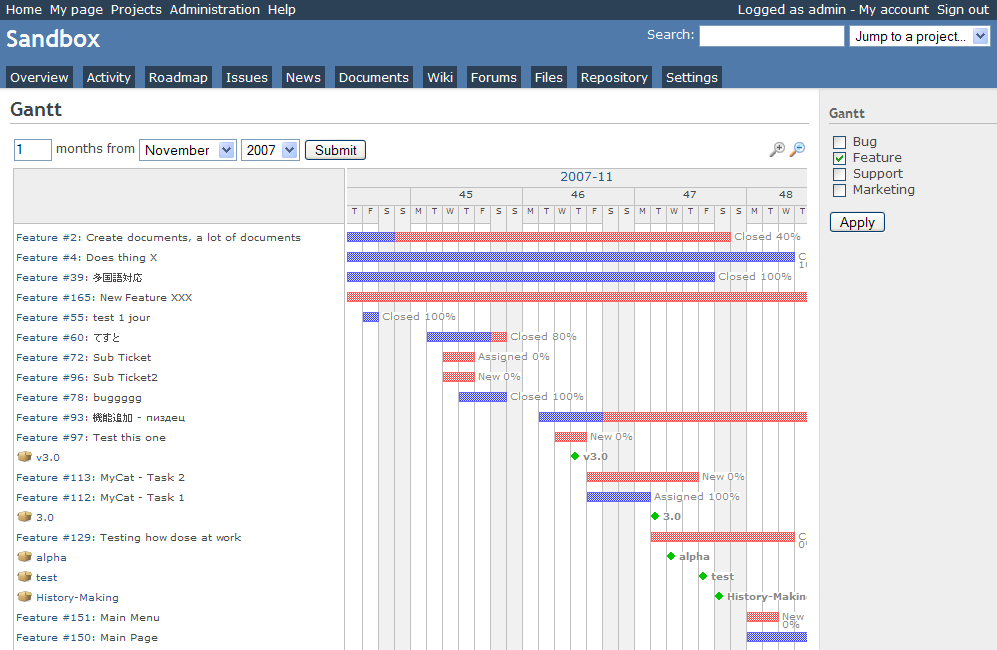
Redmine GANTT Chart

GANTT chart Redmine

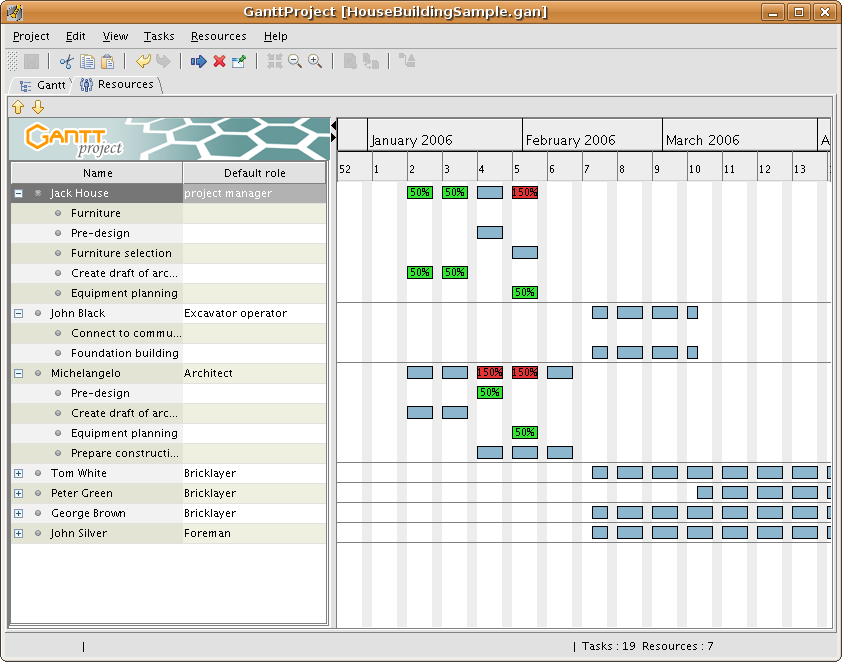
1. Gantt Project
GANTTProject chart GANTTProject Chart

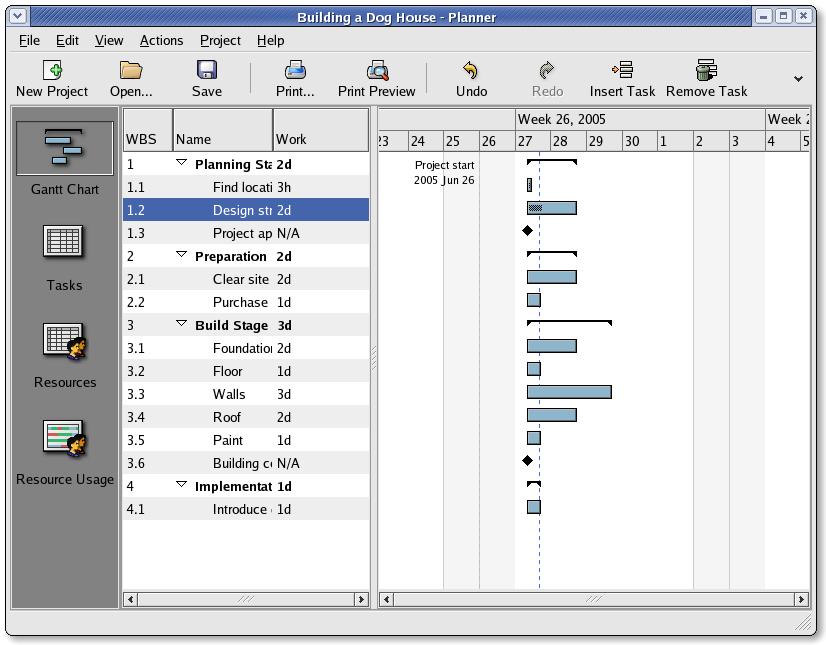
2. Gnome Planner
Planner GANTT Gnome Chart Planner GANTT Chone Chart

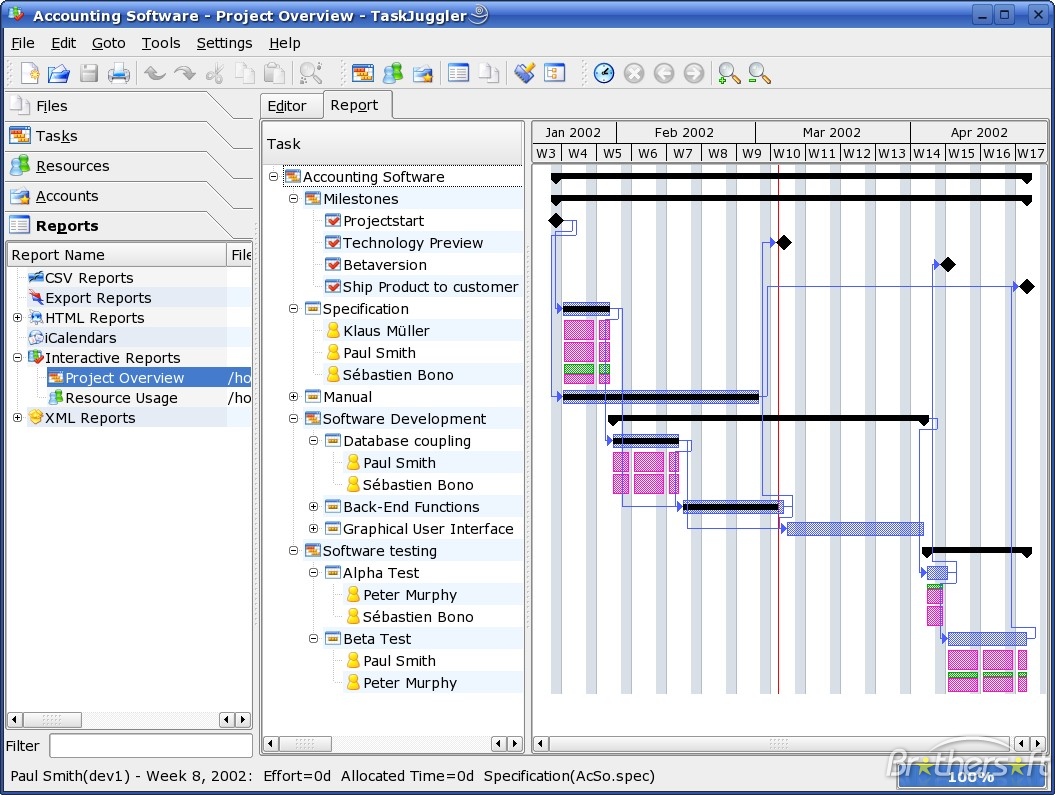
3. Task Juggler Project Manager with GANTT Capability for (KDE)
Task Juggler

4. JxProject – This software is not free, though it can be considered almost free
Take a look also at:
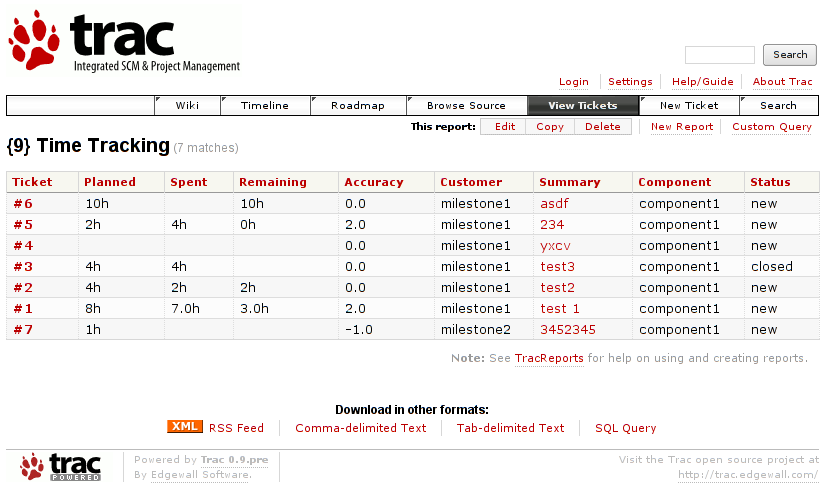
5. Trac , though it doesn't really support GANTT charts it's a lovely software to be used for PM.
Trac Project Management

Another option you have is to try out:
6. PHProjekt
That piece of softwre really looks promising, especially if we consider that it's web based and how much essential is today to have an anline tools for doing the ordinary desktop jobs.

You can even check an online demo of the PHPProjekt software here

If you're a type of KDE user you definitely has to try out Kplato

As I've tested the software the software is easy to be used, however it still is missing some essential parts that Microsoft Project includes so it's not 100% substitute.
Also it's not able to open Microsoft Project (MPP) files, neither able to save the charts in the .mpp format.

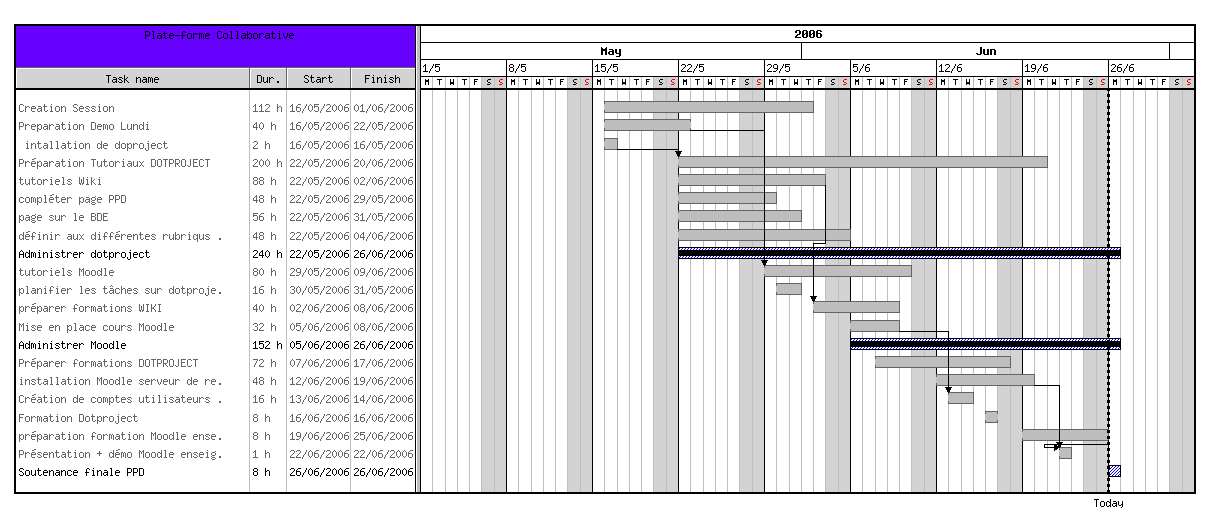
Moving ahead I've came across DotProject DotProject Gantt Chart
DottProject Gantt Chart

I haven't took the time to test it myself but however, as I go through the software website the project looked quite good.
Lastly you can take a look at: 7. PStricks as a mean of project management, however I think it doesn't support GANTT chart building.
>

Share this on

Create PDF file from (png, jpg, gif ) images / pictures in Linux

Tuesday, September 14th, 2010

I've recently received a number of images in JPEG format as a feedback on a project plan that was constructed by a team I'm participating at the university where I study.

Somebody from my project group has scanned or taken snapshots of each of the hard copy paper feedback and has sent it to my mail.

I've received 13 images so I had to open them one by one to get each of the Project Plan to read the feedback on the page this was really unhandy, so I decided to give it a try on how to generate a common PDF file from all my picture files.

Thanksfully it happened to be very easy and trivial using the good old Image Magick

In order to complete the task of generating one PDF from a number of pictures all I did was.1. Switch to the directory where I have saved all my jpeg images

debian:~# cd /home/hipo/Desktop/my_images_directory/

2. Use the convert binary part of imagemagick package to generate the actual PDF file from the group of images

debian:~# convert *.jpg outputpdffile.pdf

If the images are numbered and contain many scanned pages of course you can always pass by all the images to the /usr/bin/convert binary, like for instance:

debian:~# convert 1.jpg 2.jpg 3.jpg 4.jpg 5.jpg outputpdffile.pdf

Even though in my case I had to convert to PDF from multiple JPEG (JPG) pictures, convertion with convert is not restricted to convert only from JPEG, but you can also convert to PDF by using other graphical file formats.

For instance to convert multiple PNG pictures to a single PDF file the command will be absolutely the same except you change the file extension of the graphic files e.g.:

debian:~# convert 1.PNG 2.PNG 3.PNG 4.PNG 5.PNG OUTPUT-PDF-FILE.PDF

I was quite happy eventually to know Linux is so flexible and such a trivial things are able to be completed in such an easy way.

Share this on

Yesterday, Today, Tomorrow

Sunday, December 2nd, 2007

Yesterday I spend a lot of time outside with Lily. We went to the fountain we watched film at home. The film was called"Wild Hogs" it was supposed to be a fun commedy (only supposed to be). This week is going to be a taugh one.We have to present a project at Marketing Research.

I have to write a 600 words resume about International Enterprice,also we have to make a presentation in Culture. Today in the morning i was on a Liturgy again. God's grace ishere ! The week passed without serious server issues (Thanks God). Today I checked some logs of one of the serversand I observed oddities there. I checked the crontab and I realized it's because of a crontab. The dumped databaseis a HUGE one 2.6G (bzipped).

I asked in irc.freenode.net #mysql, and the guys there pointed me to a similar issuewhich was supposed to be an MySQL bug when dumping large database. Since the dumping databases were of a type MyISAMI ofcourse could have used mysqlhotcopy.

But in the end the solution to the problem was removing "–opt" option fromthe backup opts of mysqldump and passing "–skip-opt" to it (I suspect this would slow the dumping process a lot).But I don't care it is much better (a slow dumping), than hanging the whole Webserver and interrupting the site's visibilityover the Internet.

Btw I started playing Quake 2, it's cool but a little annoying there are too many tunnels and veryoften after I kill most of the bad guys I spend a lot of time searching for keys and stuff .. :) .END—–

Share this on