Posts Tagged ‘power’

30 years anniversary of the first mass produced portable computer COMPAQ Grid Compass 1011

Thursday, July 19th, 2012

Grid Notebook Big screen logo

Today it is considered the modern laptop (portable computers) are turning 30 years old. The notebook grandparent is a COMPAQGRiD Compass 1011 – a “mobile computer” with a electroluminescent display (ELD) screen supporting resolution of 320×240 pixels. The screen allowed the user to use the computer console in a text resolution of 80×24 chars. This portable high-tech gadget was equipped with magnesium alloy case, an Inten 8086 CPU (XT processor) at 8Mhz (like my old desktop pravetz pc ;) ), 340 kilobyte (internal non-removable magnetic bubble memory and even a 1,200 bit/s modem!

COMPAQ Grid Compass considered first laptop / notebook on earthy 30 anniversary of the portable computer

The machine was uniquely compatible for its time as one could easily attach devices such as floppy 5.25 inch drives and external (10 Meg) hard disk via IEEE-488 I/O compatible protocol called GPiB (General Purpose instrumental Bus).

First mass prdocued portable computer laptop grid COMPAQ 11011 back side input peripherals

The laptop had also unique small weight of only 5 kg and a rechargable batteries with a power unit (like modern laptops) connectable to a normal (110/220 V) room plug.

First notebook in World ever the COMPAQ grid Compass 1101,br />
The machine was bundled with an own specificly written OS GRiD-OS. GRID-OS could only run a specialized software so this made the application available a bit limited.
Shortly after market introduction because of the incompitablity of GRID-OS, grid was shipped with MS-DOS v. 2.0.
This primitive laptop computer was developed for serve mainly the needs of business users and military purposes (NASA, U.S. military) etc.

GRID was even used on Space Shuttles during 1980 – 1990s.
The price of the machine in April 1982 when GriD Compass was introduced was the shockingly high – $8150 dollars.

The machine hardware design is quite elegant as you can see on below pic:

 COMPAQ grid laptop 1101 bubbles internal memory

As a computer history geek, I’ve researched further on GRID Compass and found a nice 1:30 hour video telling in detailed presentation retelling the history.

Shortly after COMPAQ’s Grid Compass 1011′s introduction, many other companies started producing similar sized computers; one example for this was the Epson HX-20 notebook. 30 years later, probably around 70% of citizens on the globe owns a laptop or some kind of portable computer device (smartphone, tablet, ultra-book etc.).

Most of computer users owning a desktop nowdays, owns a laptop too for mobility reasons. Interestengly even 30 years later the laptop as we know it is still in a shape (form) very similar to its original predecessor. Today the notebook sales are starting to be overshadowed by tablets and ultra-books (for second quarter laptop sales raised 5% but if compared with 2011, the sales rise is lesser 1.8% – according to data provided by Digital Research agency). There are estimations done by (Forrester Research) pointing until the end of year 2015, sales of notebook substitute portable devices will exceed the overall sales of notebooks. It is manifested today the market dynamics are changing in favour of tabets and the so called next generation laptopsULTRA-BOOKS. It is a mass hype and a marketing lie that Ultra-Books are somehow different from laptops. The difference between a classical laptop and Ultra-Books is the thinner size, less weight and often longer battery use time. Actually Ultra-Books are copying the design concept of Mac MacBook Air trying to resell under a lound name.
Even if in future Ipads, Android tablets, Ultra-Books or whatever kind of mambo-jambo portable devices flood the market, laptops will still be heavily used in future by programmers, office workers, company employees and any person who is in need to do a lot of regular text editting, email use and work with corporative apps. Hence we will see a COMPAC Grid Compass 1011 notebook likes to be dominant until end of the decade.

Share this on

Human Modern Progression a move forward to Degression

Saturday, June 16th, 2012

I've been thinking about our modern day progression and what our "progressed" society looks like in reality.
We think we have progressed, we have built machines that serves us well (computers). We plan for a bright painless easy future day by day. This bright "perfect" society future is nothing more than the dream of communism in its complete form.

But in what sense we have actually progressed ?? Everyone who really sees what happens around us notice the big changes we experience. On the surface it looks like our life has become much easier with all this technology surrounding us. The number of computers which is said to help us to leap towards this bright future increases day by day. With this however increases the need to support technology. Suddenly it happens that the old believe that computers are just a tool to make our life earier becomes a modern day slavery. Most of the developed or under development countries people are nowdays almost full time spending in front of the computer screen on the internet. We put our lifes in the mercy of man-created computers and it has become impossible that we live or exist independetly without them.

Computers are everywhere around us starting from the work Desk, at hand with a notebook, ipad, mobile phones, cars, airplanes. There is rarely to see any technology we use which works with not some kind of primitive or advanced computer embedded ,,,
In the rise of computers as we know it computer was just a tool to help us along with the other overall thought and inventions development. Now from just being a tool to help us progress Computers become the common ground on which almost everything in life works.

I'm sure many people who started learning computer technology 15-20 years ago (like me) never imagined computers will integrate so heavily in our daily activities as they eventually did.

We use computers for the sake of planning which in "spiritual language" is predicting the future or prophecise what is about to come in the short future. In reality what we do mostly even not realizingly is to try to predict and modify the future through technology.
This concept is also existing in most sci-fi movies, made in last 60 years. Mobile phones revolution give the humanity a tool through which telepathy we've seen in so many SCI-FI is reality. The mobile phone is just a platform through which (phone calls) or better said voice telepathy has become possible. In that manner of thoughts it is obvious that Video phone calls is a voice + visual telepathy. The Skype revolution and Video and voice conferences is brought was just until recently seen on the sci-fi movies where spaceship crews communicated with other spaceship crews by using a Visual conferences like skype.

It is really hard to believe that for just few years now everyone can speak with ease with everyone else on the planet in the same way just like we've seen in the movies as some foreign abstract concept!

Now suddenly most people on earth are equipped with technology with gives them the power to do everything but it is my firm believe people are not ready to wisely use this power. Therefore instead of using this higher technology wisely technology is used mostly senseless and the more technological advancement grows and becomes more accessible to the masses the more the tendency to use the technology for shit grows.

I'm sure people who have a good knowledge on programming and how computer works are already seriously aware of this enormous problem.
Another severe problem with the raise of technology is the language slang it introduces. This tech-slang is adopted quickly all around the society and suddenly as a result the human language as we know it is seriously substituted by a vague tech words mambo-jambo words. Actually the adoption of tech buzz words in modern day society language makes a great harm for the reason communication between people becomes less descriptive and therefore harder.
In short the result of this tech slang language inside our national languages is inability for people to communicate properly. This tendency is well seen if you for example try to make a comparison between old and newer movies. The newer the movie the less meaningful it is. It is true newer ones has much more as a visual adds than the predecessor but when talking about consistency the newer films are missing this point seriously.

As newer generations are born and raised up with this newer movies and "advanced" TV and computers this people doesn't even have most of the time the opportunity to see older human taped knowledge.
Even for youngesters who have somehow a wise parents enough to teach them in a religious way or just have the "luck" to have parents with old world mindset it will be extremely hard if not impossible for this kids to understand the old knowledge, as most of their same age school / university fellows will only talk about the newer things.

Besides all this, computers as they grow needs more and more support "nurturing" so day by day more and more people has to be busy with managing and supporting tech stuff. Suddenly it is no longer clear if computers serve us or we serve them, this tendency is already somehow evident but not so clearly as it will be in the short 5 to 10 years.
Therefore we slowly but surely are moving to a society which might become "enslaved by technology". Why I say here enslaved, because if we spend our time on fixing computers and technology and working with one virtual reality (which is non-reality) in essence this means we no longer have a physical freedom in the sense it was God given.

There is no doubt computers at present appears to do us a big good, but if you think a bit strategically it is obvious this good has it's price. By adopting all this technology without questioning ourselves on how this will impact our human freedom, we build a computerized jail around us. At first this jail appears to be so wide that it seems it does not interfere with our freedom, but with the introduction of newer and newer computer technology this jail becomes narrower as to the point where it could threat our physical existence freedom.

For those who could argue my thoughs I will ask two simple questions to show you how dependent we've become on technology;;;

What was the last time you switched off your mobile for a week ?

What was the last time you didn't used computers and the internet for a week time ?

Obviously rarely we can find someone that will answer positively to this question or even the thought of switching off from this so globalized society by dropping off tech stuff for a week seems scary.

This constant connectiodness that we're day-by-day heavily exposed to is scary, because it steals little-by-little our natural freedom for seclusion / pravicy / solitude.

This freedoms, were essential and especially for Christian saints and many of the people in the Holy Bible if we read closely we will find out they have used this freedom in parts of their lives especially the seclusion to hear and understand God's will for their life.
Since technology is stealing us the freedom to seclude ourselves this means it steals our basic natural freedom to communicate with God and our natural self ,,,

The consequence of this separation from God and unification with "the world" surely will lead to spiritual blindness and lack of good foundation or higher life purpose, in other words lost path in life.

This is happening all along right in front our eyes now.
Maybe the worst thing of globalization is it doesn't unite people on a soul level but rather separates them. The unification that tech boom gives to people is in the "virtual reality" but this is not a real unification as it is unification in a media which is not real.

Yes Virtual Reality is not real, that's why it is called Virtual isn't it?
I've been thinking over all this problems more and more and I'm starting to come to conclusion that people who wish to keep their essential physical freedom need to GET OUT from this tech lie, we have lived in.
For this however more people need to first realize that;;;

1. TECHNOLOGY LEADS US NOWHERE!

2. People who want to live without technology need to organize in groups (and get used to a natural living growing food, being near to a natural springing water, taking care for each other, living in a Christian commune like – like in the old days)

Actually if we read the old testament's story of Moses escaping the upcoming flood, I believe what is about to come to us as a consequence of this out of boundaries technologization is pretty much like the old testamental flood (this should happen sooner or later).

Moses was wise enough to make himself an Ark and prepare himself for the storm. Today most people are so busy that they don't see the storm coming. I'll be glad to hear from people who has the same thinking as me and want to organize in a groups and live an old humble way of life without technology.
I'm convinced people who have realized all this tech short future bad consequences on humanity, need to have a common communication media and share their knowledge on how we can find a way to live tech free in this age. I'm curious am I the only one with such thoughts or other get into this insight too. If you have come to conclusions I did please contact me in comments. Thank you.

Share this on

How to disable ACPI on productive Linux servers to decrease kernel panics and increase CPU fan lifespan

Tuesday, May 15th, 2012

Linux TUX ACPI logo / Tux Hates ACPI logohttp://www.pc-freak.net/images/linux_tux_acpi_logo-tux-hates-acpi.png

Why would anyone disable ACPI support on a server machine??
Well  ACPI support kernel loaded code is just another piece of code constantly being present in the memory,  that makes the probability for a fatal memory mess up leading to  a fatal bug resulting in system crash (kernel panic) more likely.

Many computers ship with buggy or out of specifications ACPI firmware which can cause a severe oddities on a brand new bought piece of comp equipment.

One such oddity related to ACPI motherboard support problems is if you notice your machine randomly powering off or failing to boot with a brand new Linux installed on it.

Another reason to switch off ACPI code will would to be prevent the CPU FAN rotation from being kernel controlled.

If the kernel controls the CPU fan on  high CPU heat up it will instruct the fan to rotate quickly and on low system loads it will bring back the fan to loose speed.
 This frequent switch of FAN from high speed to low speed  increases the probability for a short fan damage due to frequent changes of fan speed. Such a fan damage leads often to  system outage due to fan failure to rotate properly.

Therefore in my view it is better ACPI support is switched off completely on  servers. On some servers ACPI is useful as it can be used to track CPU temperature with embedded motherboard sensors with lm_sensors or any piece of hardwre vendor specific software provided. On many machines, however lm_sensors will not properly recognize the integrated CPU temperature sensors and hence ACPI is mostly useless.

There are 3 ways to disable fully or partially ACPI support.

- One is to disable it straight for BIOS (best way IMHO)
- Disable via GRUB or LILO passing a kernel parameter
- Partial ACPI off-ing - /disabling the software that controls the CPU fan/

1. Disable ACPI in BIOS level

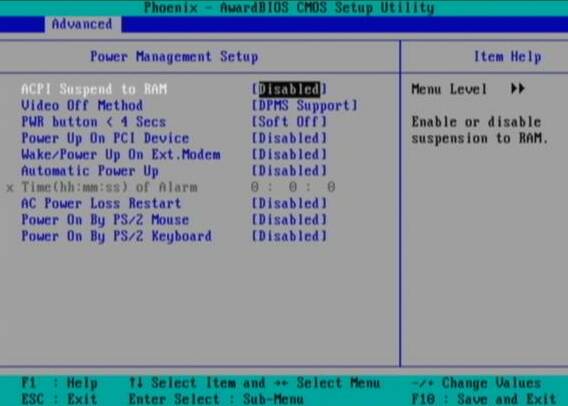
Press DEL, F1, F2, F10 or whatever the enter bios key combination is go through all the different menus (depending on the vios BENDOR) and make sure every occurance of ACPI is set to off / disable whatever it is called.

Below is a screenshot of menus with ACPI stuff on a motherboard equipped with Phoenix AwardBIOS:

BIOS ACPI Disable power Off Phoenix BIOS

This is the in my opinon best and safest way to disable ACPI power saving, Unfortunately some newer PCs lack the functionality to disable ACPI; (probably due to the crazy "green" policy the whole world is nowdays mad of).

If that's the case with you, thanksfully there is a "software way" to disable ACPI via passing kernel options via GRUB and LILO boot loaders.

2. Disabling ACPI support on kernel boot level through GRUB boot loader config

There is a tiny difference in command to pass in order to disable  ACPI depending on the Linux installed  GRUB ver. 1.x or GRUB 2.x.

a) In GRUB 0.99 (GRUB version 1)

Edit file /etc/grub/menu.lst or /etc/grub/grub.conf (location differs across Linux distribution). Therein append:

acpi=off

to the end of kernel command line.

Here is an example of a kernel command line with ACPI not disabled (example taken from CentOS server grub.conf):

[root@centos ~]# grep -i title -A 4 /etc/grub/grub.conf
title Red Hat Enterprise Linux Server (2.6.18-36.el5)
root (hd0,0)
kernel /vmlinuz-2.6.18-36.el5 ro root=/dev/VolGroup00/LogVol00 console=ttyS0,115200n8
initrd /initrd-2.6.18-36.el5.img

The edited version of the file with acpi=off included should look like so:

title Red Hat Enterprise Linux Server (2.6.18-36.el5)
root (hd0,0)
kernel /vmlinuz-2.6.18-36.el5 ro root=/dev/VolGroup00/LogVol00 console=ttyS0,115200n8 acpi=off
initrd /initrd-2.6.18-36.el5.img

The kernel option root=/dev/VolGroup00/LogVol00 means the the server is configured to use LVM (Logical Volume Manager).

b) Disabling ACPI on GRUB version 1.99 +

This version is by default installed on newer Ubuntu and Debian Linux-es.

In grub 1.99 on latest Debian Squeeze, the file to edit is located in /boot/grub/grub.cfg. The file is more messy than with its predecessor menu.lst (grub 0.99).
Thanks God there is no need to directly edit the file (though this is possible), but on newer Linuces (as of time of writting the post), there is another simplied grub config file /etc/grub/config

Hence to add the acpi=off to 1.99 open /etc/grub/config find the line reading:

GRUB_CMDLINE_LINUX_DEFAULT="quiet"

and append the "acpi=off" option, e.g. the line has to change to:

GRUB_CMDLINE_LINUX_DEFAULT="quiet acpi=off"

On some servers it might be better to also disable APIC along with ACPI:

Just in case you don't know what is the difference between ACPI and APIC, here is a short explanation:

ACPI = Advanced Configuration and Power Interface

APIC = Advanced Programmable Interrupt Controllers

ACPI is the system that controls your dynamic speed fans, the power button behavior, sleep states, etc.

APIC is the replacement for the old PIC chip that used to come imbedded on motherboards that allowed you to setup interrupts for your soundcard, ide controllers, etc.

Hence on some machines experiencing still problems with even ACPI switched off, it is helpful  to disable the APIC support too, by using:

acpi=off noapic noacpi

Anyways, while doing the changes, be very very cautious or you might end up with un-boot-able server. Don't blame me if this happens :) ; be sure you have a backup option if server doesn't boot.

To assure faultless kernel boot, GRUB has ability to be configured to automatically load up a second kernel if 1st one fails to boot, if you need that read the grub documentation on that.

To load up the kernel with the new setting, give it a restart:

[root@centos ~]# shutdown -r now
....

3. Disable ACPI support on kernel boot time on Slackware or other Linuxes still booting kernel with LILO

Still, some Linux distros like Slackware, decided to keep the old way and use LILO (LInux LOader) as a default boot loader.

Disabling ACPI support in LILO is done through /etc/lilo.conf

By default in /etc/lilo.conf, there is a line:

append= acpi=on

it should be changed to:

append= acpi=off

Next to load up the new acpi disabled setting, lilo has to be reloaded:

slackware:~# /sbin/lilo -c /etc/lilo.conf
....

Finally a reboot is required:

slackware:~# reboot
....

(If you don't have a physical access or someone near the server you better not :) )

4. Disable ACPI fan control support on a running Linux server without restart

This is the most secure work-around, to disabling the ACPI control over the machine CPU fan, however it has a downside that still the ACPI code will be loaded in the kernel and could cause kernel issues possibly in the long run – lets say the machine has uptime of more than 2 years…

The acpi support on a user level  is controlled by acpid or haldaemon (depending on the Linux distro), hence to disable the fan control on servers this services has to be switched off:

a) disabling ACPI on Debian and deb based Linux-es

As of time of writting on Debian Linux servers acpid (Advanced Configuration and Power Interface event daemon) is there to control how power management will be handled. To disable it stop it as a service (if running):

debian:~# /etc/init.d/acpid stop

To permanently remove acpid from boot up on system boot disable it with update-rc.d:

debian:~# update-rc.d acpid disable 2 3 4 5
update-rc.d: using dependency based boot sequencing
insserv: Script iptables is broken: incomplete LSB comment.
insserv: missing `Required-Start:' entry: please add even if empty.
insserv: warning: current start runlevel(s) (empty) of script `acpid' overwrites defaults (2 3 4 5).
insserv: warning: current stop runlevel(s) (2 3 4 5) of script `acpid' overwrites defaults (empty).
insserv: missing `Required-Start:' entry: please add even if empty.

b) disabling ACPI on RHEL, Fedora and other Redhat-s (also known as RedHacks :) )

I'm not sure if this is safe,as many newer rpm based server system services,  might not work properly with haldaemon disabled.

Anyways you can give it a try if when it is stopped there are issues just bring it up again.

[root@rhel ~]# /etc/init.d/haldaemon stop

If all is fine with the haldaemon switched off (hope so), you can completely disable it to load on start up with:

[root@centos ~]# /sbin/chkconfig --level 2 3 4 5 haldaemon off

Disabling ACPI could increase a bit your server bills, but same time decrease losses from downtimes, so I guess it worths its costs :)


Share this on

How to disable ACPI (power saving) support in FreeBSD / Disable acpi on BSD kernel boot time

Tuesday, May 15th, 2012

FreeBSD disable ACPI how ACPI Basic works basic diagram

On FreeBSD the default kernel is compiled to support ACPI. Most of the modern PCs has already embedded support for ACPI power saving instructions.
Therefore a default installed FreeBSD is trying to take advantage of this at cases and is trying to save energy.
This is not too useful on servers, because saving energy could have at times a bad impact on server performance if the server is heavy loaded at times and not so loaded at other times of the day.

Besides that on servers saving energy shouldn't be the main motivator but server stability and productivity is. Therefore in my personal view on FreeBSD used on servers it is better to disable complete the ACPI in order to disable CPU fan control to change rotation speeds all the time from low to high rotation cycles and vice versa at times of low / high server load.

Another benefit of removing the ACPI support on a server is this would probably increase the CPU fan life span and possibly prevent the CPU to be severely heated at times.

Moreover, some piece of hardware might have troubles in properly supporting ACPI specifications and thus ACPI could be a reason for unexpected machine hang ups.

With all said I would recommend to anyone willing to use BSD for a server to disable the ACPI (Advanced Configuration and Power Interface), just like I did.

Here is how;

1. Quick review on how ACPI is handled on FreeBSD

acpi support is being handled on FreeBSD by a number of loadable kernel modules, here is a complete list of all the kernel modules dealins with acpi:

freebsd# cd /boot
freebsd# find . -iname '*acpi*.ko'
./kernel/acpi.ko
./kernel/acpi_aiboost.ko
./kernel/acpi_asus.ko
./kernel/acpi_fujitsu.ko
./kernel/acpi_ibm.ko
./kernel/acpi_panasonic.ko
./kernel/acpi_sony.ko
./kernel/acpi_toshiba.ko
./kernel/acpi_video.ko
./kernel/acpi_dock.ko

By default on FreeBSD, if hardware has some support for ACPI the acpi gets activated by acpi.ko kernel module. The specific type of vendors specific ACPI like IBM, ASUS, Fujitsu are controlled by the respective kernel module from the list …

Hence, to control if ACPI is loaded or not on a FreeBSD system with no need to reboot one can use kldload, kldunload module management BSD cmds.

a) Check if acpi is loaded on a BSD

freebsd# kldstatkldstat | grep -i acpi
9 1 0xc9260000 57000 acpi.ko

b) unload kernel enabled ACPI support

freebsd# kldunload acpi

c) Load acpi support (not the case with me but someone might need it, if for instance BSD is running on laptop)

freebsd# kldload acpi

2. Disabling ACPI to load on bootup on BSD

a) In /boot/loader.conf add the following variables:

hint.acpi.0.disabled="1"
hint.p4tcc.0.disabled=1
hint.acpi_throttle.0.disabled=1


b) in /boot/device.hints add:

hint.acpi.0.disabled="1"

c) in /boot/defaults/loader.conf make sure:

##############################################################
### ACPI settings ##########################################
##############################################################
acpi_dsdt_load="NO" # DSDT Overriding
acpi_dsdt_type="acpi_dsdt" # Don't change this
acpi_dsdt_name="/boot/acpi_dsdt.aml"
# Override DSDT in BIOS by this file
acpi_video_load="NO" # Load the ACPI video extension driver

d) disable ACPI thermal monitoring

It is generally a good idea to disable the ACPI thermal monitoring, as many machines hardware does not support it.

To do so in /boot/loader.conf add

debug.acpi.disabled="thermal"

If you want to learn more on on how ACPI is being handled on BDSs check out:

freebsd# man acpi

Other alternative method to permanently wipe out ACPI support is by not compiling ACPI support in the kernel.
If that's the case in /usr/obj/usr/src/sys/GENERIC make sure device acpi is commented, e.g.:

##device acpi


Share this on

Double Feast in our Bulgarian Orthodox Church – feast of Annunciation and comemmoration of St. John Lesstvichnik

Monday, March 26th, 2012

One more year, we are into the great Lent and we're given the Grace to hear the Good tidings (Good News) handed down by Archangel Gabriel to our Virgin Lady (The Mother of God). We hear the GOOD NEWS that our Lord Jesus Christ is conceived immaculately and is to be born from the Holy Theotokos most pure body:

Here is a little part of the Gospel New Testamention reading from Luke for the day:

28 The angel went to her and said, Greetings, you who are highly favored! The Lord is with you.
29 Mary was greatly troubled at his words and wondered what kind of greeting this might be.
30 But the angel said to her, Do not be afraid, Mary; you have found favor with God.
31 You will conceive and give birth to a son, and you are to call him Jesus.
32 He will be great and will be called the Son of the Most High. The Lord God will give him the throne of his father David,
33 and he will reign over Jacob’s descendants forever; his kingdom will never end.
34 How will this be, Mary asked the angel, since I am a virgin?
35 The angel answered, The Holy Spirit will come on you, and the power of the Most High will overshadow you. So the holy one to be born will be called the Son of God.
36 Even Elizabeth your relative is going to have a child in her old age, and she who was said to be unable to conceive is in her sixth month.
37 For no word from God will ever fail.
38 I am the Lord’s servant, Mary answered. May your word to me be fulfilled. Then the angel left her.

You can also read the feast troparion and some more information on this great Christian feast here

This year, today's feast also coincides with the comemmoration of one great Church Father – Saint John (monk) Lestvichnik .

st. john Lestvichnik Orthodox Christian icon

St. John Lestvichnik is honoured as one of our great ascetic saints across all Orthodox Christian dome.
Actually Lestvichnik word (comes from ancient Bulgarian / ancient Slavonic) and is a title. st. John received the Lestvichnik title as his spiritual life was so high and up to God, like climbing from earth to Gods heavens.

The meaning of Lestvichnik is "of the Ladder". After his title name Lestvichnik was named also his greatest life work Lestvica, which translated to english means Ladder

To read more about st. John Lestvichnik living a good Egnlish translation is here

Just in case to preserve, this great saints short living (english translation), I've made a mirror of st. John Lestvichnik (short) living here

St.John Lestvichnik (of the Ladder) 12th, 13 century icon

Lestvica is a very popular ancient monks living rule (guidance text);
"a true instruction for those following after invariably, and as such would be a ladder of affirmation, which would lead those wishing it to the Heavenly gates…"

Lestvica was written by st. John Lestvichnik, after a 40 years ascetic seclusion in (speachless solitude
The monks spiritual instructions rules and advices work "The Ladder" bears the title Ladder described by st. John like so:

"I have constructed a ladder of ascent...
from the earthly to the holy...
in the form of the thirty years of age for the Lord's maturity, symbolically I have constructed a ladder of 30 steps, by which, having attained the Lord's age, we find ourselves with the righteous and secure from falling down".
The purpose of this work, is to teach – that the reaching of salvation requires difficult self-denial and demanding ascetic deeds. "The Ladder" presupposes, first;
1. a cleansing from the impurity of sin – the eradication of vices and passions in the old man;
second;

2. the restoration in man of the image of God. – Although the book was written for monks, any christian living in the world can receive from it the hope of guidance for ascent to God as well as get a support for better spiritual life.
The Monks Theodore the Studite(Comm. 11 November and 26 January), Sergei of Radonezh (Comm. 25 September and 5 July), Joseph of Volokolamsk (Comm. 9 September and 18 October), and others – in their instructions relied on "The Ladder" as an important book for salvific guidance.

Share this on

Linux then and Now statistics diagram on GNU/Linux use grow 1994 – 2011

Tuesday, January 31st, 2012

Linux then and now developers line of code top 500 super computers and GNU / Linux 1994 - 2011, Kernel source code lines


In above graphics you see development of GNU/Linux through the years startingfrom 1992 to 2010.  You see for the past 18 years the number of kernel developers has rasised from 100 to 1000 (10 times). The number of super computers based on GNU / Linux operating system was only 1, while in 2011 they were already 413. Just for information Top 10 Super computers in terms of CPU power are running on top of some Linux + GNU environment based operating system.

Cell Phones baed on Linux or GNU sold worldwide, Internet users growth, PCs with linux shipped worldwide

You see the number of Patented software increased approximate 3 times for 16 years … PC shipped with Linux all oer the world increased almost 10 times.

GNU / Linux  user habits then and now pie, Where Linux is used most survey results

A survey was run among the biggest Linux convention LinuxCon aiming to find out the share difference between users using different distros, as well as a survey to answer the question where is Linux mostly used. Obviously even though the Ubuntu desktop boom this years Linux is still mostly used in work location, home desktop / notebook users are almost 3 times less.
The survey show the sad results,  the Linux in school and academic communities is less used than for professional purposes. On the desktop things has slightly changed, for the last 5-7 years. From the position of being a Linux Desktop leading OS, Fedora went into the shadows in favour of  the "less free" (in terms of Freedom) Ubuntu.

Linux users then and now, biggest successes and challenges for Linux and free software use and adoption

All system administrators knows well Linux is a very common choice for building small or middle enterprise business information systems. Hugest platforms which are the web backbone today like Google, Facebook, Twitter, Stock Exchanges,  Mail services, various technical equipment etc. runs on top of Linux. Even though the huge number of adoption Linux and free software is though to not be legally assured this is well known among free software and open source evangelist under the term FUD.

Android found its way also in Samsung Galaxy and a number of tablet devices running Linux based kernel OS was shipped in 2011.

With the raise of Android which (base is mostly Linux kernel and less GNU tools based). The spread of Linux has seen a huge raise on the mobile (smart phones) market as well. You see in above chart as of 2011 Android sells had the highest market share  with 37%.
The year 2011 was not among the best Linux users anywas, as Unity does turned away many users to become Linux converts. The big GNOME 3 mess, which was called by Linus Toravlds a "holy mess" , along with the kernel.org's security break in does also contributed that year 2011 ended up as a bad one for free software.

Linux, Windows 7, Vista, XP, MacOS X, iOS market share chart

As of August 2011, the global Linux market approximate market share is about 3% of all the installed OSes currently existing in the world. And compared to 5 years ago there is a little decline in the share. I believe the 2012 will be a better year for both development and adoption of free software and Linux.


Share this on

KRaptor a Raptor free software (open source) arcade game clone for GNU / Linux

Monday, January 30th, 2012

Kraptor is another Raptor Shadow of Death free software, open source clone arcade game for GNU/Linux, DOS and Windows (98, XP etc.).

KRaptor main menu game screenshot Linux Debian Squeeze

The game is not under active development anymore since 2004. Kraptor features a powerful engine for creating quickly 2D shooter games, so the game should be a good learning curve for people interested into creation of arcade game shooter games.

The game just like Rafkill is built upon DUMB sound engine.
The game intro is quite entertaining ;) The intro plays one by one the text:

Near Future:
Blobalization
Imperalizm
Corporations
Megalomaniacs
Money and Power. Slaves of the New Millenium!

KRaptor Bill gates like looking oppressor

After years of oppression, the slaved people of the world have raised against their masters. You, has a mercenary pilot, has been
contacted by the popular rebellion to fight against the forces of oppression.

In the morning, you jump into your cockpit and start up the engines. It's time to get airborne and start the attack. Get ready to
scramble the scum hired by the masters. Murder for freedom is the only way, you're on a mission, don't defraud us...

Like Rafkill, Kraptor is one man masterpiece created by a free software Argentinean geek known under the Kronoman artistic pseudonim. The game is really incredible for a one man work … a true masterpiece.
The game is licensed under MIT License.

Even though Kraptor is older game than Rafkill, the design is more resembling the original Raptor game. The game music is high quality stereo. Besides that music and fx sound effects are quite awesome. After each level you have a Raptor like weapons "blackmarket", where you can buy new weapons, recharge ship energy, upgrade ship etc.
The blackmarket implementation part of the game is probably the worst moment in the game along with the game menus (in my view).
Talking about graphics Kraptor supports really high number of resolutions ranging from 320×240 to 1280×1024! 640×480 is the standard resolution in which the game is running.

Kraptor raptor like Linux game plasma gun debian screenshot

Something I really like in the game is the number of multiple weapons your ship uses during play. Even if played in Easy mode it is taught.

There are game Saves after each level, so thanksfully you don't have to start again from zero once death.
At the end of each level there is a huge bad BOSS you have to destroy ;) .
Kraptor the boss Debian GNU / linux

Installing Kraptor on Debian / Ubuntu and deb derivatives is with:

debian:~# apt-get install kraptor

On most rpm based Linux distributions, you can install the game by converting the deb package to rpm with alien or by building from source from Kraptor's sourceforge page

Its interesting the game name e.g. Kraptor is also a death / grind metal band name, (Maybe Kronoman is metalhead big fan of Kraptor and that's how he came up with the playful name. For all the old school game addicts there is the joystick support. I've tested it with my Genius analogous joystick and it works fine.

The game is lacking .desktop gnome definition and after once installed it only appears through Debian (section) GNOME menus and not in Applications -> Games :

Applications -> Debian -> Games -&act; Action -&t; Kraptor

Just like Rafkill on Debian the game exacutable binary is located in /usr/games/kraptor . Also like with the Rafkill case when launched the game has troubles with choppy sound and music caused by the stupid buggy! pulseaudio

Analogously like with Rafkill's case, the work around to the problematic music en sound is to use a little bash shell script like:

#!/bin/bash
pulseaudio -k;
/usr/games/kraptor
pulseaudio --start;

You can dowload Kraptor fix sound issues wrapper here

To install it on your Debian / Ubuntu and hence make the game sound play good issue with root:

debian:~# cd /usr/bin
debian:/usr/bin# wget http://www.pc-freak.net/bshscr/kraptor.wrapper.sh
...
debian:/usr/bin:# chmod +x kraptor.wrapper.sh
debian:/usr/bin:# mv kraptor.wrapper.sh kraptor


Share this on

Xtractor Extreme, Power Email Harvester and AMS (Advanced Mass Sender) three Windows programs to Beware of

Monday, August 15th, 2011

AMS (Advanced Mass Sender /Spammer) , POwer Email Harvester, Xtractor Extreme Pro Windows VPS screenshot

Few days ago, I’ve catch some Spammers on some of the servers running Windows inside Virtual Private Servers.

I was doubting if I want to write an article to mention about this 3 piece of software as it might be a bit boury however eventually I thought the goods of it will be better so I just took minutes and wrote it.

Back to the topic the three programs which the spammer was installed and prepare to do his spamming job on the VPS server was:
1. Xtractor Extreme

2. Power Email Harvester

3. Advanced Mass Sender

In order to hide his real IP address and prevent the IP he was spamming, he has also installed some anonyous proxy like Windows software called Hide My IP

The first program Xtractor is basicly an Email collector, the program crawls the net and searches to match email string on web pages.
It get target websites from major search engines.
You put an email like @gmail.com inside it and it starts spidering and grabs all email strings under the domain @gmail.com. Besides that Xtractor Extreme Pro is freeware and can be easily downloaded from many locations online.

Power Email Harvester‘s program name is also quite self-explanatory, what it does is it digs the net for email addresses and generates spam lists … This is the ultimate tool for a spammer, however the guys who create this piece of disruptive software has branded it as “a marketing tool” and even sold and advertised as a tool to help an e-marketing campaign.
This is of course just a word play and in fact in my viewe these program should be prohibited by international law.

Advanced Mass Sender is another piece of Spammer software which officially is tagged as marketing software and is sold and recommended as an useful tool for e-marketing.

I’ve take the time to take a quick and test the spammer installed AMS , honestly I’ve been amazed how far spamming has went during the last 5 years.

This AMS shit is capable of creating a target groups which could easily be spammed whether each group can contain up to 200000+ ! target emails
Advanced Mass Sender can even check if a certain email is present on the remote mail server and only then tries to deliver.
Besides that it even supports sending the spam mails via multiple mail servers (simultaneously) to increase the thoroughput as well as supports proxy servers…

I decided to write this few lines article to raise some awareness about this shitty sofware in a hope that somebody who is Administrating / Supporting client owned Windows servers or Virtual Private Servers will be able to read about this 3 ones and stop spammers before they succeed to create mail havoc with their ugly spam stuff.

Share this on

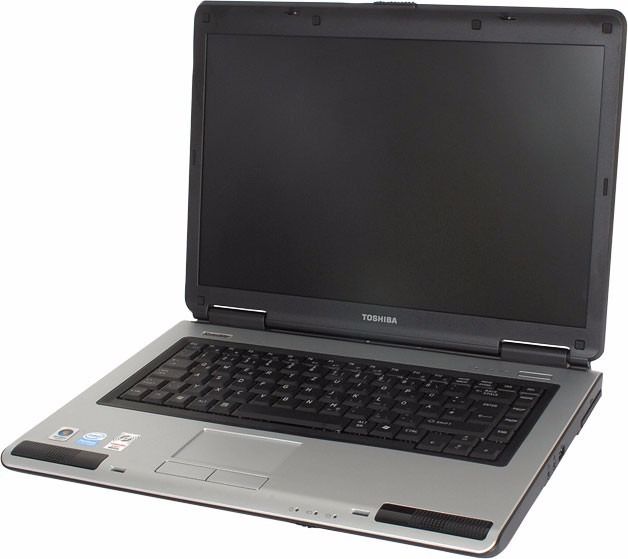
How to install Toshiba Satellite L40 B14 Wireless Adapter ( ID 0bda:8197 Realtek Semiconductor Corp. RTL8187B) on Ubuntu and Debian Linux

Thursday, April 28th, 2011

How to install Toshiba L40 B14 Wireless Adapter ( ID 0bda:8197 Realtek Semiconductor Corp. RTL8187B) on Ubuntu and Debian Linux
I’ve been struggling for more than 10 hours to fix up issues on a Ubuntu Maverick-Meerkaat with a rtl8187B Wireless Adapter

The RTL8187B almost drove me mad. I could see the wlan0 which meant the kernel is detecting the device, I could even bring it up with ifconfig wlan0 up , however when I tried it in gnome’s network-manager or wicd the wireless networks were not showing up.

Trying to scan for networks using the commands:


ubuntu:~# iwlist wlan0 scan

was also unsuccesful, trying to bring up and down the wireless wlan0 interface with:


ubuntu:~# iwconfig wlan0 up

or


ubuntu:~# iwconfig wlan0 down

Both returned the error:
iwconfig: unknown command “up” and iwconfig: unknown command “down”

Running simply iwconfig was properly returning information about my Wireless Interface wlan0 :


wlan0 IEEE 802.11bg ESSID:off/any
Mode:Managed Access Point: Not-Associated Tx-Power=20 dBm
Retry long limit:7 RTS thr:off Fragment thr:off
Encryption key:off
Power Management:off

The exact information I could get about the wireless device was via the command:


ubuntu:~# lsusb | grep realtek
Bus 001 Device 002: ID 0bda:8197 Realtek Semiconductor Corp. RTL8187B Wireless Adapter

Trying manually to scan for wireless networks from console or gnome-terminal with command returned also the below weird results:


ubuntu:~# iwconfig wlan0 scan
iwconfig: unknown command "scan"

More oddly tunning wlan0 interface with commands like:


ubuntu:~# iwconfig wlan0 mode managed
ubuntu:~# iwconfig wlan0 essid ESSID
ubuntu:~# iwconfig wlan0 rate 11M

were succesful …

I read a bunch of documentation online concerning the wireless card troubles on Ubuntu, Gentoo, Debian etc.

Just few of all the resources I’ve read and tried are:

http://rtl-wifi.sourceforge.net/wiki/Main_Page (Returning empty page already a lot resource)
http://rtl8187b.sourceforge.net (A fork of rtl-wifi.sourceforge.net which is still available though it was not usable)

Some of the other resources which most of the people recommended as a way to properly install the RTL8187B wireless driver on linux was located on the website:

http://datanorth.net/~cuervo/rtl8187b/ (Trying to access this page returned a 404 error e.g. this page is no-longer usable)

I found even a webpage in Ubuntu Help which claimed to explain how to properly install and configure the RTL8187B wireless driver on which is below:

https://help.ubuntu.com/community/WifiDocs/Device/RealtekRTL8187b

Even the Ubuntu help instructions were pointing me to the broken cuervo’s website URL

Anyways I was able to find the rtl8187b-modified-dist.tar.gz online and made a mirror of rtl8187b-modified-dist.tar.gz which you can download here

Another rtl8187b driver I found was on a toshiba website made especailly for the wireless linux drivers:

http://linux.toshiba-dme.co.jp/linux/eng/pc/sat_PSPD0_report.htm

The questionable file which was claimed to properly be able to make the Realtek Semiconductor Corp. RTL8187B Wireless Adapter to work out was called rl8187b-modified-804.tar.gz.
I’ve made a mirror of rtl8187b-modified-804.tar.gz is here

None of the driver archives rtl8187b-modified-dist.tar.gz and rl8187b-modified-804.tar.gz that was supposed to make the Toshiba L40 realtek wireless to work out, after compiling and installing the drivers from source worked out …

Both archives produced plenty of error messages and it seems on newer kernels like the one on this notebook:

Linux zlatina 2.6.35-28-generic #50-Ubuntu SMP Fri Mar 18 19:00:26 UTC 2011 i686 GNU/Linux, they’re no longer usable.

The compile errors I got when I tried compiling the rtl8187b driver provided by the archive rtl8187b-modified-dist were:


root@ubuntu:/home/zlatina/rtl8187b-modified# sh makedrv
rm -fr *.mod.c *.mod *.o .*.cmd *.mod.* *.ko *.o *~
make -C /lib/modules/2.6.35-28-generic/build M=/home/zlatina/rtl8187b-modified/ieee80211 CC=gcc modules
make[1]: Entering directory `/usr/src/linux-headers-2.6.35-28-generic’
scripts/Makefile.build:49: *** CFLAGS was changed in “/home/zlatina/rtl8187b-modified/ieee80211/Makefile”. Fix it to use EXTRA_CFLAGS. Stop.
make[1]: *** [_module_/home/zlatina/rtl8187b-modified/ieee80211] Error 2
make[1]: Leaving directory `/usr/src/linux-headers-2.6.35-28-generic’
make: *** [modules] Error 2
rm -fr *.mod.c *.mod *.o .*.cmd *.ko *~
make -C /lib/modules/2.6.35-28-generic/build M=/home/zlatina/rtl8187b-modified/rtl8187 CC=gcc modules
make[1]: Entering directory `/usr/src/linux-headers-2.6.35-28-generic’
scripts/Makefile.build:49: *** CFLAGS was changed in “/home/zlatina/rtl8187b-modified/rtl8187/Makefile”. Fix it to use EXTRA_CFLAGS. Stop.
make[1]: *** [_module_/home/zlatina/rtl8187b-modified/rtl8187] Error 2
make[1]: Leaving directory `/usr/src/linux-headers-2.6.35-28-generic’
make: *** [modules] Error 2
root@ubuntu:/home/zlatina/rtl8187b-modified#

Another driver I tried which was found on aircrack-ng.org’s website was rtl8187_linux_26.1010.zip

Here are the error messages I experienced while I tried to compile the realtek wireless driver from the archive rtl8187_linux_26.1010.0622.2006


compilation terminated.
make[2]: *** [/home/zlatina/rtl8187_linux_26.1010.0622.2006/beta-8187/r8187_core.o] Error 1
make[1]: *** [_module_/home/zlatina/rtl8187_linux_26.1010.0622.2006/beta-8187] Error 2
make[1]: Leaving directory `/usr/src/linux-headers-2.6.35-28-generic’
make: *** [modules] Error 2

I tried a number of fix ups hoping to solve the compile error messages, but my efforts were useless, as it seems many things has changed in newer Ubuntu versions and they could no longer be compiled.

As I realized I couldn’t make the native drivers provided by the above sources compile, I decided to give a try to the Windows drivers for Realtek 8187B with ndiswrapper, a link for download of Realtek 8187B (RTL8187B_XP_6.1163.0331.2010_Win7_62.1182.0331.2010_UI_1.00.0179 is found here

I untarred the
RTL8187B_XP driver
and used ndiswrapper to load driver like so:


root@ubuntu:~# tar -zxvf
RTL8187B_XP_6.1163.0331.2010_Win7_....L.tar.gz
root@ubuntu:/home/zlatina/RTL8187B#
root@ubuntu:/home/zlatina/RTL8187B# cd Driver/WinXP
root@ubuntu:/home/zlatina/RTL8187B/Driver/WinXP# ndiswrapper -i net8187b.inf

In order to test the RTL8178B Windows driver I used:


root@ubuntu:~# ndiswrapper -l
net8187b : driver installed
device (0BDA:8197) present (alternate driver: rtl8187)

To finally load the Windows XP RTL8187B driver on the Ubuntu I used again ndiswrapper:


root@ubuntu:~# ndiswrapper -m

Further on I used the ndisgtk graphical ndiswrapper interface to once again test if the Windows driver is working on the Ubuntu and it seemed like it is working, however still my wicd was unable to find any wireless network ….

There were many online documentation which claimed that the driver for rtl8187b works out of the box on newer kernel releases (kernel versions > 2.6.24)

Finally I found out there is a driver which is a default one with the Ubuntu e.g. rtl8187.ko , I proceeded and loaded the module:


root@ubuntu:~# modprobe rtl8187

I also decided to check out if the hardware switch button of the Toshiba Satellite L40 notebook is not switched off and guess what ?! The Wireless ON/OFF button was switched OFF!!! OMG …

I switched on the button and wicd immediately started showing up the wireless networks …

To make the rtl8187 module load on Ubuntu boot up, I had to issue the command:


root@ubuntu:~# echo 'rtl8187' >> /etc/modules

Voila after all this struggle the wireless card is working now, it’s sad I had to loose about 10 hours of time until I come with the simple solution of using the default provided ubuntu driver rtl8187 , what is strange is how comes that it does not load up automatically.

Thanks God it works now.

Share this on

What is Xorg’s server DPMS module for? And how to use it to reduce your computer power consumption

Thursday, April 21st, 2011

As I’m manually configuring a Xserver via xorg.conf I have noticed a block of code in:

Section "Monitor"
Identified "Generic Monitor"
Option "DPMS"
EndSection
That triggered my curiousity to research further what is DPMS . A very quick google search revealed that DPMS’s purpose is to communicate to communicate between the monitor and the computer, to make the computer turn off the (CRT or LED) based monitor if the computer is not used

Thus in short to rephrase DPMS is a power saving handy Xorg feature. I many custom configured xorg.conf like the mine I’m building right now does not include DPMS as many people doesn’t have idea what DPMS is and how to enable it.

DPMS is also an interface to the Energy start power-saving capability if not all, most of the modern day monitor screens.

DPMS enables the Xserver to control automatically the computer screen and thus reduces the overall computer power consumption.

To enable the use of DPMS on my Linux, all I had to do is place a couple of configuration directives in my xorg.conf .:
Here is how I enabled DPMS in my Xorg server:

1. Edit with a text editor /etc/X11/xorg.conf

2. Find the Monitor Section , e.g.:

Section "Monitor"
....
EndSection

3. Add inside the Monitor Section Options "DPMS" "true"

4. Lookup for the ServeryLayout section , e.g.:

Section "ServerLayout"
...
EndSection

5. Place inside the ServerLayout section For instance the following options:

Option "StandbyTime" "20"
Option "SuspendTime" "10"
Option "OffTime "25"

You might like to change the options StandbyTime, SuspendTIme or OffTime to match your likings.
6. As a last step restart the Xorg server.

Press Ctrl+Alt+BackSpace or by issuing:

host:~# pkill -HUP X

Test that DPMS is loaded properly by reviewing /var/log/Xorg.0.log for example:

host:~# grep -i /var/log/Xorg.0.log
(II) Loading extensions DPMS

Share this on