I've been given a HUAWEI Mobile Broadband E173 USB 3g model. The USB modem contains a flash USB Storage segment storing a little install program dedicated to make the modem work fine on Microsoft Windows XP / Vista / 7 and probably other M$ OSes. I'm a long time DebianGNU / Linux user and as a free software enthusiast I ofcourse wanted to be able to use Vivacom's 3G USB Modem on my Linux powered notebook.
Thanksfully as I've red on Vivacom's website the modem supports Linux OS 🙂
For those unaware in Bulgaria there are currently 3 major GSM network providers providing 3G internet this are;;;
VIVACOM – The ex Government ran national company BTC (Bulgarian Telecommunication Company)
M-Tel – The first GSM network provider that entered Bulgaria around year 1995
GLOBUL – The 3rd and last GSM mobile and net provider entered last and not so much used by Bulgarians today
Until today I had no experience in running any 3G modems on Linux, neither I had used the 3 networks 3G internet to determine which one is best, however I've been given for temporal use a VIVACOM 3G internet modem today so I proceeded to try installing it on my Debian host.
My Linux system is a bit strangely configured as I use wicd network connection manager -( wicd-gtk ) to manage wireless and LAN connections instead of the standard installed GNOME network manager – available through package ( network-manager-gnome ).
The reason I use wicd is not that it is so much better than GNOME network manger but rather for historical reasons because few years past I had impression it works better in connecting me to wireless networks. Another reason why I choosed wicd back then was the nice looking stats …
I tried plugging in the Vivacom USB 3G modem stick and checked in wicd to see if I can see a possibility to connect to the mobile opeartor 3G network but unfortunately nothing appeared.
Though the 3G adsl modem was unavailable straing in wicd, checking about it in the list of attached USB devices I could see it detected, e.g.:
noah:~# lsusb |grep -i huawei

Bus 001 Device 007: ID 12d1:1c05 Huawei Technologies Co., Ltd.
This was at least a good sign pointing me to the thoughts that the modem is probably gonna work.
I did a quick Google search to see if other people succeded running the device on a Linux host and came across a few blog posts in Bulgarian explaining a "success story" on Ubuntu Linux through using a tweakened shell script – sakis3g. For more on how the script works and script download check out Sakis3g
Here is a quote from sakis3g's website describing the script:
It automagically setups your USB or Bluetooth™ modem, and may even detect operator settings. You should try it when anything else fails!
Sakis3g has different versions designed for for plenty of spacific hware architectures i.e. for (i386, amd64, armv4t, armv5t). There is also a version of the script which by the way contains a combination of bash shell scripting instruction and some binary exec data.
To run sakis3g on my laptop I did:
1. Download sakis3g
My notebook architecture is 64 bit so I download and used the amd64 version of the script;;;
hipo@noah:~$ mkdir sakis3g

hipo@noah:~$ cd sakis3g

hipo@noah:~/sakis3g$ wget http://www.sakis3g.org/versions/latest/amd64/sakis3g.gz
I've made also a mirror of sakis3g i386, 64 bit and all architecture the mirrors just in case it disappears in future. The mirror versions of sakis3g are here:
The script is then ready to run by either clicking twice on it or (as I prefer for debugging reasons to run it in terminal):
hipo@noah:~$ ./sakis3g
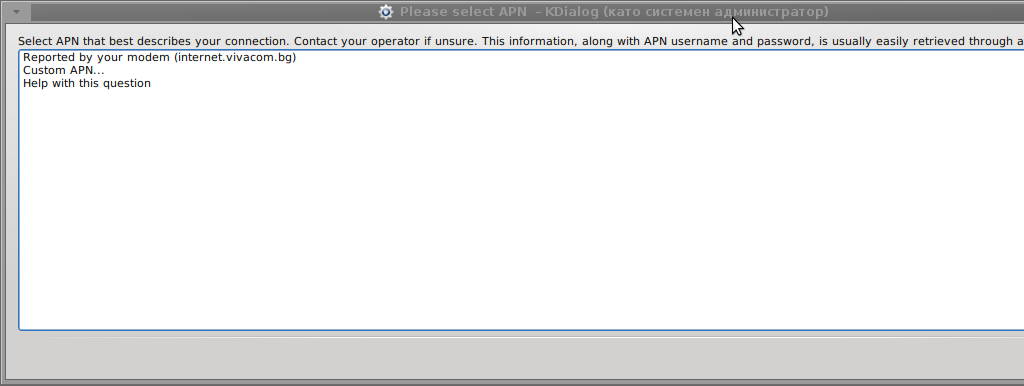
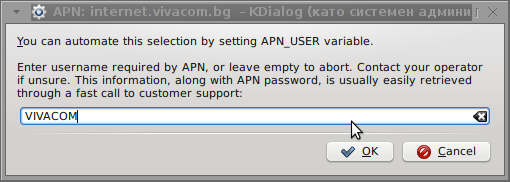
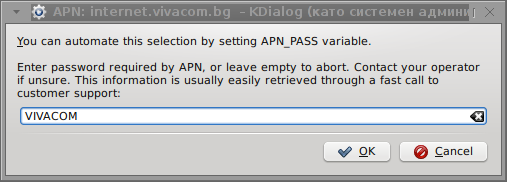
Something that I have wondered a bit was the dialog where I had to fill in some data of some variable APN abbreviation for – (Access Point Name)
The APN host for VIVACOM mobile internet is;;; APN: internet.vivacom.bg
I've used the Windows configuration progrma to gather also the following data that I thought might be important for configuring the 3G adsl modem on the Linux host;;;
Auth: *99#

User: VIVACOM

pass: VIVACOM
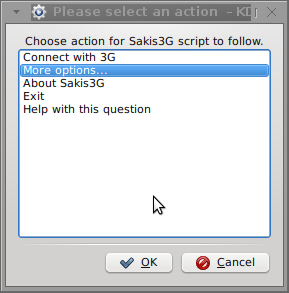
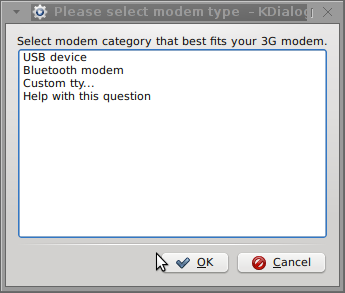
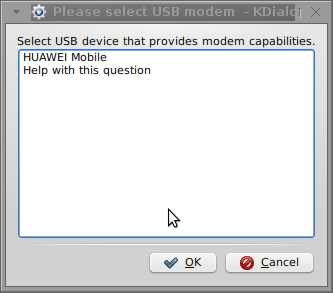
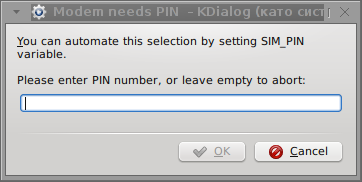
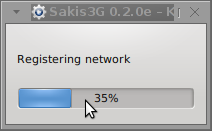
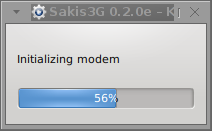
Here are all the configuration screenshots I've taken from sakis3g and all the data that I filled in. Next the following tiny window appeared on screen:
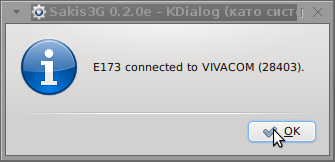
Well that's all folks, now sakis3g succesfully connected to the I_net via an (PPP) VPN connection tunnel here is data from ifconfig command showing the succesful 3G connection to VIVACOM;;;
The internet via the 3G connection is not blazing fast but good enough to check your mail or read some webpages. VIVACOM currently has different (traffic limited packages) for their 3G internet, I'm not sure which package exactly is the 3G USB stick modem but probably the "quick" internet connection that is now would slow down once the traffic limit is reached … Hope this post helps someone to configure 3G internet on VIVACOM in Debian and Ubuntu Linux. Though I've tested sakis3g on Debian it should work with no hassles on any other GNU Linux distribution that has bash installed.
Maybe little know about this embedded Android mobile smart phone features but there is a few mobile code cheats that can help you find out a little bit about your phone security, that's pretty handy for anyone who really wants to know whether mobile phone is being sniffed / tapped on Android software level and can give you an idea on how much your smart phone data is protected or are you being a target of someone's secret surveillance, of course this info is just on Android firmware embedded features level and if your mobile is somehow hacked or trojanned the information that can show could be not adequate, but still it is a good info to know. I'm sure you'll be surprised how much embedded Android features are there for the controllers (Google staff) 🙂
1. Information about telephone, battery status and statistics about telephone use
*#*#4636#*#*
To get information about battery, usage statistics and device.
2. Are Smart Phone Voice / SMS Transfers on?
*#21#
This combination of numbers and symbols allows you to understand where your mobile is Transferring Calls, SMS-es or other messages. If you type this code and click call the phone screen should show any numbers to which any data is being transferred, if your phone is okay and not tapped you will get a message the phone call transfers and sms transfer is disabled. Always keep in mind that there is a danger for your info / data or even billings to be tapped already as Android is non-free software, so even if that code returns no transfers you're still insecure at the hands of Google's mercy.
3. Where are calls and SMS-es transffered in case if Voice / SMS Transfers are on?
*#62#
This codes shows where are your input Calls and SMS-es are being transferred once someone is calling you and he is unable to reach you. At best case the inbound calls will be redirected as voice mail format to voice mail box of the number of your mobile operator.
4. Deactivate all kind of Phone Voice / SMS Transfers (Redirects) for security
##002#
By inputting above code you can deactivate all kind of redirects, which were prior configured at your mobile phone. The code is universal one and should work not only in Android but across all smart phones including IPhones. It is a recommended one especially if you're planning to travel in foreign country or region due to the roaming phone expenses.
5. Get IMEI (International Mobile Equipment Identifier) phone info
*#06#
Above code provides information about the ID number of the mobile phone th so called IMEI (International Mobile Equipment Identifier). Using the email a mobile phone that has been recently stolen can be easily found, because the device is emitting its IMEI number to the mobile phone operator, nomatter what kind of SIM Card is inserted in the phone.
6. How to protect yourself from criminals and spies?
Do not install an unknown source program to mobile phone, abstain from charging the phone on airports and suspicious free "charging" points, abtain from using any free wifi networks whose owner you don't know personally. Beware while browsing as there are websites that could infect you with javascript viruses and terrible phone malware stuff, to be safe make sure you have some kind of Antivirus software installed on the phone just in case. Be vigilant!
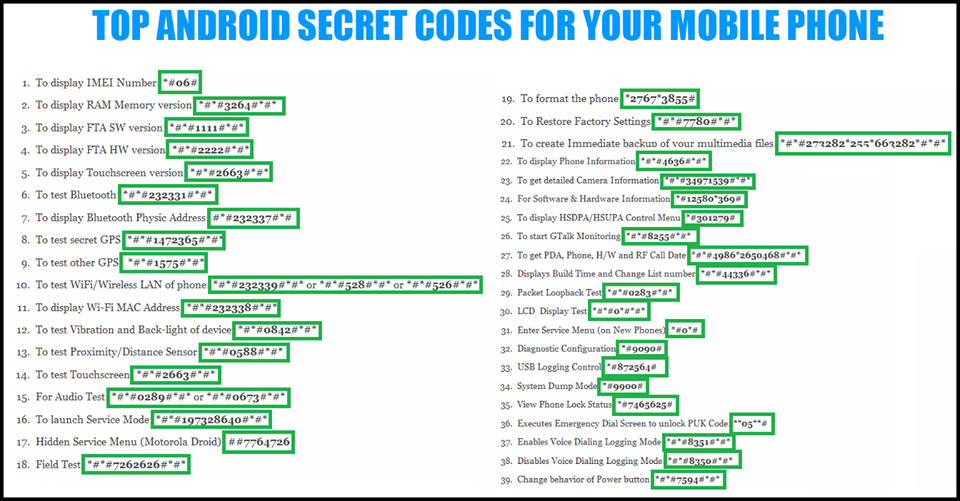
7. Bigger list of Codes working across some of Android versions providing various phone stats and info (not working on all mobiles but might be working on yours)
Here is a list also with a useful codes for some of Android version releases (this will not work on IPhones)
*4636#*#* – Information about statistics of phone, battery, usage
*#*#7780#*#* – Nullify phone settings.. Delete only applications.
*2767*3855# –Nullify all settings, reinstall firmware.
*34971539#*#* – Full information about phone camera vendor etc.
*#*#273283*255*663282*** – Quickly archive media files
*#*#197328640#*# – Test mobile service
232339#*#* / *#*#526#*#* – Test Wireless (Wi-Fi) netework
*#*#232338#*#* – Show Wi-Fi card physical MAC Address
*#*#1472365#*#* – Quick GPS test
*#*#1575#*#* – Various GPS Tests
*#*#0283#*#* – Test mobile Loopback interface
*#*#0*#*#* – Test of liquid-crystals mobile display
*#*#0673#*#* / *#*#0289#*#* – An Audio test
*#*#0842#*#* – Test vibrations of the background phone lid (lightning)
*2663#*#* – Get version of sensor screen
*2664#*#* – Test of the sensor screen
* * * *0588#*#* – Test distance sensor
* * *3264#*#* – Get Installed RAM Version
*#*#232331#*#* – Bluetooth Test
*#*#7262626#*#* – Test GSM signal
*#*#232337#*#* – Show bluetooth address
*#*#8255#*#* – Test Mobile Google Talk service
*#*#1234#*#* – Information about firmware
*#*#1111#*#* – Version of installed Open Trading software version
What makes this nifty app so great is its capability to makefree calls over mobile phones through the InternetViber. Viber saves you a lot of money as calls are handled only through the Internet (you need Wifi on your mobile or Mobile 3G Internet access on phone) and you don't need to pay to your mobile operator 0.10 – 0.15 euro / cents per minute. Besides being Free another advantage of Viber is conversations sound quality which is much better than a regular phone call
Viber doesn't need a special registration, but as (login) identificator uses your mobile phone number – you just need to have a working Mobile operator phone num. Once registered under a number even if you change your mobile sim card to other operator (for example moving from country to country) still the Viber account will continue work. Another good reason to use Viber is it makes possible price free calls between different countries (for example if you travel a lot and you want to regularly speak with your wife) – in my case right now I'm in Bulgaria and my wife is in Belarus, so to save money and keep talking daily we use Viber daily.
What Devices and Operating System Viber Supports and what is Viber advantages / disadvantages ?
Another reason why Viber is so great is its multi-platform support it works on iPhone, Blackberry, Windows Phone, Nokia (Symbian), Windows, Mac OS and even (Korean own OS-ed) Bada devices. Some might argue that Viber is inferior to Skype and interms of Voice and Video quality its better because of its enhanced HD voice enhanced codecs, besides that Viber's video is still in Beta. However Viber has one big advantage it makes easy possible to reach people using just their Mobile Phone numbers where in Skype it takes time and effort to register in Skype install application on your Mobile keep yourself logged in in Skype and have all contacts previously added, all this happens automatically in Viber in time of installation of Viber App on your mobile.
Which Is Cheaper Viber or Skype?
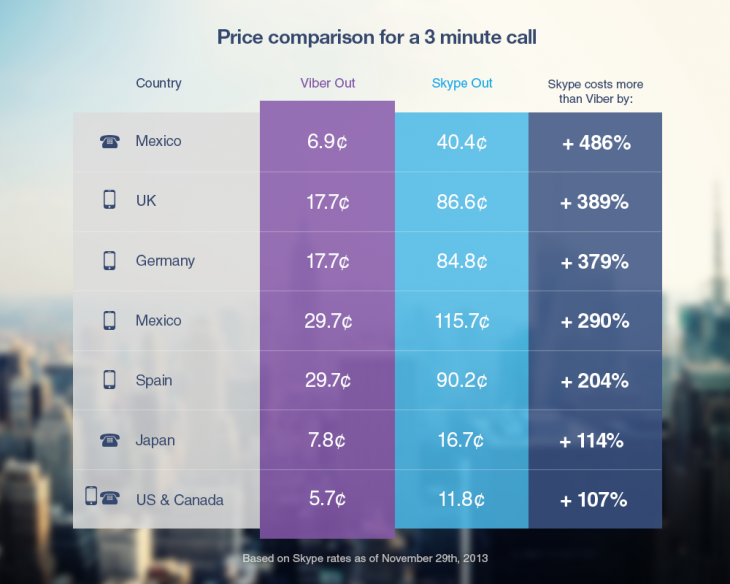
Once installed Viber could integrate itself with rest of your Mobile OS Call Manager and in time of call a friend number you have the opportunity to make it free Viber call. Viber are also selling Viber Credits so if you want to use your Viber Voice Over IP you can call external mobile operator numbers on a very very cheap price. Viber Calls to landline or mobile phones could be up to 400% cheaper than Skype! Whether you own a Smartphone it will be nice to give Viber a try.
Viber – How to make Phone calls between Desktop PC and Smarphone Mobile
One not so standard Viber use is to make Viber calls with no smartphone (at hand) from PC to another Viber equipped Mobile and vice versa. I needed to make Viber calls from my ZTE Android running mobile to my wife's MacBook Air PC because her mobile is an old Nokia running obscure Symbian version which is not supporting Viber + she doesn't have an Internet access tariff switched on her mobile.
Here is what I had to do to make Phone calls between my Mobile Viber App and my wife's MacbookAir Notebook PC:
BlueStacks App Player is a software designed to enable Android applications to run on Windows PC, Apple Macintosh Computers and Windows tablets. BlueStacks is something like (VMware, Qemu) Virtual Machine which allows you to install and run any Android App on your Desktop PC. Its curious that app was created by Rosen Sharma in 2008 an ex CTO (Chief Technology Officer) of McAfee
A mobile phone with a working SIM card (Nokia 6310 or any old mobile no need to be a smartphone
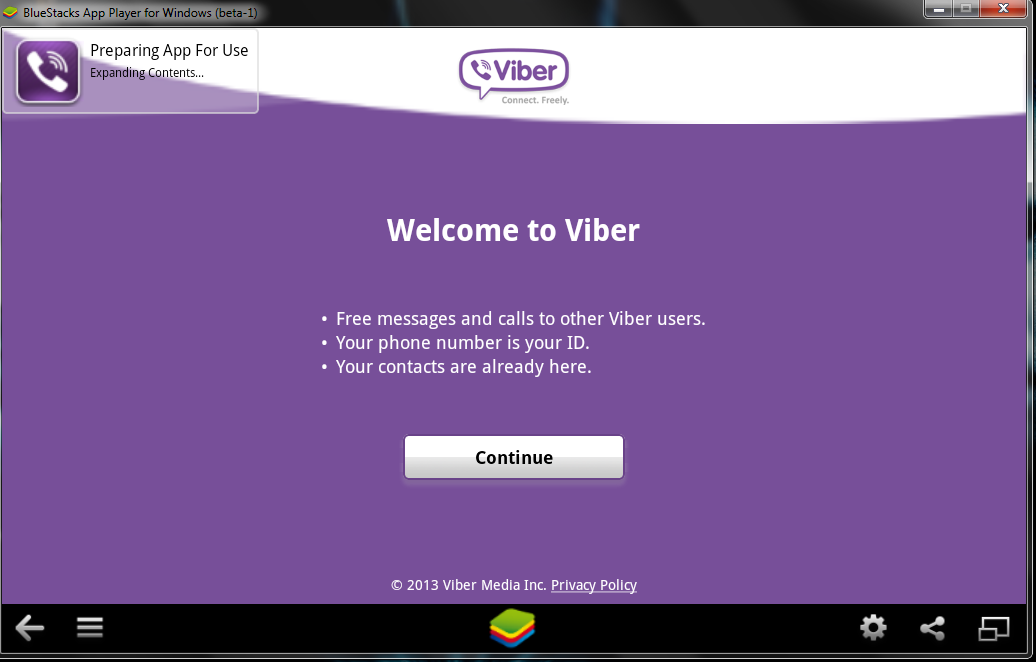
BlueStacks is needed in order to emulate a smartphone on your PC, therefore once setupped Bluestacks. Launch it and inside its necessary to login with your Gmail (Google Account) in order to allow access to Google Play Appstore on your PC. viber with no mobile phone bluestacks
Installing and Verifying Viber
This is the most crucial and tricky part in order to make Viber working on any device you need to receive a special Viber verification code, you need to fill in this code to confirm Viber installation on PC. Here I assume you have BlueStacks running with Viber Application installed.
First will be prompted to Agree with Terms and Conditions and provide Mobile Phone number for verification. Tell the Viber app that you have a smartphone with Viber already when prompted. After receving Viber Verification Code you need to fill in this code into BlueStacks Window (inside Viber should be running), go further to next step and you should be done with Desktop PC Viber number registration.
N.B. ! One brackets to open here is you need to have a working Mobile Phone number where you will receive the verification code as SMS, otherwise you cannot get the verification. On your filled in mobile phone number you will get the verification code as SMS.
Making Viber Calls to (Windows Mac) PC without Smartphone
There is no more further need for BlueStacks so you can uninstall it, however I preferred to keep it as its useful to be able to install Android Applications straight on your Desktop PC. To start using Viber on Desktop, just launch Viber application (not through BlueStacks) but the direct install.
Use Viber dial pad to dial your desired remote Smartphone number with Viber equipped. Enjoy the free Internet calls ! 🙂
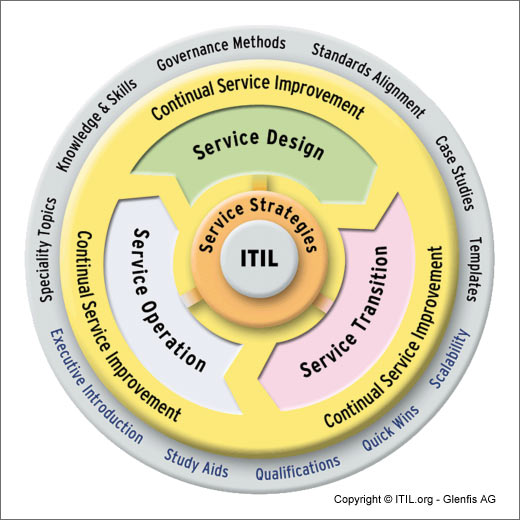
I'm just coming from my ITIL (Information Technology Infrastructure Library) Foundations Exam. ITIL Certification is mandatory for all HP employees and everybody in my team already passed it. Thanks God I passed the ITIL as well with 87.5%.
To prepare for the exam I used Dump files (files with questions and answers given to people on previous exams) and software that simulates testing Avanset Visual CertExam Manager on PC as well as VCE Exam Simulator for Mobile.
VCE Exam Simulator is a test engine designed specifically for certification exam preparation. It allows you to create, edit, and take practice tests in an environment very similar to an actual exam.
ITIL exam was held here in Sofia in Technologica EAD Study Center. ITIL exam is kindly paid by HP and costs $250. ITIL Foundation is first level of certification next one is ITIL intermediate.
In order to prepare for ITIL it took me about half a day reading the ITIL Dump files (you can download them here) and 2 days of actively simulating the exams mainly with VCE EXam Simulator on my Android based mobile. For those who want to become ITIL professionals and are going to certify further in ITIL Intermediate I recommend check all the ITIL Books covering the ITIL v.3 exam (here).
Here are also ITIL Foundation v.3 Dumps for Visual Cert exam manager. By the way ITIL exam is nowadays is required for almost anyone employeed in middle or large sized IT companies so if you still don't know anything about it and you're working or you will be working in the IT field take a look at. Lastly when I was looking for job offers I've noticed there are already plenty of companies who either require the candidate to have an ITIL passed or count ITIL certified candidates advantageous.
I bough a new Mobile Phone changing my old Nokia Communicator 9300i (powered by Symbian) with ZTE Blade 3 with Android. I'm not a big fan of big mobility myself. However as I already have it decided to test my blog with Mobile phone default browser and my blog theme looked really crappy. Knowing that the amount of Mobile devices on the Internet is increasing dramatically these days raises the chance my blog is found by Mobile user thus its nice my blog to be Mobile ready well …
To solve that I did a quick search in google and found WPTouch – a mobile plugin for WordPress that automatically enables a simple and elegant mobile theme for mobile visitors of your WordPress website To install it downloaded the plugin in usual /var/www/blog/wp-content/plugins , enabled it and refreshed in Android Mobile Browser and my blog appeared great in a theme specially designed for mobile browsers as you can see in below screenshot:
It is a public secret that Mobile Phones which does us very good and generally makes our daily lifes way easier are also a big enemy to our natural ihnibited freedom. Life has become such that it is almost inevitable to do any business or do a daily simple jobs without using Mobile Phone. There is almost none practically today that has wilfully rejected to use the mobile phone on any basis, almost anyone except some strangers like Richard Stallman and probably few others security freaks.
I've been shocked to find out the Father of Free Software (Richard Mathew Stallman), well known in the hacker dome as RMS does not own and didn't use any mobiles. The concerns he pointed are very much logical and rightful. Owning a mobile is a great security hole in personal privacy (mobile phones can be easily sniffed by Mobile Operators) as well as anyone wearing a mobile can be tracked up to 5 to 2 meters to the exact location where he is based on the mobile phone cells to which the mobile is connected.
Many people are not aware actually of the severeness of the issue of constant tracking of people everywhere through this call "goodies". Many mobile operators are already running a software which is building place behaviour patterns of every user of their mobile network. In other words, as we're used to bring and use the mobile everywhere in automated program is creating a map for each number assigned in some of the mobile operators. The gathered data about our location going habits can then be easily used as a indicator for predicting our future behaviour, bying habits (how many times we go to super-market), how many times we go to cinema, what kind of interests we hold etc. etc. This combined with Google, account monitoring could possibly create a system similar to the old movies Big Brother, where all people goods and even attitudes or desires is monitored, influenced and controlled ….
The severeness of the future implications of this constant "personal surveillance and tracking device" as Stallman use to call it is very dangerous for our freedoms.
I tried to live without a mobile phone, just like Stallman for about months, and to tell you the truth the world around seems completely different when you decide not to use 'em. The time I lived wihtout a mobile, clearly show me we have come to the point we cannot any more live without GSM. We fall the trap of dependanding the little "talk box" communication for absolutely everything, obviously sacrificing privacy and freedom for convenience. Mobiles are just one side of the coin, as the non-free software which is ruling the software market and the use of computers puts another treat and takes away many foundamential freedoms we used to have in the less technological world.
Apple as a vendor of software and hardware also denies and breaks our freedom very badly, as the company tracks everyone who owns anything created by apple connected to the internet. Besides that non-free software producers, could change the user software with a press of a button giving them the opportunity to decide what is good and bad for us, leaving us at a state of a helpless dependable users.
The topic of technological little-by-little enslavement, we're going through nowdays and the denying freedoms, we experience while being convinced by companies that we became more free by each next mambo-jambo gadget or by owning the latest smart-phone is very huge and complex but unfortunately underseen in society. I don't understand why, is it due to the low technical skills of mass users is it due to a "not-care what will happen in future" attitude, but obviously people openly discussing or protesting the technologization taking away our freedom is almost zero ….
Here is the video I found in youtube in which Stallman is asked few, questions on Ipads (IBADS) and Mobile Phone use. I believe his short explanation synthesizes the problem quite well ;;;;
I just wonder after you check the video, Would you still accept an Ipad as a birthday gift ? 🙂 Do you still think cell-phones are "good" freedom safe and reliable ?
1.: Don't use a ring tone or use a short landline phone ringtone on incoming calls
In the past, we all had a local stand line phones, most of the landline phones rung using a very specific ring sound which was almost identical on all phones around the world. This ringing tone used was following some telephone standards. The result was everyone could distinguish a ringing phone in a room or closed space and tell for sure, this sound is generated by a phone. Nowdays with the boom of cellular phone ringtones, there is almost noone who uses a standard old-fashioned telephone ringtone as a ring melody.
The consequence of this is in our minds we start loosing the boundary between whether communicating on the phone or communicating without it. In younger people this boundary between phone line and a physical communication is more evident than in adults (as youngsters has grown in society where mobile was used everywhere). The implication of this is more and more people are starting to perceive mobile communication as so natural as the person to person communication. Spending big part of the day talking over the phone mostly senseless things, not being consciously aware that this is done due to a heavy phone addiction and repeating behaviour trait stored sub-consciously.
Today everyone chooses a custom mobile phone ringtone melody (popular or impopular) song and sets it up to be a standard incoming call signal. As you can guess there are consequences on the mind, as the ringtone set is heard ten times or more a day during each and every phone call. The result is just like with alcoholics or drug addicts, the more you take from a certain "good" the more attached you become to it. Hence the more we listen to a certain song chunk daily on incoming calls, the sub-conscious becomes dependent on hearing this sound at least a number of times daily. If a day passes without no-one calling us and we don't hear the ringtone indicating a call the sub-conscious stored dependency starts popping up and we could start feeling lonely and we feel like calling someone (and we often do). Obviously this is dependency and even if someone might argue me this is a severe addiction which as every other addiction could be very dangerous and hard to fight.
As I prior said due to the fact that the phone use dependency is built in our minds starting with the phone ring melody, we can reduce this dependency by switching off the phone ringtone completely or at least changing it to a unique beep which is not likely to be heard or seen somewhere in your surrounding environment.
By setting the ringtone to some popular song we see on (TV, Radio or Internet on daily basis) this might become a trigger for us to associate hearing this sound with talking on the phone and hence make you increase the time you spend on the phone ,,, so be careful ,,,,
2.:: Stop Mobile Beeps and sounds on menu navigation
All new mobiles sold on the market are configured to have buzzling sounds on events and various beeps on keypad lock / unlock and menu navigation. This sounds are there mostly to make you more alert and concentrated on using your mobile and often as a consequence whether one uses his mobile his awareness is comletely taken by the phone screen (you're totally "absorbed" by the phone use). Besides designed to alert you the Managers and CEO's who decided to have a heavy beep sounds on mobiles made it having probably something else on mind? The beeps on keypad navigation makes the user emotionally and sub-consciously attached to the Cell Phone. The idea here is like in popular music streamed on radios and TVs and mostly everywhere …. The more you listen to a song, the higher the mind trait it leaves in you, so later when one hears a music pattern or a whole song, which he / she listened already thousands of times this brings back "good" old memories. It is very simple actually our minds are constructed in a way that the mor certain "information" is heard / saw / smell the bigger the mind influence this leaves on us. Back to the mobile sounds, the more you use the mobile phone with turned on sounds, the more addicted and mind stucked the beep and melodies during use of the cell phone becomes in the mind. For example many people take a look at their mobile automatically (without being consciously aware) and do the activity of (unlock) and (lock) the phone screen not knowing they do it automatic. More or less we all do such an auto-mated learned behaviour because of the subconscious dependency that is built in our minds. Whether we lock and unlock the mobile phone almost robotically, we do it because our sub-conscious mind plays a trick on us and "force" us to do a previous learned activity (association in our mind with the unlock / lock beep sound).
3.::: Use your mobile in different ways
Any modern mobile is quite advanced in functionality and there is more than one way to initiate a phone call. E.g. the mobile has a shortcut buttons assigned to do quick phone calls, quickly evoke SMS menu etc. Learn them and occasionally use the shortcut buttons instead of the menu navigation. Our minds like changing patterns and doing things different.
Even if you have no chance to do a things via a certain menu, you can always change the position of the phone screen to different distance to eyesight 🙂 You can for example type on the keypad following the menu steps by watching from left or right eye periphery or you can use the menus with your phone screen turned backwards 🙂 If you're used to type on the keypad or touch screen with right hand try doing it with the left hand 🙂
This will take time but the fun worths it. Plus the most valuable thing in using the mobile in different ways each time is there is no specific inflicting pattern associated in your mind and hence the depepdency set in your sub-conscious mind on phone use is lesser. Actually there are too many various "hacks" one could come up with on how to use mobile as differently as possible. It is up to your imagination. Though using the mobile "each-time-different" can be sometimes more time-consuming it surely makes your phone use amusing.
We’re constantly being said to reduce energy consupmtion, they sell us new bulbs to save energy, new TVs with energy saving. The newer the computer equipment microwaves or whatever home electrical equipment we buy the more it is said to be saving energy.
So far so good it is true we can reduce energy consumption by producing gadgets which consume less. However there are also another approach to the “green problem” which we never are said about.
It is rather simply instead of saving energy on technology base, we can save energy on physical base. One simple thing to do to save energy with no need to spend money on latest advacement gadgets is to simply make it the old school way.
a -= Learn to switch off your lamps and home equipment whenever its not necessery
If you’re about to go to sleep, you can simply switch off the mobile and use a mechanical clock to wake you up on the morning, this way you have 3 benefits.
1; Less energy will be discharged by the mobile in the time you’re not awake, so you don’t need to charge so frequently the battery and therefore you will draw less energy from the Electrical network hence saving energy.
2; You will not be radiated with a bit less radiation produced by the Mobile phone in order to stay connected to the GSM local located cell.
Though the good this does will not be dramatical it for sure will be better for your health than if the mobile is switched on the whole night.
3; You will not be awakened in morning by some crazy person who just decided to call you early in the morning. Often this morning unexpected and desired phone calls make you jump off the bed rapidly and hence giving a large dose of stress to your organizm.
-=- Of course switching off the mobile has some disadvantages if you can receive a crucial phone calls during all time of day or night you can’t afford to simply switch off the mobile, this is however not true for most people who work in an OFF-ICE.People working in offices can simply wake up at a scheduled time, get a shower do their morning hygiene and jump to a car or bus to the office so the need for having the mobile switched ON at night is not really needed.
Of course thinking in the same direction, it is logical that switching off the computer earlier when not needed, the wireless home router or the TV is another place from where a huge energy savings can be achieved.
If large amount of people re-learn their energy in-efficient habits to be more energy cautios a HUGE amounts of energy can be saved. This of course can have a positive impact on the monthly energy bills and hence can save you money in monthly expenses.
The TV is surely another big energy draining source, many people have the habit to sleep with a Television switched on. Besides this has a negative impact on the conscious since vast amounts of information are being stored and processed by the conscious and unconscious mind, also the lights emitted from the TV screen prevents the persons body to not have a pieceful rest.
Its rather stupid that companies are constantly ranting on how they improve their products to be energy friendly but they don’t invest even a penny to educate the masses that energy saving does not only depend on how good the technology is produced to save energy but also on how much the people are educated how to use the technology with energy saving in mind.Probably there are plenty of other ways a households can change their habits to save energy. I’ll be glad to hear some other suggestions ,,,
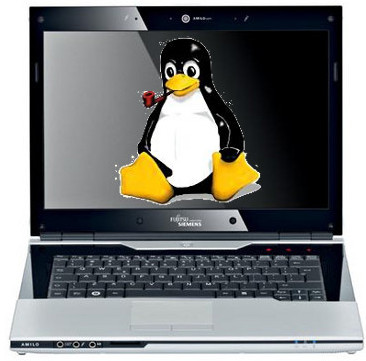
A friend of mine has Fujitsu Siemens Amilo laptop and is full time using his computer with Slackware Linux.
He is quite happy with Slackware Linux 13.37 on the laptop, but unfortunately sometimes his screen brightness lowers. One example when the screen gets darkened is when he switch the computer on without being plugged in the electricity grid. This lowered brightness makes the screen un-user friendly and is quite tiring for the eye …
By default the laptop has the usual function keys and in theory pressing Function (fn) + F8 / F7 – should increase / decrease the brightness with no problems, however on Slackware Linux (and probably on other Linuxes too?), the function keys are not properly recognized and not responding whilst pressed. I used to have brigtness issues on my Lenovo notebook too and remember how irritating this was. After a bit of recalling memories on how I solved this brightness issues I remembered the screen brigthness on Linux is tunable through /proc virtual (memory) filesystem.
I took a quick look in /proc and found few files called brightness:
/proc/acpi/video/GFX0/DD01/brightness
/proc/acpi/video/GFX0/DD02/brightness
/proc/acpi/video/GFX0/DD03/brightness
/proc/acpi/video/GFX0/DD04/brightness
/proc/acpi/video/GFX0/DD05/brightness
cat-ting /proc/acpi/video/GFX0/DD01/brightness, /proc/acpi/video/GFX0/DD03/brightness, /proc/acpi/video/GFX0/DD04/brightness all shows not supported and therefore, they cannot be used to modify brightness:
bash-4.1# for i in $(/proc/acpi/video/GFX0/DD0{1,3,4,5}/brightness); do \

cat $i;

done

<not supported>

<not supported>

<not supported>

<not supported>
After a bit of testing I finally succeeded in increasing the brightness. Increasing the brightness on the notebook Intel GM965 video card model is done, through file:
/proc/acpi/video/GFX0/DD02/brightness
To see all the brightness levels the Fujitsu LCD display supports:
As you can see the dark screen was caused cause the current: brightness is set to a low value of 25. To light up the LCD screen and make the screen display fine again, I increased the brightness to the maximum level 100, e.g.:
Here is also a tiny program that reduces and increases the notebook laptop brightness written in C. My friend Dido, coded it in just few minutes just for the fun 🙂 To permanently solve the issues with darkened screen on boot time it is a good idea to include echo '100' > /proc/acpi/video/GFX0/DD02/brigthness in /etc/rc.local:
I've also written another Universal Linux Increase laptop screen brightness Shell script which should be presumable also working for all Laptop models running Linux 🙂
I had 3 days trip with bus with my girl classmate (Ina). We traveled using the union-ivkoni bus lines. As a wholebeing on the road with bus for 3 days in order to reach some destination is pretty killing. We started the historicaltravel from Kavarna to Sofia and then at 2 o’clock we catched the bus Sofia -> Utrecht. There was big delays in the Serbianand the Hungarian borders. On all the other boarders we and our luggage weren’t checked. We had a bunch of stops on a oil stations.And I have to note everything in the oil stations in europe is pretty expensive. For example one sanwdich costs somwehere aroundalmost 4EU!. I and Ina came at Utrecht at around 6 o’clock and went to the Utrecht’s train station where we took two tickets to Arnhem.At 7 we were at Arnhem and went to the bus station. Originally we expected that there are gonna be welcoming students there and HAN university buses traveling from there to Vivare and the other accommodation places, unfortunately this was not the case. We were absolutely alone at an unknown country again I prayed to God in Jesus name to help me find a way to fix this mess. I went to search for Mobile SIM card, at the end after 20 minutes of walk I asked a police officer near the train station and he told me about a bookstore where I can find mobile SIM cards. I took two of them one for Ina and one for me. I took the T-Mobile mobile. I heard that the prices of conversations between the Bulgarian GSM operator Globul and T-Mobile are cheaper so I decided to give it a try. We called Koko (A College Colleague, who is gonna study HRQM just like me and is going to continue as a 3rd year student in Arnhem Business School, he came instantly in 20 minutes or so with another Bulgarian guy who already studied a year in Arnhem (Drago). Drago didn’t helped much with the traveling bags. But Kaloyan helped a lot. Today I feel the grace of God so real. I pray that he keep me and guide me in the same way in the future too. Another thing to note is that the living room that Vivare selected for me or should I say God make it be for me is just perfect. It has a toilet (!big plus!, a terrace, аsink, a nice bed, A Buro, a lamp and a chair. The room number is with ID K. 111. I think 111 stays for the Holy Trinity (The Father, The Son and The Holy Spirit) to Whom is and be the Glory the worship and power now and Forever and Ever, Amen!) I forgot to mention that I blocked my mobile telephone while trying to make the T-mobile SIM card work with my Motorola C115, luckily God has thought for this too. It seems Koko has one Mobile apartus he didn’t need right now so he gave it on a good will to me. Again what I can say Our Lord is an awesome God. Now I’m pretty tired and I’m going to bed. I have to mention Arnhem is excitingly charmful city and I really like it, also I’m impressed by the Dutch guys with which I had any work until now.Well for final I can only say: ” I screamed to the Lord and he heard my prayer and delivered me from evil”! Glory to you Lord of Hosts! Amen !END—–