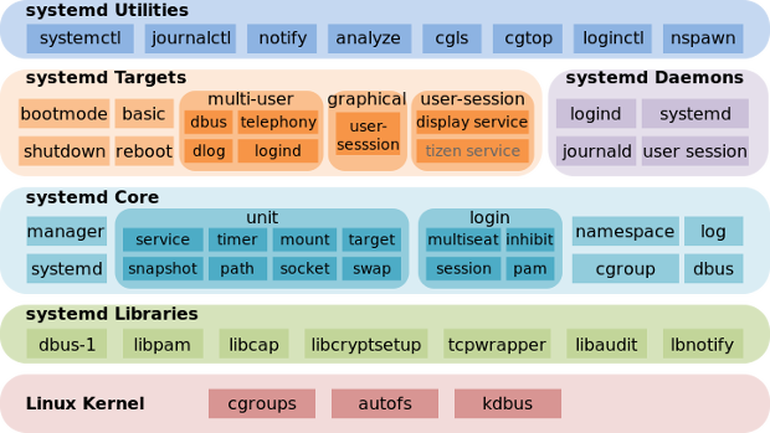
This post is going to be a very short one and to walk through shortly to System V basic start / stop remove service old way and the new ways introduced over the last 10 years or so with the introduction of systemd on mass base across Linux distributions.
Finally I'll give you few hints on how to check (analyze) the boot time performance on a modern GNU / Linux system that is using systemd enabled services.
1. System V and the old days few classic used ways to stop / start / restart services (runlevels and common wrapper scripts)
The old fashioned days when Linux was using SystemV / e.g. no SystemD used way was to just go through all the running services with following the run script logic inside the runlevel the system was booting, e.g. to check runlevel and then potimize each and every run script via the respective location of the bash service init scripts:
root@noah:/home/hipo# /sbin/runlevel
N 5
Or on some RPM based distros like Fedora / RHEL / SUSE Enterprise Linux to use chkconfig command, e.g. list services:
~]# chkconfig –list
etworkManager 0:off 1:off 2:on 3:on 4:on 5:on 6:off
abrtd 0:off 1:off 2:off 3:on 4:off 5:on 6:off
acpid 0:off 1:off 2:on 3:on 4:on 5:on 6:off
anamon 0:off 1:off 2:off 3:off 4:off 5:off 6:off
atd 0:off 1:off 2:off 3:on 4:on 5:on 6:off
auditd 0:off 1:off 2:on 3:on 4:on 5:on 6:off
avahi-daemon 0:off 1:off 2:off 3:on 4:on 5:on 6:off
And to start stop the service into (default runlevel) or respective runlevel:
~]# chkconfig httpd on
~]# chkconfig –list httpd
httpd 0:off 1:off 2:on 3:on 4:on 5:on 6:off
~]# chkconfig service_name on –level runlevels
Debian / Ubuntu and other .deb based distributions with System V (which executes scripts without single order but one by one) are not having natively chkconfig but instead are famous for update-rc.d init script wrapper, here is few basic use of it:
update-rc.d <service> defaults
update-rc.d <service> start 20 3 4 5
update-rc.d -f <service> remove
Here defaults means default set boot runtime for system and numbers are just whether service is started or stopped for respective runlevels. To check what is your default one simply run /sbin/runlevel
Other useful tool to stop / start services and analyze what service is running and which not in real time (but without modifying boot time set for a service) – more universal nowadays is to use the service command.
root@noah:/home/hipo# service –status-all
[ + ] acpid
[ – ] alsa-utils
[ – ] anacron
[ + ] apache-htcacheclean
[ – ] apache2
[ + ] atd
[ + ] aumix
root@noah:/home/hipo# service cron restart/usr/sbin/service command is just a simple wrapper bash shell script that takes care about start / stop etc. operations of scripts found under /etc/init.d
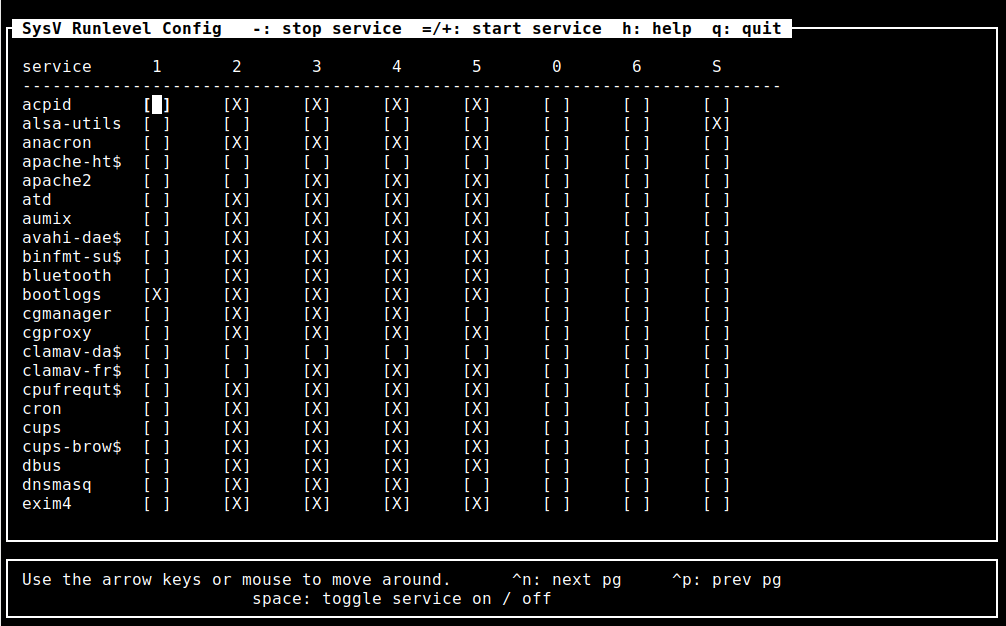
For those who don't want to tamper with too much typing and manual configuration there is an all distribution system V compatible ncurses interface text itnerface sysv-rc-conf which could make your life easier on configuring services on non-systemd (old) Linux-es.
To install on Debian distros:
debian:~# apt-get install sysv-rc-conf
debian:~# sysv-rc-conf
2. SystemD basic use Start / stop check service and a little bit of information
for the novice
As most Linux kernel based distributions except some like Slackware and few others see the full list of Linux distributions without systemd (and aha yes slackw. users loves rc.local so much – we all do 🙂 migrated and are nowadays using actively SystemD, to start / stop analyze running system runnig services / processes
systemctl – Control the systemd system and service manager
To check whether a service is enabled
systemctl is-active application.service
To check whether a unit is in a failed state
systemctl is-failed application.service
To get a status of running application via systemctl messaging
# systemctl status sshd
● ssh.service – OpenBSD Secure Shell server Loaded: loaded (/lib/systemd/system/ssh.service; enabled; vendor preset: enabled) Active: active (running) since Sat 2019-07-06 20:01:02 EEST; 2h 3min ago Main PID: 1335 (sshd) Tasks: 1 (limit: 4915) CGroup: /system.slice/ssh.service └─1335 /usr/sbin/sshd -D юли 06 20:01:00 noah systemd[1]: Starting OpenBSD Secure Shell server… юли 06 20:01:02 noah sshd[1335]: Server listening on 0.0.0.0 port 22. юли 06 20:01:02 noah sshd[1335]: Server listening on :: port 22. юли 06 20:01:02 noah systemd[1]: Started OpenBSD Secure Shell server.
To enable / disable application with systemctl systemctl enable application.service
systemctl disable application.service
To stop / start given application systemcl stop sshd
systemctl stop tor
To reload running application
systemctl reload sshd
Some applications does not have the right functionality in systemd script to reload configuration without fully restarting the app if this is the case use systemctl reload-or-restart application.service
systemctl list-unit-files
Then to view the content of a single service unit file:
:~# systemctl cat apache2.service
# /lib/systemd/system/apache2.service
[Unit]
Description=The Apache HTTP Server
After=network.target remote-fs.target nss-lookup.target[Service]
Type=forking
Environment=APACHE_STARTED_BY_SYSTEMD=true
ExecStart=/usr/sbin/apachectl start
ExecStop=/usr/sbin/apachectl stop
ExecReload=/usr/sbin/apachectl graceful
PrivateTmp=true
Restart=on-abort[Install]
WantedBy=multi-user.target
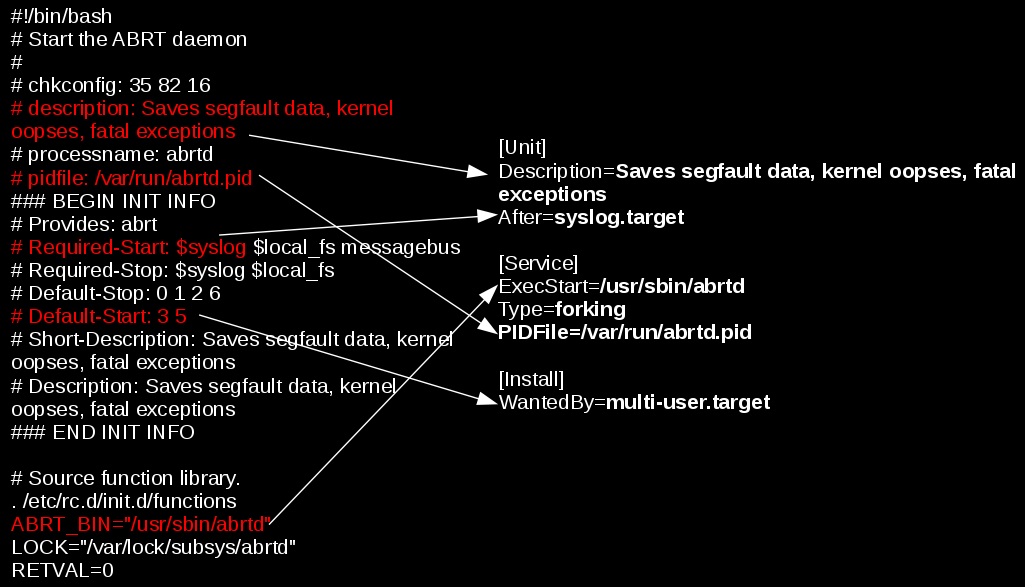
systemd's advancement over normal SystemV services it is able to track and show dependencies
of a single run service for proper operation on other services
:~# systemctl list-dependencies sshd.service
● ├─system.slice
● └─sysinit.target
● ├─dev-hugepages.mount
● ├─dev-mqueue.mount
● ├─keyboard-setup.service
● ├─kmod-static-nodes.service
● ├─proc-sys-fs-binfmt_misc.automount
● ├─sys-fs-fuse-connections.mount
● ├─sys-kernel-config.mount
● ├─sys-kernel-debug.mount
● ├─systemd-ask-password-console.path
● ├─systemd-binfmt.service
….
…
.
You can also mask / unmask service e.g. make it temporary unavailable via systemd with
sudo systemctl mask nginx.service
it will then appear as masked if you do list-unit-files
If you want to change something on a systemd unit file this is done with
systemctl edit –full nginx.service
In case if some modificatgion was done to systemd service files e.g. lets say to
/etc/systemd/system/apache2.service or even you've made a Linux system Upgrade recently
that added extra systemd service config files it will be necessery to reload all files
present in /etc/systemd/system/* with:
systemctl daemon-reload
Systemd has a target states which are pretty similar to the runlevel concept (e.g. runlevel 5 means graphical etc.), for example to check the default target for a system:
One very helpful feature is to restart systemd but it seems this is not well documented as of now and though this might work after some system package upgrade roll-outs it is always better to reboot the system, but you can give it a try if restart can't be done due to application criticallity.
To restart systemd and its spawned subprocesses do:
systemctl daemon-reexec
root@noah:/home/hipo# systemctl get-default
graphical.target
to check all targets possible targets
root@noah:/home/hipo# systemctl list-unit-files –type=target
UNIT FILE STATE
basic.target static
bluetooth.target static
busnames.target static
cryptsetup-pre.target static
cryptsetup.target static
ctrl-alt-del.target disabled
default.target static
emergency.target static
exit.target disabled
final.target static
getty.target static
graphical.target static
…
you can put the system in Single user mode if you like without running the good old well known command:
/sbin/init 1
command with
systemctl rescue
You can even shutdown / poweroff / reboot system via systemctl (though I never did that and I don't recommend) 🙂
To do so use:
systemctl halt
systemctl poweroff
systemctl reboot
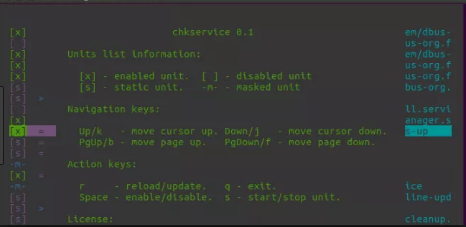
For the lazy ones that don't want to type all the time like crazy to configure and manage simple systemctl set services take a look at chkservice – an ncurses text based menu systemctl management interface
As chkservice is relatively new it is still not present in stable Stretch Debian repositories but it is in current testing Debian unstable Buster / Sid – Testing / Unstable distribution and has installable package for Ubuntu / Arch Linux and Fedora
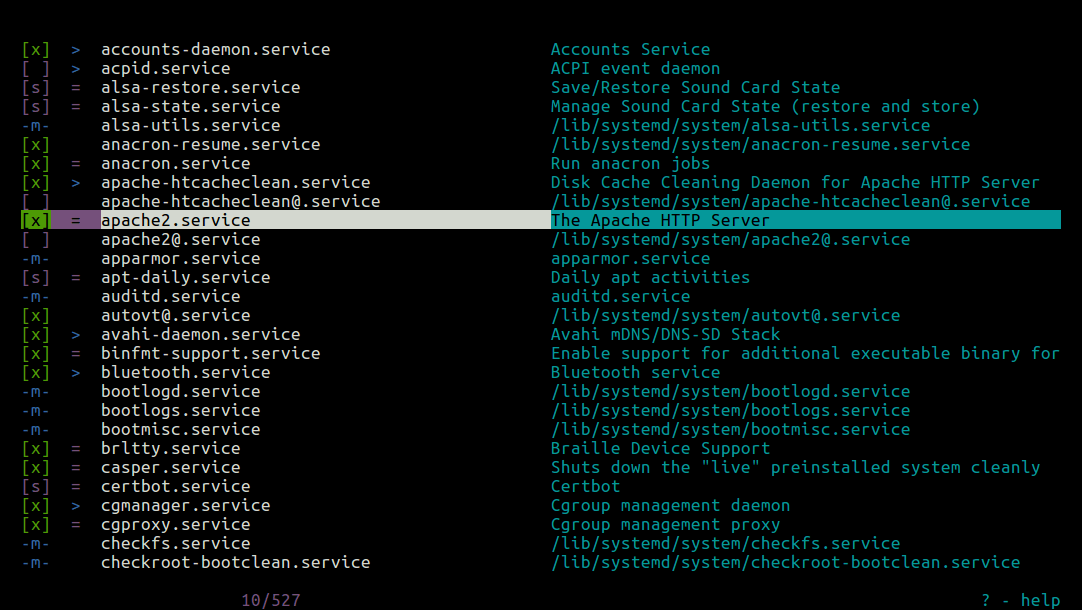
Picture Source Tecmint.com
3. Analyzing and fix performance boot slowness issues due to a service taking long to boot
The first very useful thing is to know how long exactly all daemons / services got booted
on your GNU / Linux OS.
linux-server:~# systemd-analyze
Startup finished in 4.135s (kernel) + 3min 47.863s (userspace) = 3min 51.998s
As you can see it reports both the kernel boot time and userspace (surrounding services
that had to boot for the system to be considered fully booted).
Once you have the system properly booted you have a console or / ssh access
root@pcfreak:/home/hipo# systemd-analyze blame
2min 14.172s tor@default.service
1min 40.455s docker.service
1min 3.649s fail2ban.service
58.806s nmbd.service
53.992s rc-local.service
51.458s systemd-tmpfiles-setup.service
50.495s mariadb.service
46.348s snort.service
34.910s ModemManager.service
33.748s squid.service
32.226s ejabberd.service
28.207s certbot.service
28.104s networking.service
23.639s munin-node.service
20.917s smbd.service
20.261s tinyproxy.service
19.981s accounts-daemon.service
18.501s loadcpufreq.service
16.756s stunnel4.service
15.575s oidentd.service
15.376s dev-sda1.device
15.368s courier-authdaemon.service
15.301s sysstat.service
15.154s gpm.service
13.276s systemd-logind.service
13.251s rsyslog.service
13.240s lpd.service
13.237s pppd-dns.service
12.904s NetworkManager-wait-online.service
12.540s lm-sensors.service
12.525s watchdog.service
12.515s inetd.service
…
As you can see you get a list of services time took to boot in secs and you can
further debug each of it to find out why it boots so slow (netwok / DNS / configuration isssue whatever).
On a servers it is useful to look up for some processes slowing it down like gdm.service etc.
Close up words rant on SystemD vs SysemV
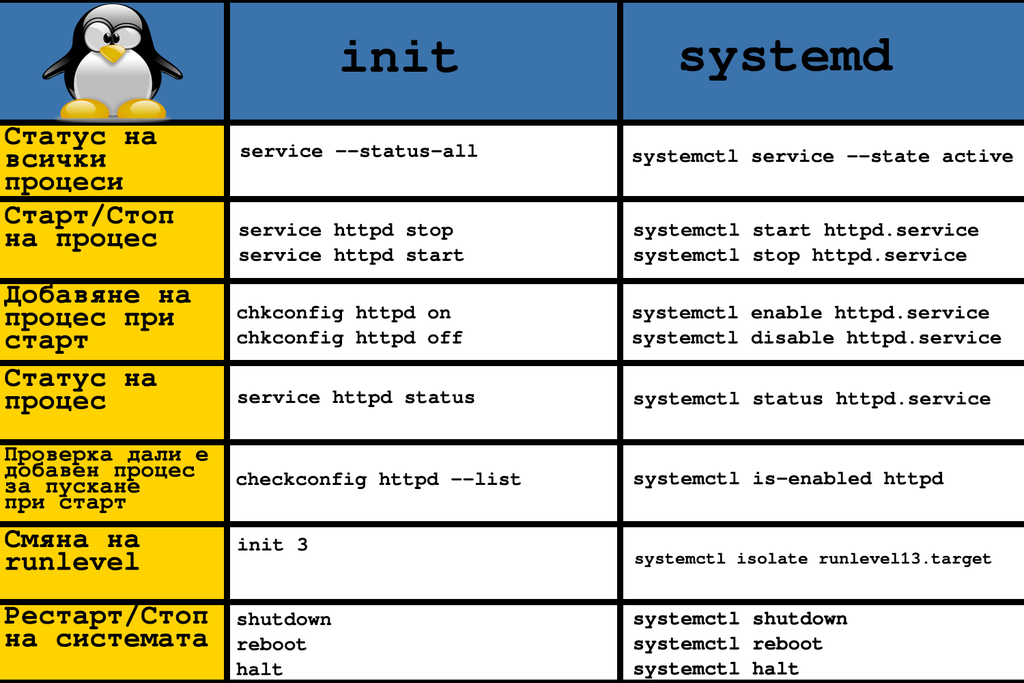
A lot could be ranted on what is better systemd or systemV. I personally hated systemd since day since I saw it being introduced first in Fedora / CentOS linuxes and a bit later in my beloved desktop used Debian Linux.
I still remember the bugs and headaches with systemd's intruduction as it is with all new the early adoption of technology makes a lot of pain in the ass.
Eventually systemd has become a standard and with my employment as a contractor through Itelligence GmBH for SAP AG I now am forced to work with systemd daily on SLES 12 based Linuces and I was forced to get used to it.
But still there is my personal preference to SystemV even though the critics of slow boot etc.but for managing a multitude of Linux preinstalled servers like Virtual Machines and trying to standardize a Data Center with Tens of Thousands of Linuxes running on different Hypervisors VMWare / OpenXen + physical hosts etc. systemd brings a bit of more standardization that makes it a winner.