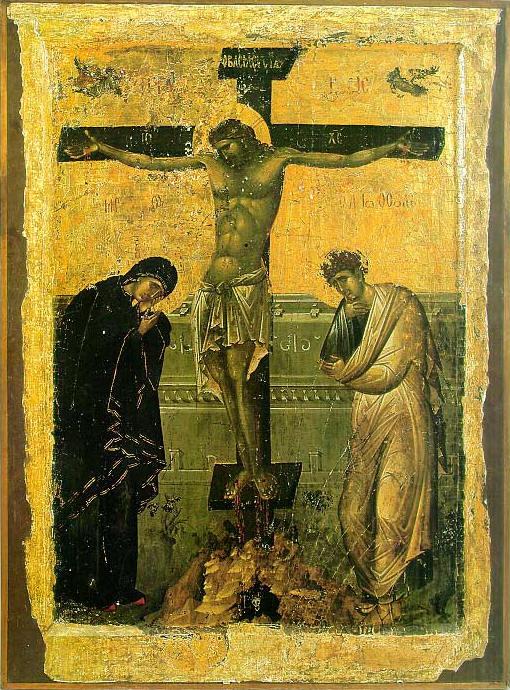
Why Does Eastern Orthodox Churches celebrate their Eastern often on a later or a different date from (Western Christians) – Roman Catholic Church, Greek Catholic Church, Anglican, Presbyterian or Protestant (Evangelist), Old Catholic Methodist, Calvinist or some other kind of Lutheran or Charismatic Christian sects?
If you happen to be born innd raised in America or Western European contry it is most likely, you're little if at all or not at all aware of the fact that in the Eastern Orthodox Churches the date of Eastern (Passcha) is celebrated often on a different date from the Roman Catholic and the other schismatic churches.
For example, this year 2016 Roman Catholics already celebrated Passcha on March 27th and we Eastern Orthodox Christians are still in the Great Lent (Fasting) period and we'll have the Easter celebrated on 1st of May.
That certainly raises some questions across people who are not Eastern Orthodox, because the Western Roman Catholic Church and the rest of Protestant Christians are the biggest group of Christians out there and even atheists and people belonging to other religions such as Buddhism or Islam might be puzzled why the Eastern Orthodox Christians celebrate easter on a different they if after all they're Christian and what and why is this division among Christians?
With the increased globalization of the World and the fact that currently there are a lot of multi-national international companies and the fact that the companies and businesses today are mostly multi-cultural with people from all the world and all religions across the globe, for some countries situated within countries with predominant Eastern Orthodox population such as Bulgaria, Romania, Serbia, Greece, Ukraine, Belarus, Russia etc. it might be quite a disturbance because there Orthodox Christian country situated branches might be not able to operate on the days of Orthodox Easter.
Here is a short example on the martch and dismatch by years between Roman Catholic and Eastern Orthodox Church by years from 2010 to 2020
Roman Catholic and Eastern Orthodox Easters from year 2010 to 2020
| Year | 2010 | 2011 | 2012 | 2013 | 2014 | 2015 | 2016 | 2017 | 2018 | 2019 | 2020 |
| | | | | | | | | | | | |
| Catholic | 4/4 | 24/4 | 8/4 | 31/3 | 20/4 | 5/4 | 27/3 | 16/4 | 1/4 | 21/4 | 12/4 |
| Orthodox | 4/4 | 24/4 | 15/4 | 5/5 | 20/4 | 12/4 | 1/5 | 16/4 | 8/4 | 28/4 | 19/4 |
Easter 2000 to 2009
| Year | 2000 | 2001 | 2002 | 2003 | 2004 | 2005 | 2006 | 2007 | 2008 | 2009 |
| | | | | | | | | | | |
| Catholic | 23/4 | 15/4 | 31/3 | 20/4 | 11/4 | 27/3 | 16/4 | 8/4 | 23/3 | 12/4 |
| Orthodox | 30/4 | 15/4 | 5/5 | 27/4 | 11/4 | 1/5 | 23/4 | 8/4 | 27/4 | 19/4 |
A complete list of Eastern Orthodox Pascha feast days is here
Funnly or strangely e ven many people who are situated within an Eastern Orthodox country doesn't have a good understanding why and what is the reason our Eastern Orthodox Easter feast is celebrated on a different date.
There is a lot written on the reasons why Eastern Orthodox Church celebrates on a different date Passcha from Catholics however in this article, I'll try to make it as short and clear as the reasons behind are often presented quiet messy.
In short there are 2 reasons (rules) why Eastern Orthodox Christian Church celebrates Eastern often on a different date:
1) The Julian calendar which is still used by the Eastern Orthodox Church for counting time
2) Adherence of the Orthodox to the early practices of the Original and Ancient Christian Church for Christian Passcha to not coincide with the Jewish Passover
The consequence of these 2 rules is that the Eastern Orthodox Christians on about 50% of the time throughout years celebrate Christistmas later from Catholics because the Orthodox Church is following the First Church Ecumenical Council of Nicea (325 A.D.) that has set the rule that Passcha must take place always after the Jewish Passover because in the Church the Biblical described consequence of events of the Passover and the Crucifix are followed, it appears rest of the Christian churches ignore (break) this requirement and this makes them fall under the Anatemas of the Church fathers from the I Ecumenical Council (see the Full decisions of the 7 Ecumenical Canonical Councils of the Original Church here).
Here the difference for Catholics celebrating on a different date Eastern stems from the fact since the XVI century they're using in Catholic Church the Gregorian calendar (adopted by Pope Gregory the XIII-th) because of scientifical superiority claimed by the Gregorian calendar.
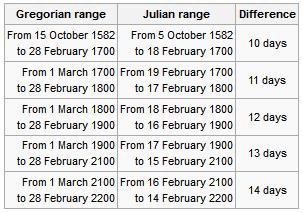
Well as you can see the scientific accuracy of Gregorian calendar is better and with years the Julian calendar is starting to miss astronomical re-calculated dates, causing mathematical incorrectness but the problem with the acceptance of the Gregorian Calendar and the reason why the Eastern Orthodox Church decided not to use the Gregorian calendar for Pascha is the fact that when the Gregorian Calendar was accepted in secular western world and the Roman Catholic Church in order to matematically align the missing date 13 days were simply dropped off (or from Thursday 4th of October 1582 under Julian Calendar the next day Friday people started being in 15th of October, see the picture below:
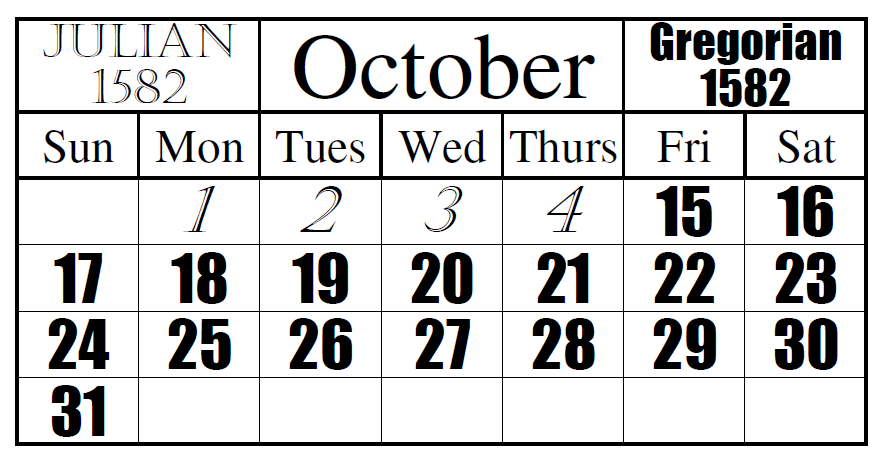
Well as you can see Friday October the 15, 1582 was quite a crazy year for the people as they lay down as 4th of Thursday and they woke up on 15th the next day 🙂
The Eastern Orthodox still to follow the Julian Calendar for Easter feast and some Churches adopted to using partly the Gregorian (Secular) calendar for some of the feasts under the pressure of the Greek Ecumenical Patriarchate , whether some Churches such as the Russian Orthodox Church (ROC) which as of time of writting is the biggest Orthodox Crhuch as well as the Serbian Church are completely using the Julian calendar for calculating all feast days. Now what should be known is difference between Julian and Gregorian calendar is 13 days falling back (Gregorian Calendar is 13 days in future), while Julian calendar is 13 days in time behind the Gregorian.
However as prior said sometimes throughout years the Easterns of (Western) Roman Catholic Church and Eastern Orthodox Church coincide, such a date on which we celebrated Eastern on one date is on 24 April 2011.
The two dates coincide when the full moon following the equinox comes so late that it counts as the first full moon after 21 March in the Julian calendar as well as the Gregorian.
In recent years the conciding years was frequent in 2010, 2011, 2014 and will be again 2017 but after that there will be no coincidence of Orthodox and Catholic Easter feasts until 2034.
For those who might be wondering why the Eastern Orthodox Church choose to not celebrate Easter on a different date here is some information on how Pascha (Easter) was determined historically in the One and Holy Apostolic Church
which for historical and dogmatical reasons is today Our Holy Eastern Orthodox Church.
During the first three centuries of Christianity, some Christians celebrates Pascha on the First date after Jewish Passover and others celebrates the feast on the same time as Passover.
This was causing confusions in across Churches and this together with other heretical teachings caused the Holy Church Fathers (successors of Holy Apostols) of the First Ecumenical Council to gather and decide
how to solve the issue.
The Holy Fathers therefore devices a uniform formula for calculating the date of the Pascha that was inline and taking in consideration the most early traditions of the Church as well as the Biblical
sequence of events.
Here is the Easter calculation forumla devices on I Ecumenical Council:
Pascha is to be always celebrated on the first Sunday after the first full moon following the vernal equinox but always after the Jewish Passover.
To even better ensure that there was no confusion as to when the vernal equinox occured the date of the vernal equinox was set to be March 21 (which is April 3rd or 13 days later on the Julain Calendar).
The formula was universally accepted by all of Christianity, ensuring the Pascha was celebrated on the same day throughout the entire Universe (world).
The Eastern Orthodox Church which is keeping to strictly keep the decisions of the fathers 7 Councils and thus strictly keeps the formula in the Church.
The Western Church (Roman Catholic Church) used to be holding also the Eastern calculation formula however in modern times it rejected the Nicene formulate that requires that Pascha to always follow the Jewish Passover.
Now as the apostacy from True Christian faith is increasing Western theologians and many of the misguided or so called heretical (ecumenism movement oriented) orthodox theologians are starting to claim that the provision about the formula
was not important and thus provision of the formula is rejected and thus ignoring the fact that during years 325 – 1582 as well as the historical date from early Christian historians and Early Canons such as Canon VII of the Apostolic Canons clearly reads:
“If any Bishop, or Presbyter, or Deacon celebrate the holy day of Pascha before the vernal equinox with the Jews, let him be deposed.”
The Calendar Issue came to be in 1582 by Pope Gregory XIII with instituted reform of the traditional Julian calendar. Actually the Protestant Reformation in its beginning harshly defended the Julian Calendar and kept the new Julian Calendar as an unnecessery information at times
when large chunks of the protestantized countries such as Germany and Netherlands were thinking actively of joining the Orthodox Church, however for some historical reason and by the settle backs of the Roman Catholic Church the rejoining of large sea of protestants with Orthodox sadly never happened.
Until 1923 all Eastern Orthodox Chuches was following the Julian calendar for all yearly feasts however as in 1923 an inter-Orthodox congress was helpd in Constantinople attended by some but not all of the Orthodox Churches, the Church fathers gathering took the very
controversial decision to follow a revised Julian calendar (the so called new Orthodox Church Calendar / New Style) which is essentially the same as Gregorian calendar for all things except the celebration of Pascha and few other feasts which continued to be celebrated across all Orthodox Churches on the same dates across all Eastern Orthodox Churches who are in full eucharistic communion.
The official claimed reason for accepting the Gregorian calendar and moving most of the feasts +13 days in future was that within some eastern countries many of the orthodox christian workers couldn't attend many of the 12 important feasts because of work duties (for example 7th of January is a working day in most of the world except Russia and thus it is a problem for many to attend the Church service and prepare and much more confortable if the feast is celebrated on 24th of December like it is in Roman Catholic and Protestant christians) – i.e. the change was initiated most for economical reasons right after the end of the 1st world war.
The result is now many of the great 12 Church Feasts in Orthodox Church like Christmas (Nativity of Christ), Epiphany, the Nativity of the Holy Theotokos, Entrance Presentation of the Theotokos in many of the Orthodox Churches together with Catholics but not with Russian Church and the other Orthodox Churches who still stick to the Julian Calendar.
The only other feasts which are being celebrated together with Russian Orthodox Church is Pentecost and Ascension as they're movable feasts depending on Pascha according to Julian calendar.
For us Orthodox tradition and Church teachings are of paramount importance and thus sadly the change to re-visited Julian calendar just created further confusion internally in the Eastern Orthodox Church, today many people who completely stick to the Julian calendar and refuse the re-visited Julian calendar has joined Schismatic Self-Proclaimed Orthodox Old Calendar Churches or for those who prefered to stay in full communion with the rest of the Eastern Orthodox Churches and stick to old calendar joined the Russian Orthodox Church and Serbian Church as they're considered to better keep the true faith tradition and spiritual descendance from the holy apostles. The question of the calendar difference has been largely discussed within the Orthodox Church and hopefully on the upcoming Holy All Orthodox Council upcoming this year in June 16 – 27 2016 the question of returning back the Old Julian calendar for all Church feasts might be also raised and resolved, once and for all.
As a closure I'll say that the most important thing why Pascha tends to falls different from Catholics is to show that actually the Eastern Orthodox Church is the original Church and different from Roman Catholic and the true Church of Christ falling the prescription of the Church fathers.
P.S. As the so called "Holy Orthodox Council", often called by many 8th ecumenical counil already has taken place in Crete and there was no real signs for it to be neither ecuminical nor holy as the Bulgarian, The Russian, Antiochian and Georgian Orthodox Churches refused to take participation and the overall observation online from their website holycouncil.org evidently shows that this council is not needed neither solved any of the real important non-doctrinal problems of the Orthodox Church it also prooved to be a PR kind of council trying to make in the eyes of the world the ecumenical patriarch Bartholomeo to look like an Orthodox Church (head) pope and perhaps the ones who organized this council had this intention together with the intention to put even more confusion concerning the unity of the Orthodox Church and separate the chirch into two parties (a conservatives) and (liberals) sides.
Also after the council finalized it prooved not to be really what it meant to be Thanks be to our Lord and Saviour Jesus Christ. The refusal of the Bulgarian Orthodox Church to take participation in the council from my point of view as a member of the Orthodox Church was a right one and has delayed the plans of global enemies of the church to destroy it.
An interesting rumor is the holy council in Crete was sponsored with 70 000 000 from anonymous donators within United States some priests claim the money come from secret societies such as free masonry also it is mostly ridiculous the costs that this ecumenical council impeded.