Posts Tagged ‘function’
Monday, September 9th, 2019 
Python is very appealing for Rapid Application Development for many reasons, including high-level built in data structures, dynamic typing and binding, or to use as glue to connect different components. It’s simple and easy to learn but new Python developers can fall in the trap of missing certain subtleties.
Here are 7 common mistakes that are harder to catch but that even more experienced Python developers have fallen for.
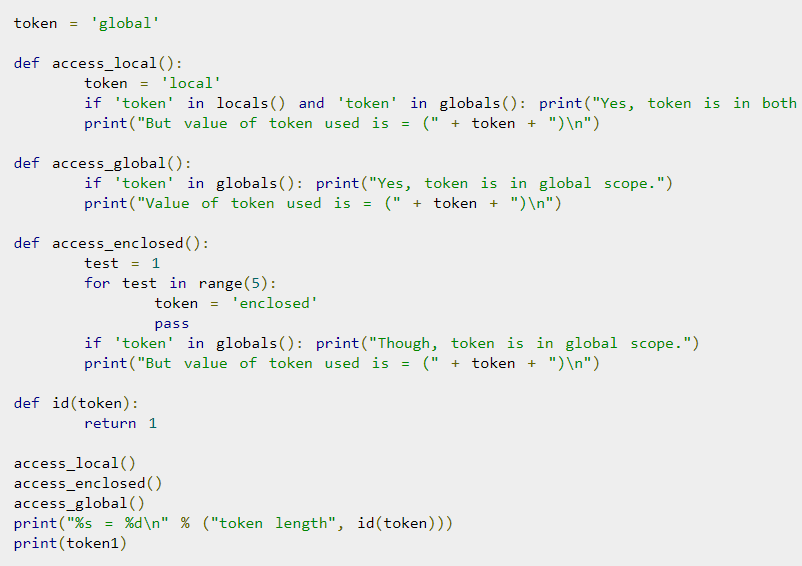
1. The misuse of expressions as function argument defaults
Python allows developers to indicate optional function arguments by giving them default values. In most cases, this is a great feature of Python, but it can create some confusion when the default value is mutable. In fact, the common mistake is thinking that the optional argument is set to whatever default value you’ve set every time the function argument is presented without a value. It can seem a bit complicated, but the answer is that the default value for this function argument is only evaluated at the time you’ve defined the function, one time only.
2. Incorrect use of class variables
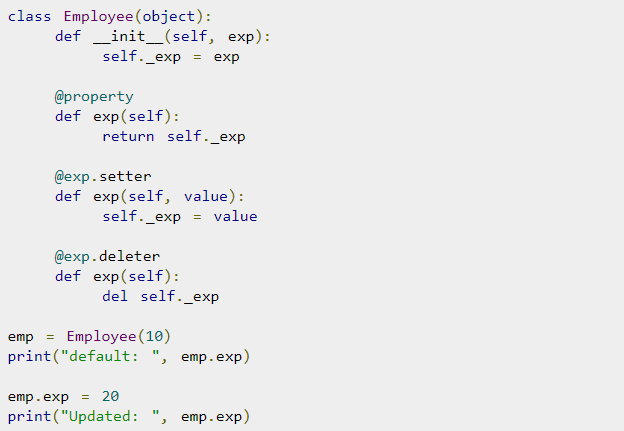
Python handles class variables internally as dictionaries and they will follow the Method Resolution Order (MRO). If an attribute is not found in one class it will be looked up in base classes so references to one part of the code are actually references to another part, and that can be quite difficult to handle well in Python. For class attributes, I recommend reading up on this aspect of Python independently to be able to handle them.
3. Incorrect specifications of parameters for exception blocks
There is a common problem in Python when except statements are provided but they don’t take a list of the exceptions specified. The syntax except Exception is used to bind these exception blocks to optional parameters so that there can be further inspections. What happens, however, is that certain exceptions are then not being caught by the except statement, but the exception becomes bound to parameters. The way to get block exceptions in one except statement has to be done by specifying the first parameter as a tuple to contain all the exceptions that you want to catch.
4. Failure to understand the scope rules
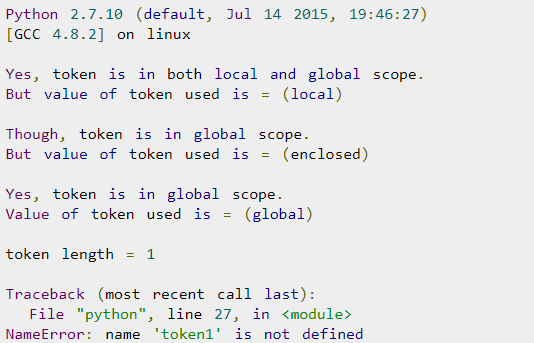
The scope resolution on Python is built on the LEGB rule as it’s commonly known, which means Local, Enclosing, Global, Built-in. Although at first glance this seems simple, there are some subtleties about the way it actually works in Python, which creates a more complex Python problem. If you make an assignment to a variable in a scope, Python will assume that variable is local to the scope and will shadow a variable that’s similarly named in other scopes. This is a particular problem especially when using lists.
5. Modifying lists during iterations over it
When a developer deletes an item from a list or array while iterating, they stumble upon a well known Python problem that’s easy to fall into. To address this, Python has incorporated many programming paradigms which can really simplify and streamline code when they’re used properly. Simple code is less likely to fall into the trap of deleting a list item while iterating over it. You can also use list comprehensions to avoid this problem.
6. Name clash with Python standard library
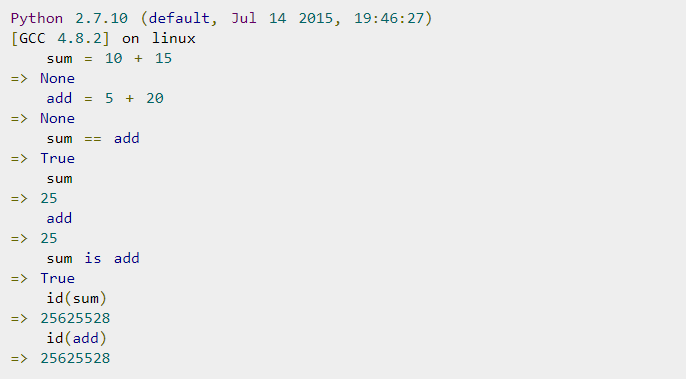
Python has so many library modules which is a bonus of the language, but the problem is that you can inadvertently have a name clash between your module and a module in the standard library. The problem here is that you can accidentally import another library which will import the wrong version. To avoid this, it’s important to be aware of the names in the standard library modules and stay away from using them.
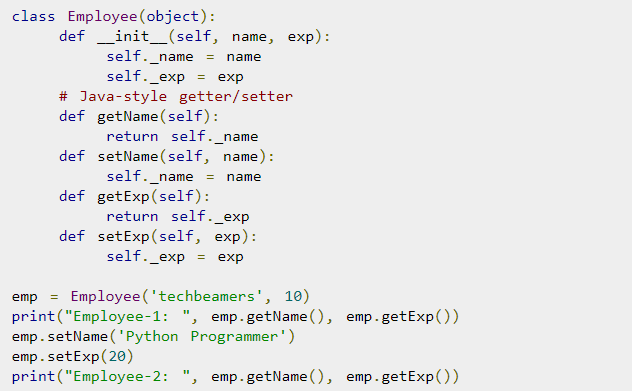
7. Problems with binding variables in closures
Python has a late binding behavior which looks up the values of variables in closure only when the inner function is called. To address this, you may have to take advantage of default arguments to create anonymous functions that will give you the desired behavior – it’s either elegant or a hack depending on how you look at it, but it’s important to know.
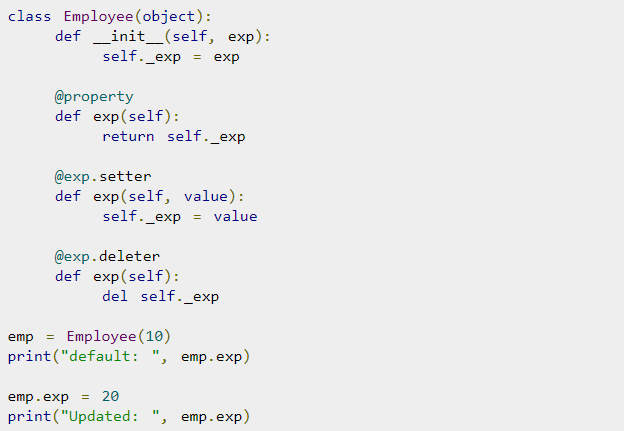
Python is very powerful and flexible and it’s a great language for developers, but it’s important to be familiar with the nuances of it to optimize it and avoid these errors.
Ellie Coverdale, a technical writer at Essay roo and UK Writings, is involved in tech research and projects to find new advances and share her insights. She shares what she has learned with her readers on the Boom Essays blog.
Tags: argument, class, commin programming mistakes python, default, during, errors, exception, function, Global, Incorrect, language, list, nuances, one time, Problems, python, resolution, value, variables
Posted in Programming | 2 Comments »
Thursday, May 18th, 2017 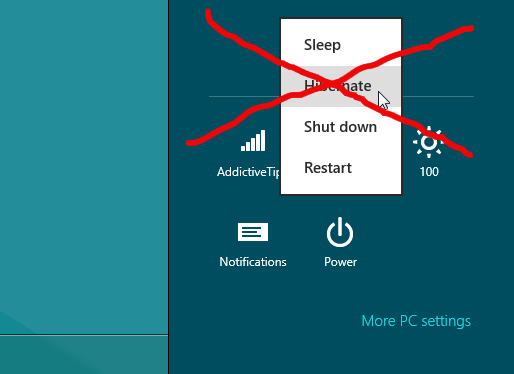
Some Windows laptop / desktop users prefer not to shutdown computers (especially those coming back from Mac OS backgound) at the end of the day but hibernate instead.
Hibernate is a great thing but historically we know well that in Windows hibernate is working much worser than on Macs and it is common that after multiple hibernates you will face problems with missing C: drive space is it might be "misteriously" decreasing in a way that the PC performance degrades as the C:hibfile.sys hidden file occupies few 16Gigas or so (the occupied space by hibfile.sys does resemble the installed RAM Memory on the computer, so if your PC has 16Gigas the hibfile.sys will be lets say approximately 15 Gigabytes)
However most users never use hibernate and might never use it for a life time, especially those on a Desktop Windows PCs, I use Windows as a WorkStation as an employee of DXC (the ex Hewlett Packard or Hewlett Packard Enterprise that merged with CSC) but to be honest I've used hibernate function very raraly on the notebook, thus I find the hibernate more or less useless feature, especially because at many times I try to wake-up the PC after hibernate the computer boots but the display stays dark and I have to restart the Computer before I can go back to normal work operations. Of course my Windows 7 hibernation issues might be caused do to the corporate software installed on my PC or because the fact the hard drive is encrypted but nomatter that in my case and I guess in case of many the hibernate function on Windows 7 / 8 / 10 might be totally useless.
Few works is Hiberfil.sys File and Why you might want to complete disable / delete it
On Windows 7 / 8 / 10 the hiberfil.sys file is being used to store the PC current state at time of hibernation, so if you have to move from a place to place within an organization / university / office without a charger hibernation is a really nice way to save battery power without later wasting time for additional PC boot (where a lot of power is wasted for Operationg System to load and re-opening the opened Browser etc.
So in short sleeping the PC with Hibernate function does cause the Computer to write into C:hiberfil.sys all data at the moment stored in the PC RAM (Memory), which is being cleared up at time of Computer being in Sleep mode.
Once the computer receives a Wake-up call from the hibernation in order to present with the Desktop at the same state hiberfile.sys stored information is being red and transferred to PC flushable RAM so the RAM memory is again filled with same bits it used to have right before the hibernation was made.
Because hiberfil.sys is a system file it has the hidden attribute and it can only be write / read by a Administrator Win account and usually it is not a good idea to touch it
Some people haven't shutdown Windows for 20-30 days and especially if Windows has disabled updates it happens for some users to use the hibernate function for weeks (re-hibernating and waking up thousand times) for long periods so the effect is the hiberfile.sys might become gigantic and if you take the time to check what is file or directory is wasting all your C:> drive with leys say WinDirStat or SpaceSniffer you will notice the lets say 15Gigas being eaten by Hiberfil.sys.
Disable of hibfile.sys is also a great tip for Gamers desktop PCs as most gamers won't use hibernate function at all.
I. How to Disable Hibernate Mode in Windows 10, 8, 7, or Vista
In order to get rid of the file across Windows 7 / 8 / 10
Open command prompt (as an Administartor, right click on the Command Prompt cmd.exe and choose Run as Administartor) and issue below cmd:
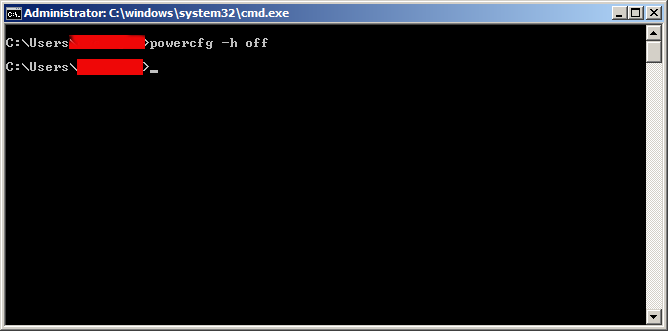
C:> powercfg -h off
…
If later you decide you need the hibernate function again active on the PC or notebook do issue:
C:> powercfg -h on
…
You’re likely reading this because you noticed a gigantic hiberfil.sys file sitting on your system drive and you’re wondering if you can get rid of it to free up some space. Here’s what that file is and how you can delete it if you want to.
II. Disable Hibernate Mode in Windows XP
Hibernate function command is not present on Windows XP so in order to remove it on XP (hope you don't use XP any more and you're not a viction of the resent crypt catastrophic ransomware WannaCry 🙂
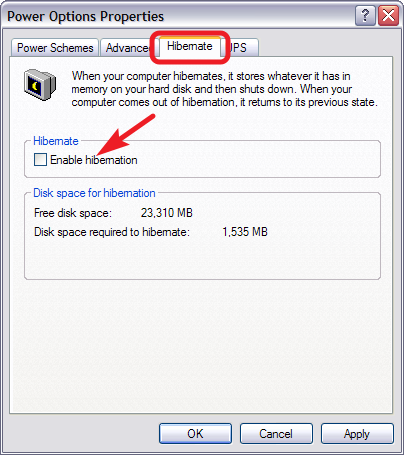
Control Panel -> Power Options
In the Power Options properties window, switch to the “Hibernate” tab and disable the “Enable hibernation” option.
After you disable hibernate mode, restart PC, and manually delete the hiberfil.sys file.
Now enjoy free-ing up few gigabytes of useless wasted C: hard drive space from your PC 🙂
Note: Removing hiberfil.sys is a precious thing to do on old Windows Computers which have been made with a little leys say 40Gigabyte partition drive C: whether with the time due to User profile use and Browsing caches the C: drive has left with leys say 1-2 Gigabyte of free space and the computers overall performance has fallen twice or so.
This post is in memoriam of Chriss Cornell (our generation used to grow with grunge and his music was one of the often listened by me and our generation)
R.I.P: Chriss Cornell (the head of SoundGarden and AudioSlave who passed away yesterday right on the day when we in Bulgarian Eastern Orthodox Church commemorate the memory of a great-martyr Nicolay Sofijski (Great Martyr Nicolas from Sofia martyred by Turkish Ottomans during year 1555).
I found surprising fact for me that Chriss Cornell converted to Greek Eastern Orthodox faith under influence of his Greek Wife, below is paste from his Wikipedia page:
"
Chriss Cornell Personal life (Rest in Peace Chris)
Cornell was married to Susan Silver, the manager of Alice in Chains and Soundgarden.[123] They had a daughter, Lillian Jean, born in June 2000.[123] He and Silver divorced in 2004.[123] In December 2008, Cornell reported via his official website that he had finally won back his collection of 15 guitars after a four-year court battle with Silver.[124]
He was married to Vicky Karayiannis,[125] a Paris-based American publicist of Greek heritage. The union produced a daughter, Toni, born in September 2004, and a son, Christopher Nicholas, born in December 2005.[126] Cornell converted to the Greek Orthodox Church through her influence.[127]
When asked how Cornell beat all his addictions he stated, "It was a long period of coming to the realization that this way (sober) is better. Going through rehab, honestly, did help … it got me away from just the daily drudgery of depression and either trying to not drink or do drugs or doing them and you know, they give you such a simple message that any idiot can get and it's just over and over, but the bottom line is really, and this is the part that is scary for everyone, the individual kinda has to want it … not kinda, you have to want it and to not do that crap anymore or you will never stop and it will just kill you."[128]
In a 2011 interview,[129] Cornell said the major change with the reformed Soundgarden is a lack of alcohol: "The biggest difference I noticed … and we haven't even really talked about it: There are no bottles of Jack Daniel's around or beers. And we never talked about … it's just not there."
Enjoy!
Tags: alcohol, cmd, command prompt, Disable Windows, file, free space, function, Open, Pc, work notebook
Posted in Curious Facts, Everyday Life, Various, Windows | No Comments »
Wednesday, January 7th, 2015 
I've been to home of my wife's parents and for this Christmas, they have received second hand Acer Aspire notebook as a Christmas gift. So far they were using internet using their Windows XP PC which is getting internet here in Belarus via UTP network cable using ByFly ZTE ADSL router modem. As ADSL modem lacked wifh WI-FI Antenna (support) and there was already the Acer notebook which had to access the internet preferrably via Wireless connection, the option was to get a WI-FI router and connect it to the ADSL modem but as this would cost (20 EUR at minimum) and there was alreay Wireless (Receiver) adapter TP-LINK TL-WN722N unused, I decided to try make the TP-LINK Receiver and Windows XP PC to act as a small Home Made Wireless (software) router.
Until I succeeded I've tried multiple softwares which all failed to turn the Windows PC to Wi-Fi Hotspot.
Here is list of few of the softwares I tried that didn't worked for some reason:
1. Wifi HotSpot Creator
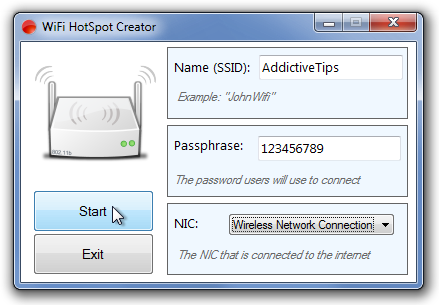
Turn your PC into a Wi-Fi Router for Free!
Instantly share your internet connection with your friends and peers over Wi-Fi. Turns your PC into a Wi-Fi Router! And its Free! Wifi HotSpot Creator is said to be able to convert any Mac OS X and Windows PC to hotspot here is Wifi HotSpot Creator download website
Wifi HotSpot Creator is said to work with Windows Vista / XP / 7 / 8, however as I said it doesn't work for me on Windows XP.
2. Virtual Wifi router
Here is
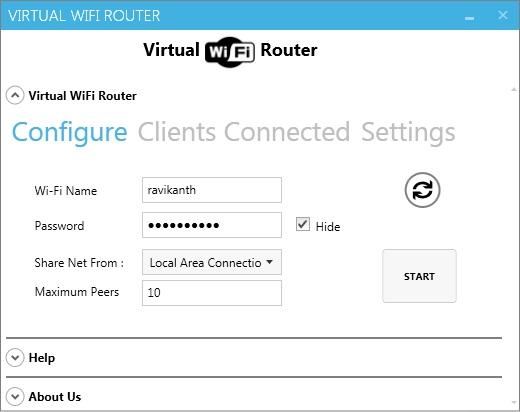
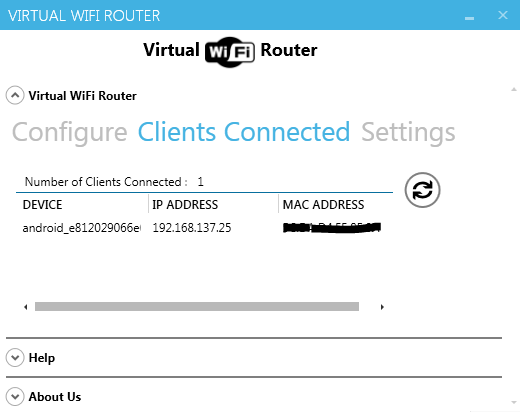
With Virtual WiFi Router you can create a WiFi hotspot for WiFi Reverse Tethering on Windows 7 and for wifi supported mobiles and other wifi enabled computer to create a network and to share internet. Virtual Wifi Router in a minute converts your PC into a WiFi hot spot for free.
To make the program working it depends on .NET 4.5. Though the program looked like a superb it unfortunately was crashing on Windows XP. Below are few screenshots from program working on Windows 7.
3. My Wifi Router 3.0
Finally I've come across My Wifi Router 3.0 which is just another program that makes necessery Windows configuration to TP-Link TL-WN722N Wireless receiver Adapter to turn it into a homemade Wi-Fi router.
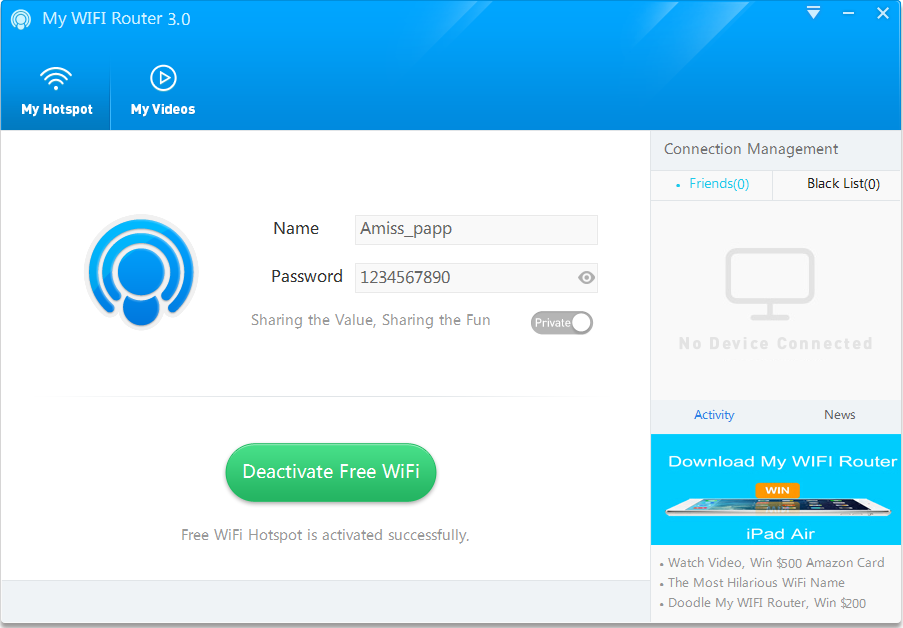
By default Amiss_papp Wifi is configured, this can be changed, however in my case when I tried changing it there were some issues, so finally I've had to re-install My Wifi Router to make it working again.
Once configured My Wifi Router there is the green button (Activate / Deactivate Free Wifi) as seen from screenshot.
As you can see My Wifi Router also allows to Share Videos over WiFi. Once I've tested the program and confirmed it as working, I had to configure it to automatically start on Windows PC boot.
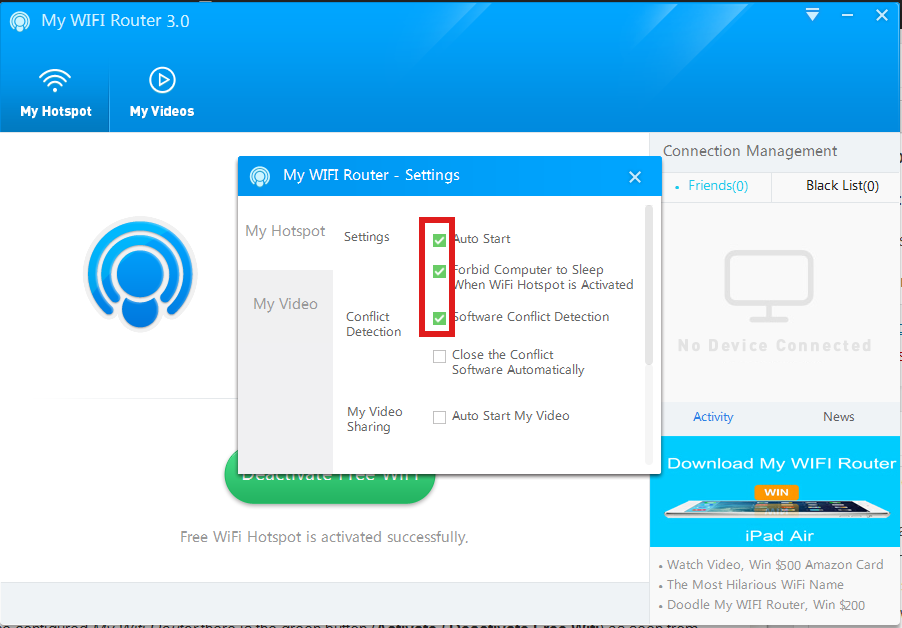
This is done from Settings (located on backward triangle button, next to minimize function).
I had to set check in to Auto Start and Software Conflict Detection.
Once connected to the TP-Link TL-WN722N (USB) Wi-Fi (High Gain) Receiver adapter in Windows Tray a new indicator will popup that a device has been connected. I've tested My Wifi Router and it seem to be working fine with 3 remote connected Wi-Fi devices (1 Notebook and 2 Nokia Lumia mobile phones). The speed of internet was fast and if I didn't know the connection is done in a software way via such an improvised Windows XP Wi-Fi network router I would think it is just a regular Wi-Fi network router.
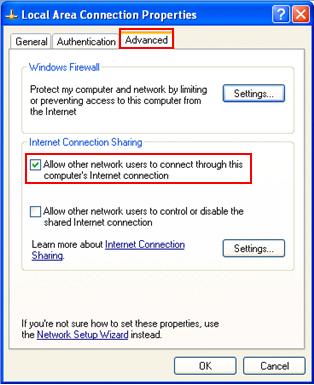
One more thing I had to do to make the internet working I had to share the the LAN Network (ethernet card) Interface's internet from
Control Panel -> Networking -> Local Area Connection (Properties) -> Advanced
A downside of My Wifi Router is I couldn't find a way to save password while connection to the newly created WiFi router with it, so each time I had to login I had to manually type in the password (default my wifi router password is 123567890). Re-typing password on each login is annoying but if you have to do it once per day in the morning when you turn on your notebook it is not such a big deal.
Once connected to My Wifi Router in Connection Management in Friends (tab) you will see a list with connected devices.
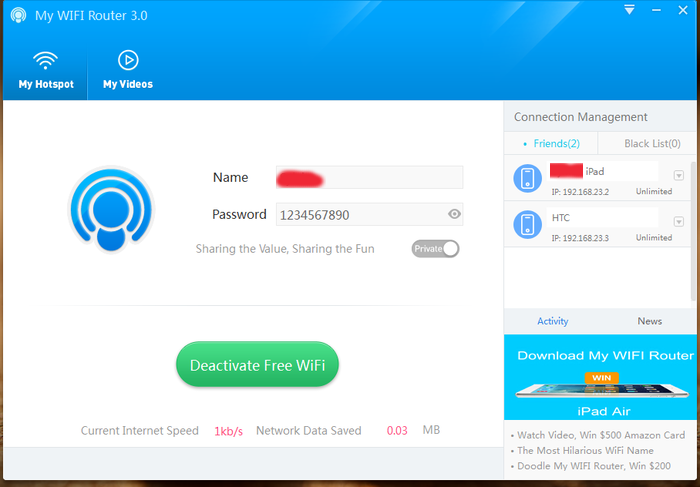
As visible from above screenshot default IPs which will be assigned to new connected clients to My Wifi Router will be in local network IP range 192.168.23.2 – 192.168.23.254.
Now all left is to Enjoy your new Software Wi-Fi router 🙂
Tags: function, make, multiple, password, Pc, program, screenshot, turn, Windows Tray, working
Posted in Entertainment, System Administration, Various, Windows | 3 Comments »
Tuesday, April 12th, 2011 The more my blog is growing the slower it becomes, this is a tendency I’ve noticed since a couple of weeks.
Very fortunately while reading some random articles online I’ve came across a super valuable wordpress plugin called WP-OPTIMIZE
I think it’s best if I present instead of taking the time to explain what the WP-optimize does for a wordpress powered blog:
WP-Optimize is a WordPress 2.9++ database cleanup and optimization tool. It doesn’t require PhpMyAdmin to optimize your database tables. It allows you to remove post revisions, comments in the spam queue, un-approved comments within few clicks.
Additionally you can rename any username to another username too.
For example: If you want to rename default ‘admin’ username to ‘someothername’; just put ‘admin’ (without quotes) to the Old username field and the new username to the New username field, then click “PROCESS”)
Now in short to rephrase above text, during MySQL database requests a lot of database starts needing the so called MySQL optimization , this operation becomes necessery especially for databases which are very actively used and is related to the basic design of the mysql server.
Very often many tables starts having a lot of garbage (repetitive) data and therefore read and writes from the SQL server gets slower and slower day by day.
Thus the MySQL server has it’s famous OPTIMIZE TABLE command which does wipe out all the garbage unnecessery data stored in a tables/s and hence seriously impacts the later read/write table operations.
Now to go back to wordpress the same optimization issues, very often are a cause for a performance bottleneck and some smart guy has came with the great idea to create a specific wordpress plugin to fix such an optimize table issues
The WP-Optimize plugin has 5 major options which somehow could have a positive impact on blog’s performance, these are:
- Remove all Post revisions
- Remove all auto draft posts
- Clean marked Spam comments
- lean Unapproved comments
-
Optimize database tables
Apart from the nice performance boost applicaiton the wp-optimize plugin has one super valuable function, it could change the default wordpress blog administrator user admin to some other desired username, for example rename the default blog administrator username “admin” user to “john”.
From a security perspective this is another must have feature in every wordpress blog as it can kill many of the possible brute force attacks with some web brute force softwares like Hydra
Installing and using wp-optimize is a real piece of cake, here is a very quick few command lines to install it:
host:~# cd /var/www/blog/wp-content/plugins/

host:/var/www/blog/wp-content/plugins:# wget https://www.pc-freak.net/files/wp-optimize.0.9.2.zip

host:/var/www/blog/wp-content/plugins:# unzip wp-optimize.0.9.2.zip

...
To launch WP-OPTIMIZE and fix many speed bottlenecks caused by unoptimized tables, or just hanging around in database old spam comments, go and login with your adminsitrator to wordpress.
In the left pane menu starting up with Dashboard somewhere near the end of the vertical menu you will notice a button reading WP-Optimize .
Click over the Wp-Optimize button and a screen like the one in below’s screenshot will appear in your browser screen:
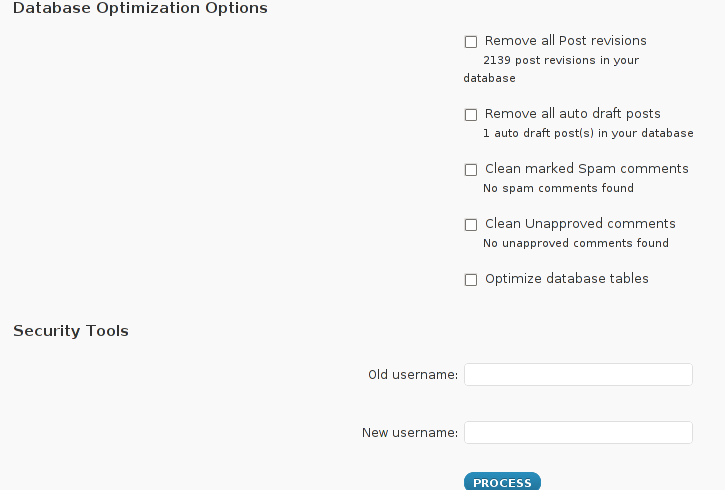
I have personally decided to use just 2 of all the 5 available primary plugin options, I decided to select only:
- Clean marked Spam comments
- Optimize database tables
Scrolling below the PROCEED button I could also notice a number of tables which were missing optimization and hence required an optimize table to be executed on each one of them.
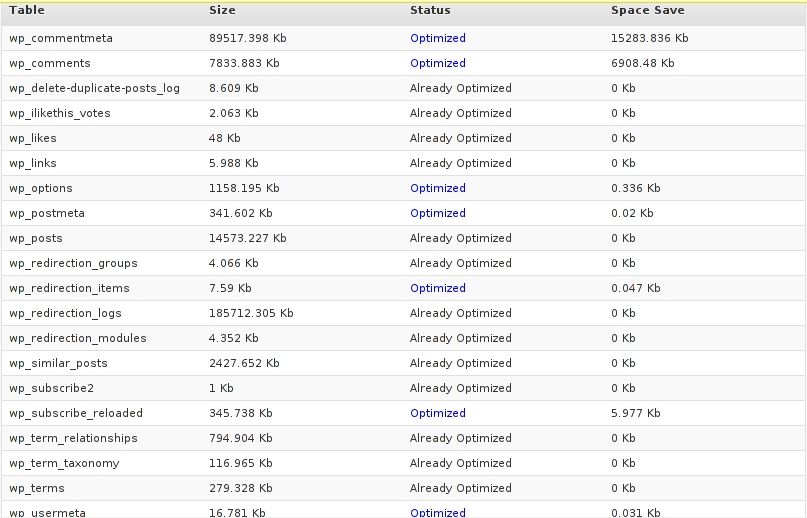
Further on I pressed the PROCESS button and after a couple of minutes (2, 3 minutes) of waiting the wp-optimize plugin was done it’s selected tasks:
In the screenshot below, you see all my blog tables which were optimized by the plugin:
It’s interesting to say few words about the Remove All Posts revisions plugin option, as many might be wondering what this plugin option really means.
When writting posts, wordpress has an option to restore to a certain point of the write out and makes a sort of different versions in time of each of it’s written posts.
Therefore later restoration if something gots deleted by mistake is facilitated, this is actually the all meaning of Remove All Posts revisions
With time and the increase wp posts the amount of Posts Revisions is growing on and on and just taking space and possibly making the access to the database entries slower, thus it might be a good idea to also remove them as, it’s absolutely rare to use the wp post restoration function.
However I’ve personally decided to not wipe out the old posts revisions as someday i might need it and I’m a bit scared that it might cause me some database issues.
I’ll be glad if somebody has tried the Posts Revisions wp-Optimize funciton and is happy with the results.
Tags: Button, cleanup, database cleanup, database tables, databases, doesn, function, garbage, many tables, mysql data, mysql server, nbsp, necessery, Old, operation, optimization issues, optimization tool, option, performance bottleneck, plugin, queue, quot, random articles, repetitive data, rephrase, Revisions, screen, smart guy, spam, SQL, sql server, TABLE, taking the time, tendency, text, time, tool, username, username field, Wordpress, wp, WP-OPTIMIZEI
Posted in MySQL, Web and CMS, Wordpress | No Comments »
Sunday, July 24th, 2011 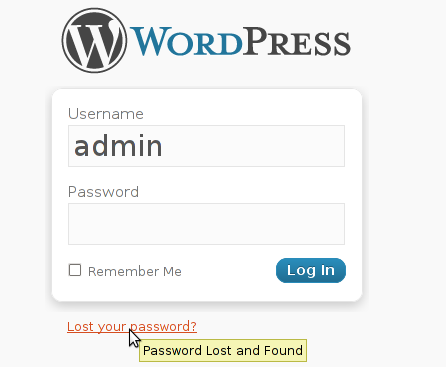 My sister has forgotten the administrator account for her wordpress blog as she did not blogged for a while.
I decided to help her and reset the WORDPRESS blog password to another one.
The easiest way of course in normal circumstances is to use wordpress's Lost your password password reset via email.
However with this blog it seems I used an email address which I forgot so I couldn't really use this as a mean to reset the blog password.
Therefore as I'm addicted to command line 😉 I decided to do it straight via connecting to mysql server with mysql cli and change the encrypted password value directly there. Here is how I did it:
1. First I logged in to the mysql server with my root user/pass
pcfreak# mysql -u root -p

Enter password: Welcome to the MySQL monitor. Commands end with ; or \g.

Your MySQL connection id is 39263

Server version: 5.0.83-log FreeBSD port: mysql-server-5.0.83
Type 'help;' or '\h' for help. Type '\c' to clear the current input statement.
2. Then I checked current set user and password for the wp-admin admin user
mysql> use wordpress1;

mysql> select * from wp_users where user_login like '%admin%';

+----+------------+--------------+---------------------+-------------+--------------+

| ID | user_login | user_pass | user_nicename | user_email | user_url | user_registered | user_activation_key | user_status | display_name |

+----+------------+------------------------------------+---------------+----------------+----------+---------------------+----

| 1 | admin | $P$BG9eMoysG8ztywLp25AOpJSkWlRZMu. | admin | invoke@emailaddress.com | | 2011-03-10 13:44:26 |

| 0 | admin | +----+------------+------------------------------------+---------------+----------------+----------+---------------------+---

1 row in set (0.25 sec)
3. Used a query to reset the current encrypted password you see below shown under the user_pass column
mysql> UPDATE wp_users SET user_pass= MD5('my_new_wordpress_password_to_reset') where ID = '1';
4. I've changed the email set for user_email to which mail is sent, in case of forgotten password again
I've done this to prevent my sister to bother me again, if she forgets her password once again 😉
mysql> UPDATE wp_users SET user_email='invoke_@abv.bg' where ID = '1';
One important note here is that in step 3
I've used the MD5(); mysql embedded function to generate the MD5 crypted password which is inserted in above's sql query, however the MD5 function is only available in MySQL servers version 5.x, therefore in older releases of MySQL e.g. ver 4.x, one will have to first generate the md5 password with let's say md5sum linux command or bsd's md5 cmd like so:
a. On Linux
hipo@noah:~$ echo 'my_new_wordpress_password_to_reset' | md5sum

f0ed1489e6d9e7eae8b363b1b5e4a864 -
b. On FreeBSD
pcfreak# echo 'my_new_wordpress_password_to_reset' | md5

f0ed1489e6d9e7eae8b363b1b5e4a864
Afterwards the SQL query that can be used with the above generated string to issue on the MySQL 4.x server or earlier versions would be:
mysql> UPDATE wp_users SET user_pass='f0ed1489e6d9e7eae8b363b1b5e4a864' where ID = '1';
That's all now the password is set to the newly generated my_new_wordpress_password_to_reset pass string.
Cheers 😉
Tags: administrator account, circumstances, cli, com, Commands, connection, connection id, course, Display, eae, email address, encrypted password, function, help, input statement, login, monitor, mysql connection, password, pcfreak, reset, root, root user, row, server version, status, update, url, value, wordpress blog, wp, ztywLp
Posted in FreeBSD, Linux, MySQL, System Administration, Wordpress | 7 Comments »
Saturday, April 7th, 2012 I've recently wanted to use PHP's embedded system(""); – external command execute function in order to use ls + wc to calculate the number of files stored in a directory. I know many would argue, this is not a good practice and from a performance view point it is absolutely bad idea. However as I was lazy to code ti in PHP, I used the below line of code to do the task:
<?

echo "Hello, ";

$line_count = system("ls -1 /dir/|wc -l");

echo "File count in /dir is $line_count \n";

?>
This example worked fine for me to calculate the number of files in my /dir, but unfortunately the execution output was also visialized in the browser. It seems this is some kind of default behaviour in both libphp and php cli. I didn't liked the behaviour so I checked online for a solution to prevent the system(); from printing its output.
What I found as a recommendations on many pages is instead of system(); to prevent command execution output one should use exec();.
Therefore I used instead of my above code:
<?

echo "Hello, ";

$line_count = exec("ls -1 /dir/|wc -l");

echo "File count in /dir is $line_count \n";

?>
By the way insetad of using exec();, it is also possible to just use ` (backtick) – in same way like in bash scripting's “.
Hence the above code can be also written for short like this:
<?

echo "Hello, ";

$line_count = `ls -1 /dir/|wc -l`;

echo "File count in /dir is $line_count \n";

?>
🙂
Tags: Auto, backtick, bad idea, behaviour, browser, code lt, command, command execution, count, default behaviour, dir, Draft, exec, execution, file, fine, function, idea, kind, libphp, line, online, order, performance, performance view, quot, solution, task, way
Posted in Programming, Web and CMS | 2 Comments »
Friday, March 9th, 2012 
A friend of mine has Fujitsu Siemens Amilo laptop and is full time using his computer with Slackware Linux.
He is quite happy with Slackware Linux 13.37 on the laptop, but unfortunately sometimes his screen brightness lowers. One example when the screen gets darkened is when he switch the computer on without being plugged in the electricity grid. This lowered brightness makes the screen un-user friendly and is quite tiring for the eye …
By default the laptop has the usual function keys and in theory pressing Function (fn) + F8 / F7 – should increase / decrease the brightness with no problems, however on Slackware Linux (and probably on other Linuxes too?), the function keys are not properly recognized and not responding whilst pressed.
I used to have brigtness issues on my Lenovo notebook too and remember how irritating this was.
After a bit of recalling memories on how I solved this brightness issues I remembered the screen brigthness on Linux is tunable through /proc virtual (memory) filesystem.
The laptop (Amilo) Fujitsu Siemens video card is:
lspci |grep -i vga

00:02.0 VGA compatible controller: Intel Corporation Mobile GM965/GL960 Integrated Graphics Controller (primary) (rev 03)
I took a quick look in /proc and found few files called brightness:
- /proc/acpi/video/GFX0/DD01/brightness
- /proc/acpi/video/GFX0/DD02/brightness
- /proc/acpi/video/GFX0/DD03/brightness
- /proc/acpi/video/GFX0/DD04/brightness
- /proc/acpi/video/GFX0/DD05/brightness
cat-ting /proc/acpi/video/GFX0/DD01/brightness, /proc/acpi/video/GFX0/DD03/brightness, /proc/acpi/video/GFX0/DD04/brightness all shows not supported and therefore, they cannot be used to modify brightness:
bash-4.1# for i in $(/proc/acpi/video/GFX0/DD0{1,3,4,5}/brightness); do \

cat $i;

done

<not supported>

<not supported>

<not supported>

<not supported>
After a bit of testing I finally succeeded in increasing the brightness.
Increasing the brightness on the notebook Intel GM965 video card model is done, through file:
/proc/acpi/video/GFX0/DD02/brightness
To see all the brightness levels the Fujitsu LCD display supports:
bash-4.1# cat /proc/acpi/video/GFX0/DD02/brightness

levels: 13 25 38 50 63 75 88 100

current: 25
As you can see the dark screen was caused cause the current: brightness is set to a low value of 25.
To light up the LCD screen and make the screen display fine again, I increased the brightness to the maximum level 100, e.g.:
bash-4.1# echo '100' > /proc/acpi/video/GFX0/DD02/brigthness
Just for the fun, I've written also a two lines script which gradually increases LCDs brightness 🙂
bash-4.1# echo '13' > /proc/acpi/video/GFX0/DD02/brightness;

bash-4.1# for i in \

$(cat /proc/acpi/video/GFX0/DD02/brightness|grep 'levels'|sed -e 's#levels:##g'); do \

echo $i > /proc/acpi/video/GFX0/DD02/brightness; sleep 1; \done
fujitsu_siemens_brightness_fun.sh script is fun to observe in changing the LCD screen gradually in one second intervals 🙂
Here is also a tiny program that reduces and increases the notebook laptop brightness written in C. My friend Dido, coded it in just few minutes just for the fun 🙂
To permanently solve the issues with darkened screen on boot time it is a good idea to include echo '100' > /proc/acpi/video/GFX0/DD02/brigthness in /etc/rc.local:
bash-4.1# echo '100' > /proc/acpi/video/GFX0/DD02/brigthness
I've also written another Universal Linux Increase laptop screen brightness Shell script which should be presumable also working for all Laptop models running Linux 🙂
My maximize_all_linux_laptops_brightness.sh "universal increase Linux brightness" script is here
I'll be glad to hear from people who had tested the script on other laptops and can confirm it works fine for them.
Tags: Amilo, Auto, bit, card, Display, Draft, electricity, electricity grid, eye, f7, f8, file, fn, Fujitsu, fujitsu siemens amilo, fujitsu siemens amilo laptop, full time, fun, function, function keys, Graphics, graphics controller, integrated graphics, intel corporation, laptop, LCD, level, Linux, linuxes, lt, Mobile, nbsp, quot, screen, screen brightness, script, siemens, slackware linux, time, ting, value, video, video card, virtual memory
Posted in Linux, Linux and FreeBSD Desktop, Linux Audio & Video, System Administration | No Comments »
Friday, December 3rd, 2010 ‘ve used the RSForms to build some custom Joomla Contact forms.
The RSForms was recommended to me by a friend and actually it’s a pretty cool and quick way to create forms.
I’ve installed it and played a bit with it to create a custom forms for one of the website I had to bring up just recently.
After the contact form was ready however there was a problem with sending emails. It took me quite a while to find out how to solve the problemwith contact not able to mail whatever is filled in.
First time I tried the RSForms after filling in the details and pressing the submit button,I got the error message;
Could not instantiate mail function.
I should say that, I’m running a QMAIL email server on the server where I have the Joomla & RSForms installed and configured.
I’ve came up with a solution to this issue after some research in Google
In order to solve that you will have to login to your Joomla administrator and
Navigate to:
Site -> Global Configuration -> Server
Whenever it opens up you should be seing the Mail Settings on the bottom right corner;
From there you will have to change the Mailer from PHP Mail Function to SMTP Server
To give you a better idea check out the screenshot of the Mail Settings below:
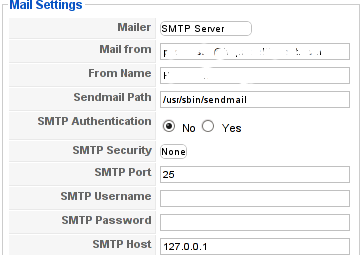
Changing this simple setting resolved the Could not instantiate mail function for me.
Right after I tested the RSForms to send my filled in form content but this time the PHPMAILER_RECIPIENTS_FAILED message was there;
This error was caused actually by a mistake I made in the configuration of the Custom RSForm I have prepared;
In Components -> RSForm!Pro -> Manage forms whenever I was preparing my form I’ve made a mistake in the User Emails customized field in my custom prepared form in the To: field I had a wrong variable set (a different value was set from the E-mail caption I’ve set on).
Solving this solved the issue. Even though the PHPMAILER_RECIPIENTS_FAILED was gone now, next I was unpleasently surprised by another error message which prevented the Contact form to properly send the input data:
Now I had to fight with the error;
PHPMAILER_FROM_FAILED
It took me a while and a lot of forums reading before I figure it out again my custom prepared RSForm had an issue;
The problem was in the Admin Emails customization of the form in the From: fill in box I had mistakenly typed in proper email, setting a proper email there solved the issue;
I’ve red online many suggested solutions to the issue which dealt with changes in the the file joomla/components/com_contact/controller.php around line 112, 162 etc.
I should say that before I found and solved the actual problem I’ve tried modifing this file also but with zero success.
Sometimes Linux is so complicated, it really pisses me of, why is not life easier? 😐
Tags: amp, bottom right corner, Button, Components, contact forms, content, cool, custom, email server, Emails, error message, file, form, function, Global, global configuration, google, How to fix "Could not instantiate mail function", login, mail function, mail settings, Manage, mistake, php, phpmailer, PHPMAILER_RECIPIENTS_FAILED and PHPMAILER_FROM_FAILED on Joomla and RSforms, problemwith, RECIPIENTS, screenshot, site, time, User, value
Posted in Joomla, Programming, System Administration, Various | 2 Comments »
Saturday, May 28th, 2011 If you’re installing some PHP based CMS/blog like (Joomla or WordPress) or some kind of template and suddenly you stumble on a error:
Deprecated: Function split() is deprecated in /usr/local/www/websitedomain/templates/youbizz/html/modules.php on line 78
In order to fix that the file which spits the error message, in my case modules.php needs to be modified and the split php function has to be substituted with explode on every occuring place.
I experienced this error on FreeBSD 7_2 with php version 5.3.5 installed from ports.
This simple fix works fine.
Tags: blog, cms, Deprecated, ERROR, error message, file, fine, fix, freebsd, function, kind, line, order, php 5, place, ports, template, usr, version, websitedomain, Wordpress, www, youbizz
Posted in FreeBSD, Joomla, System Administration, Wordpress | 4 Comments »
Tuesday, April 12th, 2011 Until recently, I have used a default wordpress theme which historically is a bit old and used to be a default theme to the older versions of wordpress.
Since however, I’ve went to many updates and on the other hand I do like and enjoy the template I have decided to continue use it for my blog until this very day.
However this nice theme’s default behaviour is a bit weird, since by default the Single opened posts are configured in a way that the usual index page sidebar is missing.
As in the sidebar there are plenty of navigation buttons and search in the blog button, at a certain moment I have realized it’s probably not a good idea that the single.php (single blog posts) open up with the right sidebar missing.
Thus I’ve decided to put back the missing sidebar in the single posts, with a hope that this will be helpful to my readers and hence have positive impact on the overall blog user experience.
Doing so prooved to be rather easy, here is how I added back the right sidebar to my wordpress single posts :
1. Edit blog/wp-content/themes/default/single.php
debian:~# vim /var/www/blog/wp-content/themes/default/single.php
2. In the single.php look up for the code:
<div id="content" class="widecolumn">
Substitute this html code with:
<div id="content" class="narrowcolumn">
3. Next find the code:
<?php get_footer(); ?>
Right before the get_footer(); php function add in the function;
<?php get_sidebar(); ?>
Tadam! Refresh a single post in Firefox and you should see your blog index.php sidebar to show up.
Tags: behaviour, blog, Button, code lt, content themes, default behaviour, default theme, div, div id, Firefox, footer, function, gt 3, hand, idea, impact, index page, moment, navigation buttons, older versions, page, php, Search, Single, substitute, Tadam, use, user experience, var, vim, way, wordpress blog, www
Posted in Web and CMS, Wordpress | 2 Comments »







