Posts Tagged ‘debian gnu’
Tuesday, October 25th, 2011 
After a recent new Debian Squeeze Apache+PHP server install and moving a website from another server host running on CentOS 5.7 Linux server, some of the PHP scripts running via crontab started displaying the following annoying PHP Warnings :
debian:~# php /home/website/www/cron/update.php
PHP Warning: PHP Startup: Unable to load dynamic library '/usr/lib/php5/20090626/suhosin.so' – /usr/lib/php5/20090626/suhosin.so: cannot open shared object file: No such file or directory in Unknown on line 0
Obviously the error revealed that PHP cli is not happy that, I've previously removes the suhosin php5-suhosin module from the system.
I wouldn't have removed php5-suhosin if sometimes it doesn't produced some odd experiences with the Apache webserver.
To fix the PHP Warning, I used first grep to see, where exactly the suhosin module gets included in debian's php.ini config files.
debian:~# cd /etc/php5

debian:/etc/php5# grep -rli suhosin *

apache2/conf.d/suhosin.ini

cgi/conf.d/suhosin.ini

cli/conf.d/suhosin.ini

conf.d/suhosin.ini
Yeah that's right Debian has three php.ini php config files. One for the php cli – /usr/bin/php, another for the Apache webserver loaded php library – /usr/lib/apache2/modules/libphp5.so and one for Apache's cgi module – /usr/lib/apache2/modules/mod_fcgid.so .
I was too lazy to edit all the above found declarations trying to include the suhosin module in PHP, hence I remembered that probably all this obsolete suhosin module declaration are still present because probably the php5-suhosin package is still not purged from the system.
A quick check with dpkg , further strenthened my assumption as the php5-suhosin module was still hanging around as an (rc – remove candidate);
debian:~# dpkg -l |grep -i suhosin

rc php5-suhosin 0.9.32.1-1 advanced protection module for php5
Hence to remove the obsolete package config and directories completely out of the system and hence solve the PHP Warning I used dpkg –purge, like so:
debian:~# dpkg --purge php5-suhosin

(Reading database ... 76048 files and directories currently installed.)

Removing php5-suhosin ...

Purging configuration files for php5-suhosin ...

Processing triggers for libapache2-mod-php5 ...

Reloading web server config: apache2.
Further on to make sure the PHP Warning is solved I did the cron php script another go and it produced no longer errors:
debian:~# php /home/website/www/cron/update.php

debian:~#
Tags: apache, apache php, assumption, candidate, CentOS, cgi, cgi module, cli, config, cron, debian gnu, declaration, declarations, doesn, dpkg, file, gnu linux, host, ini, inicgi, iniconf, lib, libapache, Linux, mod, odd experiences, package, php scripts, php server, protection, right, rli, server host, shared object, squeeze, suhosin, unable to load dynamic library, Warnings
Posted in Linux, System Administration, Various, Web and CMS | 8 Comments »
Monday, July 16th, 2012 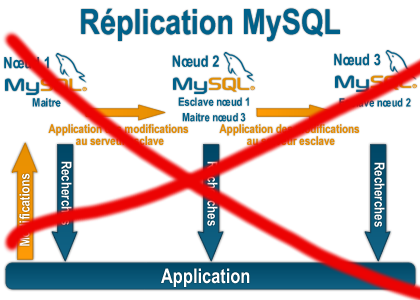
Some time ago on one of the Database MySQL servers, I've configured replication as it was required to test somethings. Eventually it turned out replication will be not used (for some reason) it was too slow and not fitting our company needs hence we needed to disable it.
It seemed logical to me that, simply removing any replication related directives from my.cnf and a restart of the SQL server will be enough to turn replication off on the Debian Linux host. Therefore I proceeded removed all replication configs from /etc/my/my.cnf and issued MySQL restart i. e.:
sql-server:~# /etc/init.d/mysql restart

....
This however didn't turned off replication,as I thought and in phpmyadminweb frontend interface, replication was still appearing to be active in the replication tab.
Something was still making the SQL server still act as an Replication Slave Host, so after a bit of pondering and trying to remember, the exact steps I took to make the replication work on the host I remembered that actually I issued:
mysql> START SLAVE;
Onwards I run:
mysql> SHOW SLAVE STATUS;

....
and found in the database the server was still running in Slave Replication mode
Hence to turn off the db host run as a Slave, I had to issue in mysql cli:
mysql> STOP SLAVE;

Query OK, 0 rows affected, 1 warning (0.01 sec)

mysql> RESET SLAVE;

Query OK, 0 rows affected, 1 warning (0.01 sec)
Then after a reload of SQL server in memory, the host finally stopped working as a Slave Replication host, e.g.
sql-server:~# /etc/init.d/mysql restart

....
After the restart, to re-assure myself the SQL server is no more set to run as MySQL replication Slave host:
mysql> SHOW SLAVE STATUS;

Empty set (0.00 sec)
Cheers 😉
Tags: Cheers, cli, cnf, Database, debian gnu, debian linux, exact steps, frontend, host, How to, init, interface, Linux, memory, Mysql, Onwards, phpmyadminweb, Query, reason, replication, reset, run, running, servers, Slave, Slave Replication, slave status, something, SQL, sql server, status, Stop, tab, time, turn, work, working
Posted in MySQL, System Administration | 1 Comment »
Sunday, May 20th, 2012 
My home run machine MySQL server was suddenly down as I tried to check my blog and other sites today, the error I saw while trying to open, this blog as well as other hosted sites using the MySQL was:
Error establishing a database connection
The topology, where this error occured is simple, I have two hosts:
1. Apache version 2.0.64 compiled support externally PHP scripts interpretation via libphp – the host runs on (FreeBSD)
2. A Debian GNU / Linux squeeze running MySQL server version 5.1.61
The Apache host is assigned a local IP address 192.168.0.1 and the SQL server is running on a host with IP 192.168.0.2
To diagnose the error I've logged in to 192.168.0.2 and weirdly the mysql-server was appearing to run just fine:
debian:~# ps ax |grep -i mysql
31781 pts/0 S 0:00 /bin/sh /usr/bin/mysqld_safe
31940 pts/0 Sl 12:08 /usr/sbin/mysqld –basedir=/usr –datadir=/var/lib/mysql –user=mysql –pid-file=/var/run/mysqld/mysqld.pid –socket=/var/run/mysqld/mysqld.sock –port=3306
31941 pts/0 S 0:00 logger -t mysqld -p daemon.error
32292 pts/0 S+ 0:00 grep -i mysql
Moreover I could connect to the localhost SQL server with mysql -u root -p and it seemed to run fine. The error Error establishing a database connection meant that either something is messed up with the database or 192.168.0.2 Mysql port 3306 is not properly accessible.
My first guess was something is wrong due to some firewall rules, so I tried to connect from 192.168.0.1 to 192.168.0.2 with telnet:
freebsd# telnet 192.168.0.2 3306
Trying 192.168.0.2…
Connected to jericho.
Escape character is '^]'.
Host 'webserver' is blocked because of many connection errors; unblock with 'mysqladmin flush-hosts'
Connection closed by foreign host.
Right after the telnet was initiated as I show in the above output the connection was immediately closed with the error:
Host 'webserver' is blocked because of many connection errors; unblock with 'mysqladmin flush-hosts'Connection closed by foreign host.
In the error 'webserver' is my Apache machine set hostname. The error clearly states the problems with the 'webserver' apache host unable to connect to the SQL database are due to 'many connection errors' and a fix i suggested with mysqladmin flush-hosts
To temporary solve the error and restore my normal connectivity between the Apache and the SQL servers I logged I had to issue on the SQL host:
mysqladmin -u root -p flush-hostsEnter password:
Thogh this temporar fix restored accessibility to the databases and hence the websites errors were resolved, this doesn't guarantee that in the future I wouldn't end up in the same situation and therefore I looked for a permanent fix to the issues once and for all.
The permanent fix consists in changing the default value set for max_connect_error in /etc/mysql/my.cnf, which by default is not too high. Therefore to raise up the variable value, added in my.cnf in conf section [mysqld]:
debian:~# vim /etc/mysql/my.cnf

...

max_connect_errors=4294967295
and afterwards restarted MYSQL:
debian:~# /etc/init.d/mysql restart

Stopping MySQL database server: mysqld.

Starting MySQL database server: mysqld.

Checking for corrupt, not cleanly closed and upgrade needing tables..
To make sure the assigned max_connect_errors=4294967295 is never reached due to Apache to SQL connection errors, I've also added as a cronjob.
debian:~# crontab -u root -e

00 03 * * * mysqladmin flush-hosts
In the cron I have omitted the mysqladmin -u root -p (user/pass) input options because for convenience I have already stored the mysql root password in /root/.my.cnf
Here is how /root/.my.cnf looks like:
debian:~# cat /root/.my.cnf

[client]

user=root

password=a_secret_sql_password
Now hopefully, this would permanently solve SQL's 'failure to accept connections' due to too many connection errors for future.
Tags: apache version, Auto, basedir, bin, cnf, connection, connectionThe, daemon, database connection, debian gnu, default, Draft, due, error error, firewall rules, fix, freebsd, GNU, guess, host, host name, hostname, lib, Linux, local ip address, localhost, machine, mysql server, mysqladmin, mysqld, mysqlMoreover, nbsp, occured, password, port 3306, root, root password, running, server version, sl 12, Socket, something, SQL, sql server, squeeze, support, topology, value, webserver
Posted in MySQL, System Administration, Web and CMS | No Comments »
Monday, June 11th, 2012 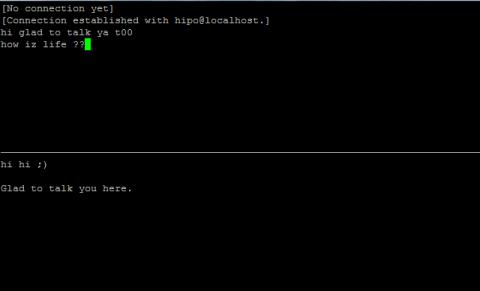
After writting in previous article on how talk be used to handle interactive chat console sessions on FreeBSD, I thought of dropping a few lines on how same is done on Debian, so here is how:
1.; Install talk and talkd
noah:/home/hipo# apt-get --yes install talk talkd

Reading package lists... Done

Building dependency tree

Reading state information... Done

The following NEW packages will be installed:

talk talkd

0 upgraded, 2 newly installed, 0 to remove and 93 not upgraded.

Need to get 19.0 kB/42.3 kB of archives.

After this operation, 201 kB of additional disk space will be used.

Get:1 http://ftp.nl.debian.org/debian/ stable/main talkd amd64 0.17-14 [19.0 kB]

Fetched 19.0 kB in 0s (67.1 kB/s)

Selecting previously deselected package talk.

(Reading database ... 90%

Unpacking talk (from .../talk_0.17-14_amd64.deb) ...

Selecting previously deselected package talkd.

Unpacking talkd (from .../talkd_0.17-14_amd64.deb) ...

Processing triggers for man-db ...

Setting up talk (0.17-14) ...

update-alternatives: using /usr/bin/netkit-ntalk to provide /usr/bin/talk (talk) in auto mode.

Setting up talkd (0.17-14) ...
2.;; Check and make sure talk and ntalkd lines are present in /etc/inetd.conf
noah:/home/hipo# grep -i talk /etc/inetd.conf

#:BSD: Shell, login, exec and talk are BSD protocols.

talk dgram udp wait nobody.tty /usr/sbin/in.talkd in.talkd

ntalk dgram udp wait nobody.tty /usr/sbin/in.ntalkd in.ntalkd
Now you probably wonder why are there two lines in /etc/inetd.conf for ))
in.talkd and in.ntald
in.talkd daemon's aim is to deliver talk sessions between logged in users on one Linux host with few logged in users willing to talk to each other locally;;
Wheter in.ntalkd is designed to serve interactive user talks between the host where in.ntalkd is installed and remote systems ruwhich have the talk client program installed. Of course in order for remote talks to work properly the firewall (if such has to be modified to allow in.ntalkd chats. I've never used in.ntalkd and on most machines having in.ntald hanging around from inetd, could be a potential security hole so, for people not planning to initiate remote TALKs between Unix / Linux / BSD hosts on a network it is a good practice the ntalkd line seen above in inetd.conf to be commented out ::;
noah:/home/hipo# grep -i talk /etc/inetd.conf

#:BSD: Shell, login, exec and talk are BSD protocols.

talk dgram udp wait nobody.tty /usr/sbin/in.talkd in.talkd

#ntalk dgram udp wait nobody.tty /usr/sbin/in.ntalkd in.ntalkd
3.;;; Restart openbsd-inetd init script and talk is ready to use
noah:~# /etc/init.d/openbsd-inetd restart

* Restarting internet superserver inetd
Onwards to use talk between two users the syntax is same like on other BSD, as a matter of fact TALK – console / terminal interactive chat originally was developed for the 4.2BSD UNIX release ;; the Linux code is a port of this BSD talk and not rewrite from scratch.
Using talk between two logged in users on pts/1 (lets say user test) and tty1 (user logged as root) is done with:
noah:~$ tty

noah:~$ talk root@localhost tty1

/dev/pts/1
On tty1 the user has to have enabled Talk sessions request, by default this behaviour in Debian and probably other Debian based Linuxes (Ubuntu) for instance is configured to have talks disabled, i,e ,,,
root@noah:~# mesg

is n
Enabling it on root console is done with:
root@noah:~# mesg y
Once enabled the root will be able to see the TALK service requests on tty1 otherwise, the user gets nothing. With enabled messaging the root user will get on his tty:
Message from TalkDaemon@his_machine...

talk: connection requested by your_name@your_machine.

talk: respond with: talk your_name@your_machine
So on the root console to reply back to talk chat request:
noah:~$ talk hipo@localhost
Tags: aim, Auto, auto mode, building, configured, confnoah, daemon, deb, debian gnu, dependency, dependency tree, dgram, Disk, disk space, DoneBuilding, Draft, exec, Fetched, freebsd, gnu linux, inetd, information, Install, Installing, interactive user, localhost, login, mesg, network, noah, nobody, ntalk, ntalkd, operation, package, protocols, reading database, reading package, request, root, root user, sbin, sessions, Shell, shell login, state information, tree, tty, wait, work, writting
Posted in Curious Facts, Everyday Life, Linux, Various | No Comments »
Friday, December 16th, 2011 
1. Frogatto & Friends – Is an Indian Free Software (Open Source) game in the spirit of old-school jump’en runs like Commander Keen, Prehistoric, Jazz Jack Rabbit
The game is really entertaining, the graphics looks approximately nice, the music is awesome, the gamelplay is good even though after some point in the game the moment with “where should I go now, I can’t find exit” comes through and it gets boring.
Generally if you compare with all the existing jump and run arcade games free software games available for Linux and FreeBSD the game will definetely arrange itself in the list of TOP 10 free software Arcade Games
and therefore its my own believe that Frogatto is a game that every GNU / Linux and FreeBSD desktop should have in Application -> Games GNOME menu.
Frogatto is rich of levels, enemies obstacles objects, places to visit (which puts it ahead of many of the linux arcade games which often miss enough game levels, has a too short game plots, or simply miss overall game diversity).

The game’s general look & feel is like a professional game and not just some tiny free software arcade, made by its authors for the sake to learn some programming, graphics or music creation.
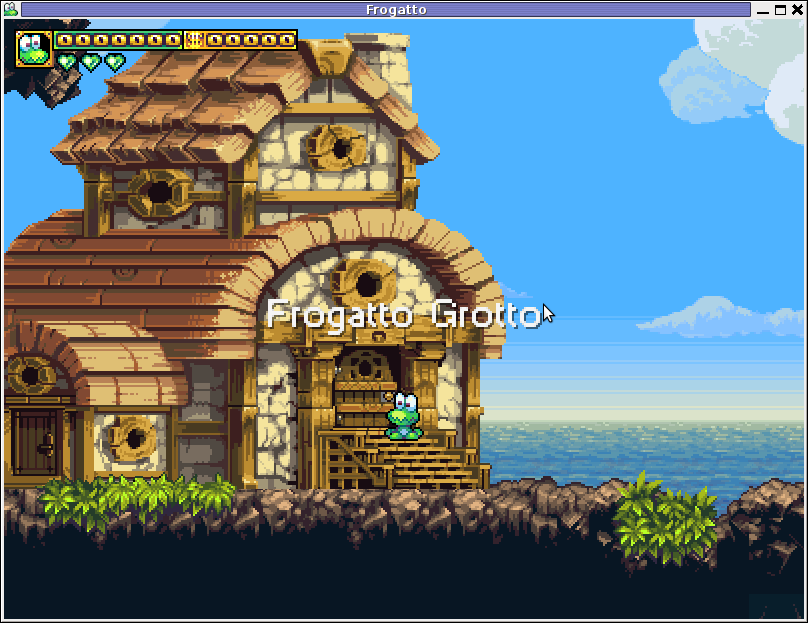

Besides that Frogatto & Friends is multi-platform supporting all the major operating systems.
Game supports:
- Windows
- Mac
- iPhone
- Debian GNU / Linux
- FreeBSD
The game source code is also available on Frogatto.com – The Game’s Official website
The game is available as a deb package in Debian and Ubuntu GNU / Linuxes so to install on those deb based distributions, simply use apt:
debian:~# apt-get install frogatto

...
The above command will install two packages frogatto (containing the game’s main executable binary) and frogatto-data containinng all the game textures, levels, graphics, music etc.
BTW the package saparation on a gamename and gamename-data in Debian (for all those who have not still noticed), can be seen on most of the games with a game data that takes more disk space.
After the game is installed the only way to start the game is to run it manually through pressing ALT+F2 in GNOME or running the progrtam through gnome-terminal with cmd:
debian:~$ frogatto
Here are few more Frogatto gameplay screenshots:


I’ve noticed Frogatto is also available as an RPM package for Fedora Linux, as well as has a FreeBSD port in the /usr/ports/games/frogatto and this makes it easy to install on most free software OSes in the wild.
While checking frogatto.com , I found an interesting link to a website offering free graphics (pictures), textures and sounds for free and open source games for all those who hold interest into the development of Free Software & Open Source Games make sure you check OpenGameArt.org
OpenGameArt.org looks like a great initiative and will definitely be highly beneficial to the development of more and better FSOS Games so I wish them God speed with this noble initiative.
Frogatto is very suitable for growing kids since it doesn’t contain no violence and every now and then the main game actor the Frogatto Frog leads few lines English dialogues with some of the characters found in the quest.
For none speaking English countries, the game can help the kids to learn some basic english words and thus can help develop kids intellect and knowledge
And oh yeah one more criticism towards the game is the Enlish structure, it seems people who wrote the plot can work this out in the time to come. Many of the English sentences during dialogues the frog leads with the cranks he met does not sound like a common and sometimes even correct english / phrases.
Besides those little game “defect”, the game is pretty awesome and worthy to kill some time and relax from a long stressy day.
Tags: arcade games, code, com, deb package, Debian, debian gnu, Desktop, Disk, English, exit, fedora linux, Free, free software games, freebsd, game levels, game source code, game textures, Gnome, gnu linux, Indian, IPhone, jack rabbit, jack rabbitthe, Jazz, jazz jack rabbit, jump, jump and run, knowledge, linux freebsd, look feel, menu, music creation, nbsp, official, Open, open source game, open source games, operating systems, package, Prehistoric, professional game, programming graphics, quot, saparation, school jump, short game, software, software arcade, software open source, Source, time, Ubuntu
Posted in Everyday Life, FreeBSD, Games Linux, Linux, Linux and FreeBSD Desktop | No Comments »
Thursday, February 14th, 2013 
I have a Debian GNU / Linux squeeze with bluetooth and bluetooth is started automatically on system boot. This is pretty annoying, cause I use bluetooth quite rarely.
disable / enable bluetooth via terminal is controlled via Linux sysfs virtual filesystem. The command to disable bluetooth one time is:
debian:~# echo 0 > /sys/devices/platform/thinkpad_acpi/bluetooth_enable
It is efficient in terms of energy saving especially if you use often your notebook on battery to turn off bluetooth permanently and only enable it when needed with:
debian:~# echo 1 > /sys/devices/platform/thinkpad_acpi/bluetooth_enable
To permanently disable bluetooth on Linux boot use:
# service bluetooth stop
In /etc/rc.local before exit 0 line place:
echo 0 > /sys/devices/platform/thinkpad_acpi/bluetooth_enable
An alternative method to permanently disable bluetooth (on other non-Thinkpad – any brand laptops) is via rfkill (bluetooth device control interface), on Ubuntu rfkill is installed by default but Debian users has to explicitly install it via apt:
debian:~# apt-get install –yes rfkill
Once rfkill is installed on host put a line before exit 0 in /etc/local:
rfkill block bluetooth
Tags: acpi, alternative, brand, control interface, debian gnu, debian users, echo 1, exit, lenovo thinkpad, line, Linux, linux ibm, notebook, one time, platform, squeeze, system boot, thinkpad laptops, Ubuntu, virtual filesystem
Posted in Bluetooth, Linux and FreeBSD Desktop, Various | No Comments »
Monday, September 9th, 2013 
Clamav Antivirus is one of must have packages installed on a new Debian Linux server. It is not only necessary whether configuring a new Mail server be it Qmail or Postfix but is good to have to always check files on a Webserver. Until few years infecting of Sites with Viruses / Installing WebShells or Backdooring for further access using Perl or PHP vulnerable PHP code was not so common, However nowadays with increase of complexity of languages and increase of not security minded programmers this possibility dramatically increaed. Thus nowadays, whether I configure a new Apache + PHP + CGI support server I always install Clamav AV. Some might argue that Clamav Virus definitions are still too little compared to proprietary solutions like BitDefender / AVG or Avast but since my experience with this under Linux is not so bright as well as Clamav captures essential Viruses and Backdoors I still prefer to keep on with Clamav. Even on home Desktops with Linux clamav is of use as there are plenty of free-ware software for Linux which come only distributed only in a binary form and hence its good to check them with clamav before use whether they don't contain some well known Rootkit or Virus. Over the years Clamav has done great job for me whether I had to clean up "hacked" hosts containing script kiddie exploit scanners or Virus infected ELF binaries
.
1. Installing ClamAV in Debian Wheezy Linux
Before time there was a separate Debian repository called Volatille providing latest version release of Clamav, since Debian Squeeze Volatille project is discontinued, thus installing on Wheezy as a deb package is only available via standard Debian repositories.
 apt-get update && apt-get --yes upgrade

...
apt-get install --yes clamav clamav-daemon
As package dependencies you get installed:
clamav clamav-base clamav-freshclam libbz2-1.0 libclamav1 libcurl3 libidn11 ucf
Clamav-Daemon will launch immediately after packages are installed and is available as process name /usr/sbin/clamd
 # ps ax |grep -i clam

 2641 ?        Ssl    6:39 /usr/sbin/clamd

 2791 ?        Ss    12:04 /usr/bin/freshclam -d --quiet

12300 pts/0    S+     0:00 grep -i clam
2. Updating Clamav Antivirus Definitions
Its worthy say few words on clamav-freshclam as it is part of ClamAV which is used to update Clamav Virus definitions. Update of ClamAV vir definitions are updating automatically through /usr/bin/freshclam daemon which is started automatically by Debian postconfiguration scripts right after Clamav install.
Manual update of AV definitions can be done also with freshclam.
 # freshclam

ClamAV update process started at Sun Sep  8 17:48:36 2013

main.cvd is up to date (version: 54, sigs: 1044387, f-level: 60, builder: sven)

daily.cvd is up to date (version: 17830, sigs: 1696886, f-level: 63, builder: neo)

bytecode.cld is up to date (version: 225, sigs: 42, f-level: 63, builder: dgoddard)
To keep an eye on definition auto-updates (useful to check where something fails), check out in /var/log/clamav/freshclam.log
A sure indication that Anvirus updates are conducting fine should be log records like:
Sun Sep 8 16:27:44 2013 -> ————————————–
Sun Sep 8 17:27:44 2013 -> Received signal: wake up
Sun Sep 8 17:27:44 2013 -> ClamAV update process started at Sun Sep 8 17:27:44 2013
Sun Sep 8 17:27:44 2013 -> main.cvd is up to date (version: 54, sigs: 1044387, f-level: 60, builder: sven)
Sun Sep 8 17:27:44 2013 -> daily.cld is up to date (version: 17830, sigs: 1696886, f-level: 63, builder: neo)
Sun Sep 8 17:27:44 2013 -> bytecode.cld is up to date (version: 225, sigs: 42, f-level: 63, builder: dgoddard)
Sun Sep 8 17:27:47 2013 -> ————————————–
3. Configuring ClamAV
For Desktop use clamav default config is pretty good. However for servers its good to raise 2 up MaxThreads:
By default MaxThreads is 12
MaxThreads 12
Change to from 30 to 80 depending on how powerful machine ClamAV runs, even on some servers more Clamav threads might be necessary
MaxThreads 30
Other value I like changing is SelfCheck 3600 is too long time for clamav Virus definitions integrity I prefer to set it to 600, i.e.
SelfCheck 600
By default ClamAV is also configured to scan archive files as well. However for this to work you will have to have previously installed unzip and unrar on system. If still you don't have them installed run:
 # apt-get install --yes unrar unzip

...
Note that you will need to have non-free part of Debian deb repositories to /etc/apt/sources.list
Here is one of my sources.list
deb http://ftp.uk.debian.org/debian squeeze main contrib non-free
deb http://security.debian.org/ squeeze/updates main contrib non-free
deb-src http://security.debian.org/ squeeze/updates main contrib non-free
deb http://ftp.debian.skynet.be/ftp/debian/ squeeze main contrib non-free
deb-src http://ftp.debian.skynet.be/ftp/debian/ stable main contrib non-free
deb http://security.debian.org squeeze/updates main contrib non-free
deb-src http://security.debian.org/ squeeze/updates main contrib non-free
3. Scanning with ClamAV
 # clamscan -r /tmp/

./dos-58.160.208.43: OK

./dos-108.18.38.140: OK

./dos-188.194.80.100: OK

./dos-91.224.160.135: OK

./dos-128.253.117.70: OK

./dos-128.172.143.110: OK

./dos-77.92.102.34: OK

./dos-195.230.5.12: OK

...

....

----------- SCAN SUMMARY -----------

Known viruses: 2735887

Engine version: 0.97.8

Scanned directories: 1

Scanned files: 129

Infected files: 0

Data scanned: 0.00 MB

Data read: 0.00 MB (ratio 0.00:1)

Time: 4.769 sec (0 m 4 s)
-r flag stands for recursive scan – e.g. scan all sub-directories in directory and its content
To not flood your console / ssh connection one very useful option is -i (print only whetherinfected files are matched). Here is one more sample case:
 # clamscan -r -i /var/tmp/

----------- SCAN SUMMARY -----------

Known viruses: 2735887

Engine version: 0.97.8

Scanned directories: 1

Scanned files: 2

Infected files: 0

Data scanned: 0.26 MB

Data read: 0.13 MB (ratio 1.97:1)

Time: 4.824 sec (0 m 4 s)
Whether you're on a physical server console and it has pc speaker or sound blaster use –bell option to ring a bell every time a Virus infection is found, for exmpl.
# clamscan -r -i --bell /var/www/
…
4. Scanning periodically and reporting with ClamAV directories with websites
A very common use of ClamAV is to just setup a scheduled cronjob once a month to scan, whether server folder containing a bunch of websites in separate Virtualhosts contain some viruses or malicious stuff. Then as administrator check those logs once a month to make sure server site or group of sites does not become banned in search engine (blocked by Google Chrome and Firefox as Virus hotbed) …
 # crontab -u root -e

00 02 01 * * clamscan -r /var/www -l /var/log/websites-scan.log
Then once a month check out /var/log/websites-scan.log
Tags: avast, cgi support, clamav antivirus, complexity, deb package, debian gnu, debian linux, debian repositories, elf binaries, home desktops, mail server, new mail, Perl, php code, postfix, programmers, proprietary solutions, Qmail, rootkit, squeeze, support server, virus definitions
Posted in Computer Security, Linux, System Administration | No Comments »
Wednesday, August 28th, 2013 
A bit outdated news but still worthy to mention as Debian GNU / Linux is important part of my life. On 16 of August this year Debian turned 20 years! I'm actively using Debian Linux for servers and Desktops over the past 13 years and for this time I've seen right before my eyes how debian grow and from buggy hobbyinst Linux distribution became a robust and rock-solid OS. Moreover Debian is now practically the most important Linux distribution around. Thanks to it currently a thousands of other world changing distributions like Ubuntu, Arch Linux, Knoppix Linux LiveCD, Linux Mint etc. Debian is truly multi platform as of time of writting supports 10 hardware architecture (platforms) – in this number Embedded devices like ARM processors, has translation of most shipped software to 73 languages and comes with about 20 000 installable software packages. Contribution of Debian GNU Linux for Free software community is immerse, hundreds of millions or even billion Debian servers or some kind of Debian based OSes are running all around the net. Besides that Debian is one of the largest if not the biggest and most influential Open Source Project. By its essence existing of Debian is just a miracle.
Though out of date again, lets great each other with Happy Debian Anniversary and Wish Debian a many and healthy years of successful development!
Tags: arm processors, buggy, debian gnu, desktops, distributions, gnu linux, happy birthday, hardware architecture, knoppix linux, languages, Linux, linux livecd, mint, open source project, oses, servers, software packages, successful development, Translation, Ubuntu, writting
Posted in Linux, Linux and FreeBSD Desktop, System Administration | No Comments »
Saturday, January 21st, 2012 
XFCE in Xubuntu looks quite nice, the developers of Xubuntu made it look and work really well.
Anyways XFCE was lacking many of the features that GNOME offers (among which the most important one in that case was creating Icons on the desktop).
Even though creation of XFCE icons on the desktop has ways to be done, this is quite a complex process and its complete un-interactive. Besides that I could not find a way to add programs to XFce's main menus (as icons).
Therefore Xubuntu's Xfce is not suitable gui envorinment for Linux novice who had no knowledge on Linux commands and stuffs.
On the other hand I've seen many users coming from Windows world to Linux to have cope approximately well with GNOME.
Therefore I decided to subsitute Xubuntu's XFCE with GNOME
I used apt-get to install GNOME desktop environment like so:
root@xubuntu-desktop:~# apt-get install --yes gnome-desktop-environment

...
Now simply logout from Xfce and on the GDM login screen I had to choose GNOME
Installing gnome using the above apt command should be also the same on most if not all Debian GNU / Linux based distros.
Tags: Auto, command, creation, customize, Debian, debian gnu, Desktop, desktop manager, developers, Draft, GDM, Gnome, gnome desktop environment, GUI, hand, Icons, Installing, knowledge, Linux, linux commands, login, main menus, manager, novice, process, root, screen, stuffs, substitute, way, Windows, XFCE, Xubuntu
Posted in Gnome, Linux, Linux and FreeBSD Desktop, Linux Audio & Video, System Administration | 1 Comment »
Tuesday, March 27th, 2012 
I've earlier wrote an article How to find which processes are causing hard disk i/o overhead on Linux there I explained very rawly few tools which can be used to benchmark hard disk read / write operations. My prior article accent was on iotop and dstat and it just mentioned of iostat. Therefore I've wrote this short article in attempt to explain a bit more thoroughfully on how iostat can be used to track problems with excessive server I/O read/writes.
Here is the command man page description;
iostat – Report Central Processing Unit (CPU) statistics and input/output statistics for devices, partitions and network filesystems
I will further proceed with few words on how iostat can be installed on various Linux distros, then point at few most common scenarious of use and a short explanation on the meaning of each of the command outputs.
1. Installing iostat on Linux
iostat is a swiss army knife of finding a server hard disk bottlenecks. Though it is a must have tool in the admin outfut, most of Linux distributions will not have iostat installed by default.
To have it on your server, you will need to install sysstat package:
a) On Debian / Ubuntu and other Debian GNU / Linux derivatives to install sysstat:
debian:~# apt-get --yes install sysstat
b) On Fedora, CentOS, RHEL etc. install is with yum:
[root@centos ~]# yum -y install sysstat
c) On Slackware Linux sysstat package which contains iostat is installed by default.
d) In FreeBSD, there is no need for installation of any external package as iostat is part of the BSD world (bundle commands).
I should mention bsd iostat and Linux's iostat commands are not the same and hence there use to track down hard disk bottlenecks differs a bit, however the general logic of use is very similar as with most tools in BSD and Linux.
2. Checking a server hard disk for i/o disk bottlenecks on G* / Linux
Once having the sysstat installed on G* / Linux systems, the iostat command will be added in /usr/bin/iostat
a) To check what is the hard disk read writes per second (in megabytes) use:
 debian:~# /usr/bin/iostat -m

Linux 2.6.32-5-amd64 (debian) 03/27/2012 _x86_64_ (8 CPU)

avg-cpu: %user %nice %system %iowait %steal %idle

15.34 0.36 2.76 2.66 0.00 78.88

Device: tps MB_read/s MB_wrtn/s MB_read MB_wrtn

sda 63.89 0.48 8.20 6730223 115541235

sdb 64.12 0.44 8.23 6244683 116039483

md0 2118.70 0.22 8.19 3041643 115528074
In the above output the server, where I issue the command is using sda and sdb configured in software RAID 1 array visible in the output as (md0)
The output of iostat should already be easily to read, for anyone who didn't used the tool here is a few lines explanation of the columns:
The %user 15.34 meaning is that 15.34 out of 100% possible i/o load is generad by system level read/write operations.
%nice – >Show the percentage of CPU utilization that occurred while executing at the user level with nice priority.
%iowait – just like the top command idle it shows the idle time when the system didn't have an outstanding disk I/O requests.
%steal – show percentage in time spent in time wait of CPU or virtual CPUs to service another virtual processor (high numbers of disk is sure sign for i/o problem).
%idle – almost the same as meaning to %iowait
tps – HDD transactions per second
MB_read/s (column) – shows the actual Disk reads in Mbytes at the time of issuing iostat
MB_wrtn/s – displays the writes p/s at the time of iostat invocation
MB_read – shows the hard disk read operations in megabytes, since the server boot 'till moment of invocation of iostat
MB_wrtn – gives the number of Megabytes written on HDD since the last server boot filesystem mount
The reason why the Read / Write values for sda and sdb are similar in this example output is because my disks are configured in software RAID1 (mirror)
The above iostat output reveals in my specific case the server is experiencing mostly Disk writes (observable in the high MB_wrtn/s 8.19 md0 in the above sample output).
It also reveals, the I/O reads experienced on that server hard disk are mostly generated as a system (user level load) – see (%user 15.34 and md0 2118.70).
For all those not familiar with system also called user / level load, this is all kind of load which is generated by running programs on the server – (any kind of load not generated by the Linux kernel or loaded kernel modules).
b) To periodically keep an eye on HDD i/o operations with iostat, there are two ways:
– Use watch in conjunction with iostat;
 [root@centos ~]# watch "/usr/bin/iostat -m"

Every 2.0s: iostat -m Tue Mar 27 11:00:30 2012

Linux 2.6.32-5-amd64 (centos) 03/27/2012 _x86_64_ (8 CPU)

avg-cpu: %user %nice %system %iowait %steal %idle

15.34 0.36 2.76 2.66 0.00 78.88

Device: tps MB_read/s MB_wrtn/s MB_read MB_wrtn

sda 63.89 0.48 8.20 6730255 115574152

sdb 64.12 0.44 8.23 6244718 116072400

md0 2118.94 0.22 8.20 3041710 115560990

Device: tps MB_read/s MB_wrtn/s MB_read MB_wrtn

sda 55.00 0.01 25.75 0 51

sdb 52.50 0.00 24.75 0 49

md0 34661.00 0.01 135.38 0 270
Even though watch use and -d might appear like identical, they're not watch does refresh the screen, executing instruction similar to the clear command which clears screen on every 2 seconds, so the output looks like the top command refresh, while passing the -d 2 will output the iostat command output on every 2 secs in a row so all the data is visualized on the screen. Hence -d 2 in cases, where more thorough debug is necessery is better. However for a quick routine view watch + iostat is great too.
c) Outputting extra information for HDD input/output operations;
 root@debian:~# iostat -x

Linux 2.6.32-5-amd64 (debian) 03/27/2012 _x86_64_ (8 CPU)

avg-cpu: %user %nice %system %iowait %steal %idle

15.34 0.36 2.76 2.66 0.00 78.88

Device: rrqm/s wrqm/s r/s w/s rsec/s wsec/s avgrq-sz avgqu-sz await svctm %util

sda 4.22 2047.33 12.01 51.88 977.44 16785.96 278.03 0.28 4.35 3.87 24.72

sdb 3.80 2047.61 11.97 52.15 906.93 16858.32 277.05 0.03 5.25 3.87 24.84

md0 0.00 0.00 20.72 2098.28 441.75 16784.05 8.13 0.00 0.00 0.00 0.00
This command will output extended useful Hard Disk info like;
r/s – number of read requests issued per second
w/s – number of write requests issued per second
rsec/s – numbers of sector reads per second
b>wsec/s – number of sectors wrote per second
etc. etc.
Most of ppl will never need to use this, but it is good to know it exists.
3. Tracking read / write (i/o) hard disk bottlenecks on FreeBSD
BSD's iostat is a bit different in terms of output and arguments.
a) Here is most basic use:
 freebsd# /usr/sbin/iostat

tty ad0 cpu

tin tout KB/t tps MB/s us ni sy in id

1 561 45.18 44 1.95 14 0 5 0 82
b) Periodic watch of hdd i/o operations;
 freebsd# iostat -c 10

tty ad0 cpu

tin tout KB/t tps MB/s us ni sy in id

1 562 45.19 44 1.95 14 0 5 0 82

0 307 51.96 113 5.73 44 0 24 0 32

0 234 58.12 98 5.56 16 0 7 0 77

0 43 0.00 0 0.00 1 0 0 0 99

0 485 0.00 0 0.00 2 0 0 0 98

0 43 0.00 0 0.00 0 0 1 0 99

0 43 0.00 0 0.00 0 0 0 0 100

...
As you see in the output, there is information like in the columns tty, tin, tout which is a bit hard to comprehend.
Thanksfully the tool has an option to print out only more essential i/o information:
 freebsd# iostat -d -c 10

ad0

KB/t tps MB/s

45.19 44 1.95

58.12 97 5.52

54.81 108 5.78

0.00 0 0.00

0.00 0 0.00

0.00 0 0.00

20.48 25 0.50
The output info is quite self-explanatory.
Displaying a number of iostat values for hard disk reads can be also achieved by omitting -c option with:
 freebsd# iostat -d 1 10

...
Tracking a specific hard disk partiotion with iostat is done with:
 freebsd# iostat -n /dev/ad0s1a

tty cpu

tin tout us ni sy in id

1 577 14 0 5 0 81
c) Getting Hard disk read/write information with gstat
gstat is a FreeBSD tool to print statistics for GEOM disks. Its default behaviour is to refresh the screen in a similar fashion like top command, so its great for people who would like to periodically check all attached system hard disk and storage devices:
 freebsd# gstat

dT: 1.002s w: 1.000s

L(q) ops/s r/s kBps ms/r w/s kBps ms/w %busy Name

0 10 0 0 0.0 10 260 2.6 15.6| ad0

0 10 0 0 0.0 10 260 2.6 11.4| ad0s1

0 10 0 0 0.0 10 260 2.8 12.5| ad0s1a

0 0 0 0 0.0 0 0 0.0 20.0| ad0s1b

0 0 0 0 0.0 0 0 0.0 0.0| ad0s1c

0 0 0 0 0.0 0 0 0.0 0.0| ad0s1d

0 0 0 0 0.0 0 0 0.0 0.0| ad0s1e

0 0 0 0 0.0 0 0 0.0 0.0| acd0
It even has colors if your tty supports colors 🙂
Another useful tool in debugging the culprit of excessive hdd I/O operations is procstat command:
Here is a sample procstat run to track (httpd) one of my processes imposing i/o hdd load:
 freebsd# procstat -f 50404

PID COMM FD T V FLAGS REF OFFSET PRO NAME

50404 httpd cwd v d -------- - - - /

50404 httpd root v d -------- - - - /

50404 httpd 0 v c r------- 56 0 - -

50404 httpd 1 v c -w------ 56 0 - -

50404 httpd 2 v r -wa----- 56 75581 - /var/log/httpd-error.log

50404 httpd 3 s - rw------ 105 0 TCP ::.80 ::.0

50404 httpd 4 p - rw---n-- 56 0 - -

50404 httpd 5 p - rw------ 56 0 - -

50404 httpd 6 v r -wa----- 56 25161132 - /var/log/httpd-access.log

50404 httpd 7 v r rw------ 56 0 - /tmp/apr8QUOUW

50404 httpd 8 v r -w------ 56 0 - /var/run/accept.lock.49588

50404 httpd 9 v r -w------ 1 0 - /var/run/accept.lock.49588

50404 httpd 10 v r -w------ 1 0 - /tmp/apr8QUOUW

50404 httpd 11 ? - -------- 2 0 - -
Btw fstat is sometimes helpful in identifying the number of open files and trying to estimate which ones are putting the hdd load.
Hope this info helps someone. If you know better ways to track hdd excessive loads on Linux / BSD pls share 'em pls.
Tags: Auto, benchmark hard disk, bottleneck, BSD, bsd world, central processing unit, central processing unit cpu, cke, command man, command outputs, debian gnu, description, Disk, Draft, explanation, few words, filesystemsI, gnu linux, hard server, hdd, images hard disk, img src, info, input output, invocation, iostat, iostat commands, iowait, Knife, level, linux distributions, linux systems, man page, megabytes, network filesystems, operations lt, option, outfut, output statistics, overhead, package, page, page description, priority, processor, quot, quot quot, reason, refresh, root, rsec, screen, sda, sdb, second, server bottlenecks, show, software, swiss army knife, sysstat, time, tin, tool, wait, yum
Posted in FreeBSD, Linux, System Administration | 1 Comment »







