THX 1138 is an American science fiction film set in a dystopian future in which the populace is controlled through android police officers and mandatory use of drugs that suppress emotion, including outlawed sexual desire. It was directed by George Lucas in his feature film directorial debut in 1971.
Produced by Francis Ford Coppola and written by Lucas and Walter Murch, it stars Donald Pleasence and Robert Duvall.
THX 1138 was developed from Lucas's student film Electronic Labyrinth: THX 1138 4EB, which he made in 1967 while attending the University of Southern California's film school. The feature film was produced in a joint venture between Warner Bros. and Francis Ford Coppola's production company, American Zoetrope. A novelization by Ben Bova was published in 1971. The film received mixed reviews from critics and failed to find box office success on initial release; however, the film has subsequently received critical acclaim and gained a cult following, particularly in the aftermath of Lucas's success with Star Wars in 1977.
THX1138 Director's cut: The Future Trailer
The movie is one of the most awesome movies on SCi-Fi Topic I've ever seen much better than comercial ones such as Star Wars and perhaps one of the best if not the best movies, George Lucas has done ever.
The THX with its Android police is another inspirational one that perhaps has inspired the naming of the Android Operating System like that.
THX 1138 movie is an example of a kind of communist society in the future which perhaps the global elite has planned for humanity. The only mean of the THX 1138 is to consume and work being programmed (conditioned) by the central authorities with a full control over all aspects of the individual life, its kinda of pretty much what is today western world has been turning into.
I believe we're currently in a transitional stage to this futuristic society in which, the life costs zero.
Well, after all the global programmers of society in our age has a sense of humour to finance a movie like that 🙂
The Emarketing assignment’s aim was to make a comparison of two websites which are operating in the same or very similar business field
The report’s goal was to present to the E-marketing teacher which in my case was Peter Stemers that the student has been acquainted with the basic theories of Emarketing. The project was actually rather easy and the main issue to build up a project like this is the start up to complete it you just need to put a start and persist in expanding the document.
As the topic was very interesting to myself I started quite early in preparing my assignment (just a few weeks after it was assigned).
I’ve considered my profound interest into Information and Computer Technology (ICT) and decided to create a report which evaluates two websites which are into the IT sphere. After a examination over a few possible domain names like for example: Verizon – verizon.com and AT&T – att.com 1& 1and1.co.uk and Godaddy etc.
I’ve finally set my websites to compare choice on: Godaddy.com and enom.com
The criterias for selection of Godaddy and Enom as a target companies to compare their online business was as follows::
1. Both Godaddy and Enom are into the same business online industry, ( e.g. domain selling, reselling, blog hosting, webhosting, SSL certificates, online presence Search Engine optimization etc.) Some other selection factor that convinced me to choose exactly Enom.com and Godaddy were that this are the biggest companies in the domain names selling IT sector and even better the Domain Selling industry has a tight relation to the History of how the Internet emerged.
The report became really thoroughful, the Godaddy vs Enom emarketing report has the size of 59 pages. Officially the study criterias has been that normally the usual student emarketing reports contains about 15 to 20 pages, however as the business products and services that this huge internet domain reseller companies has, I was forced to exceed the set teacher limitation of 20 pages and do it in 59 pages.
I’ve handed in my emarketing report and Peter Stemers graded it with 8.5 points from 10 possible (which by the way is quite a high mark for Arnhem Business School)
By the wat the E-marketing course was quite a silly one though for people that are not have an avarage computer knowledge and interest into Internet Commerce it was okay.
To read the table of contents of the Report comparison Enom compared to Godaddy click over here Here is also my Emarketing Final Report Godaddy.com vs Enom.com (Godaddy.com compared to Enom.com) in both PDF and DOC, I hope this reports will be helpful to some marketing researchers out there to get an estimate on how the two companies are performing in the domain selling and reselling business:
Compiling this Emarketing report costed me a lot of effort and time, the overall completion of the report has took me about a two weeks time, whether each day I worked a couple of hours on it. I express also my big thanks to Alex Petrov (a friend of mine) for helping me read and review the report and fix some minor errors in sentence structures and my language of expression.
The Godaddy VS Enom Emarketing report outlines, numerous pitfalls that both Enom Company and Go Daddy has done in terms of SEO, Emarketing, user friendliness and usability
I believe this report could be really helpful for the these two competitive companies and could help them improve both their user image, their accessibility and Search Engine indexing. On the other hand the report could be a good example for (HAN – Arnhem Business School E-Marketing) students on how to write a good looking Emarketing report to give themselves a pass.
An interesting fact is that before I decide to publish the report online and make it available to everyone I tried a known selling marketing report, I tried to offer to both Godaddy.Com and Enom.Com to sell them this report by sending the offer to their marketing and sales guys. Enom.com has returned me an email, that they will look forward to my request, whether with Godaddy I have received an email by Go Daddy founder and CEO Bob Parons and the COO Warren Adelman
I will present you here the reply just to show you how impodent this mans are! My offer to sell them this great report for the symbolic sum of 200 EUR which will help their companies grow was considered I quote: “Unsolicated Report”. Below I present you my offer email plus the impudent reply email by GoDaddy’s CEO and CEO:
SNAP – My Email to Godaddy Hi Bob,
My name is Georgi Georgiev and I’m currently completing my bachelor in Business Administration in HAN University of Applied Sciences (The Netherlands).
Currently I’m developing an E-marketing report which is comparing the 2 largest internet domian registrars godaddy.com and enom.com.
The report is a in depth SEO and E-marketing analysis of current positioning in major search engines of Godaddy.com and Enom.com as well as an overall analysis of user user friendliness, screen resolution readiness of the two websites. In the report I also analyse the behaviour of the enom.com and godaddy.com as tested with different major Internet web browsers, general user experience. External statistical websites etc. etc.
This research document does also concludes what are the strengths & weaknesses of both your company and enom.com. The aim of the report is to show, what Godaddy advantages and pitfalls if compared to Enom.com.
It also includes a number of suggestion for improvements which will be beneficial for your company to drive more internet traffic to you as well as increase your number of customers.
The report is 60 pages long document and includes many things that might be beneficial for your business.
If you’re interested into the report and you’d like to buy it for me for a very cheap price of 200 EUR, please contact me on my mail hipo@www.pc-freak.net or systemexec@gmail.com.
Best Regards, Georgi
— Georgi Georgiev
—— END of SNAP
SNAP – Godaddy’s Bob Parson and Warren Adelman Reply Email:
Office of the President Response Dear Georgi Georgiev,
Thank you for contacting the Office of the President. Our CEO, Bob Parsons, and President and COO, Warren Adelman, have asked me to respond on their behalf.
We value your time and appreciate the information you have provided regarding this request. Please understand that we are not seeking to acquire any unsolicited reports of this nature at this time.
Thank you for your understanding.
Sincerely,
Jordan McAlister
Hope this post is helpful to some students stucked with writting their E-marketing report I also hope it shows how proficient, I’m in building reports and might be a good exapmle on how qualitative my work is and enhearten somebody to hire me as an E-marketing consultant 😉
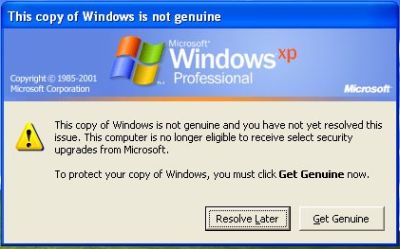
I have a pirate version of Windows XP Pro 2 installer CD which does automatically turn on Windows Genuine Advantage
This is kind of annoying as the computer gets really slow and the hard disk drive activite gets intensive as well as an annoying popup message that the Windows XP copy is not genuine does appear periodically
In order to get rid of the message I had to do the following steps:
1. Get into Windows Safe Mode without Networking
As most of the people knows this is achieved by pressing F8 keyboard key right before the Windows bootup screen appears.
After in Safe mode it’s necessery to,
2. Run Windows Command Line (cmd.exe)
To do so follow, the menus:
Windows (Start Menu) -> Run -> cmd.exe
3. In the command prompt window issue the commands:
C:Documents and SettingsUser> cd WindowsSystem32

C:WindowsSystem32> taskkill -IM wgatray.exe

C:WindowsSystem32> del wgatray.exe

C:WindowsSystem32> move wgalogon.dll wgalogon.dll.old

C:WindowsSystem32> del wgalogon.dll.old
Something to mention is you have to be really quick, with deleting wgalogon.dll, cause wgatray.exe is scheduled to run every 1 / 2 seconds 🙂 It is a bit of situation of type “be quick or be dead” as Maiden used to sing 🙂 A Windows system restart and Hooray the Windows Genuine message is gone 🙂
My sister tried updating her Ubuntu to a newer version 12.04 (Precise Pangolin) but in the middle of the dist-update process had to go out and hence closed her notebook thinking the update would continue by itself. I’m not fully aware what happened next, maybe the battery charge went down, maybe the computer entered sleep mode in the middle of some important package update or whatever. The result however on next opening OF her Ubuntu powered Acer Aspire 5736Z was Ubuntu unable to boot properly. The boot up failed in the middle of booting the BootSplash (from some of the /etc/init.d … init scripts)
. The BootSplash status was therefore failing and on the screen the GUI cursor appeared refreshing every few seconds, whether on every refresh the screen become blank, the hard drive was reading on and on, continuously as well. Since the screen was keeping mostly blank I had no way to see exactly why the hard drive was scraping on and on….
My first guess was to try to boot the Ubuntu in single user mode (without GUI environment) and then complete the interrupted packages apt-get dist-upgrade.
In the old days of RedHat and probably nowdays in Fedora, I remember entering single user mode was easy just press I button few times on OS boot in non-interactive mode. The I (boot single-mode) shortcut however is not compatible with Deb based distros (as I found out by trying it out unsuccesfully).
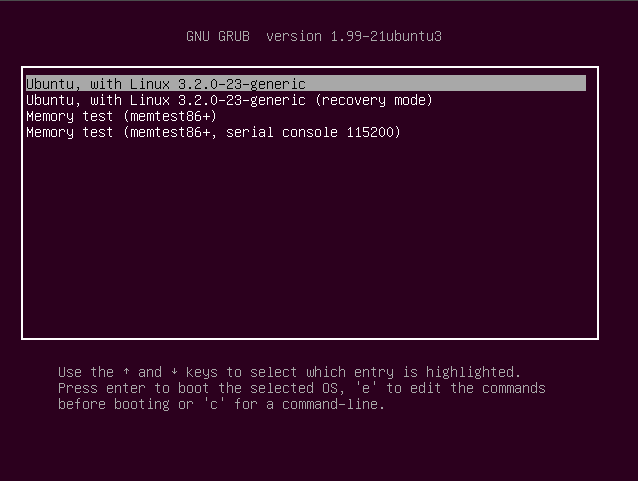
Actually during booting process, this notebook did not even prompted the GRUB menu with even simple choice to choose an old kernel or something, hence I took a quick look on the net how can I make the GRUB menu appear on Ubuntu!. As I read the reason why GRUB menu did not appear on the laptop boot was due to very short GRUB (select) boot timeout delay set.
Therefore to make the GRUB prompt (select) prompt appear in Ubuntu it is necessery to:
1. Hold continously the SHIFT key at boot
Once the textmode GRUB selection screen appears, as I read in instructions in blogs one has to: HITe key, over default boot-up kernel, e.g.:
Ubuntu, with Linux 3.2.0-23-generic
Now to boot Ubuntu in single user mode as I red it is necessery to modify near line:
linux /boot/vmlinuz-3.2.0-24-generic root=UUID=bc6f8146-1523-46a6-8b\6a-64b819ccf2b7 ro quiet splash
to something like:
linux /boot/vmlinuz-3.2.0-24-generic root=UUID=bc6f8146-1523-46a6-8b\6a-64b819ccf2b7 ro single quiet splash
initrd /boot/initrd.img-3.2.0-24-generic
Then finally to load up with the changed GRUB options, I have pressed Ctrl+X Unfortunately this didn’t work on this totally bugged Ubuntu. After continuously looking for way to boot in sigle user or textmode (without X server), I found another blog recommending to change: quiet splash words with text in grub kernel load-up options ..
In my case none of the ways worked out so I finally decided to do it the “old-fashioned” classical way to recover Ubuntu, e.g. – by using Ubuntu Install CD, booting in “Try Ubuntu” mode and using the good old chroot cmd.
Fixing the failed updates Ubuntu, came up to booting with Ubuntu Install CD with option: Try Ubuntu without any change of your computer, further on once the CD boot up, I entered console and inside console used commands similar to one of my previous posts – How to mount /proc, /dev and chroot in Linux
Ubuntu fix was up-to to issuing :
# mkdir /mnt/recover
# chroot /dev/sda1 /mnt/recover
root@ubuntu:~# mount /proc
root@ubuntu:~# mount /proc/pts
root@ubuntu:~# mount -a
root@ubuntu:~# mount /dev
root@ubuntu:~# dpkg-reconfigure -a
root@ubuntu:~# apt-get update
....
root@ubuntu:~# apt-get --yes upgrade
....
root@ubuntu:~# apt-get --yes dist-upgrade
....
Onwards during the apt-get upgrade and apt-get dist-upgrade few questions poped up asking me if I would like to replace some files with their new versions on each questions I substituted the files with the new maintainer version. Then finally after PC restart my sis Ubuntu boot up now fine with the latest Ubuntu version 12.04.
As you can read in my few previous posts I have just installed a new Ubuntu 10.10 on a Toshiba Satellite L40 notebook.
Most of the things which are necessery for a fully working Linux desktop are already installed and the machine works fine, however I just noticed there is an issue with the default torrent gnome client and transmission unable to download files from torrent trackers.
Few minutes of playing with the transmission’s settings has revealed what was causing my torrent download problems.
It seems on Ubuntu 10.10 (probably on other Ubuntus and Debians) by default the transmission bittorrent client is trying to use for torrent download connections an incoming port 53636 number.
As the computer is behind a firewall and does not have a real IP address seeders cannot properly connect to the notebook port 53636 and hence the transmission bittorrent client could not initialize any torrent downloads.
Fixing up the issue is rather easy to fix it I had to change the settings in transmission from the menus:
Edit -> Settings -> Network
You need to select the options:
Pick a random port on startup
Use UPnP or NAT-PMP to redirect connections
Next I had to restart transmission and my torrent downloads started 😉
The day ran mostly smoothly for which thanks and praise the Lord of course ! I was at school we had a long discussion ofworld economic system, the possible future of humanity also physics, latest science discovery, philosophy etc. etc.Later I worked for some time, then Geri came home and asked me to help her to fix her computer because it didn’twant to start. The problem was trivial I only have to unplug all the power supply calbles and plug them on againand it ran fine. In the evening we went out with Javor and because there was no free tables on the coffee “The Fountain”,we went to Mino’s coffee and I drinked one tea. I learned today about a very interesting blues singer his name isStevie Ray Vaughan and his band is called “Double Trouble”, this guy Stevie Ray Vaughan is famous with this that heis the best white blues musician. Also I should mention I prayed and well yes I think this is how my day just went by.I should say that the presence of God in our life is the most precious thing. I can clearly see now that without himeverything just blews and wents away. I have to extensively thank him for he being so merciful to me :)END—–
These days, I'm playing with The GIMP. I've been a GNU / Linux, FreeBSD user for already 11 years now but as I'm doing mostly system administration and I don't have much expertise in Panting or Computer Graphical Design, I've never put much time to learn more in the interesting area of graphical design. Hence until just recently, Just until now, I've never spend time with the GIMP (GNU Image Manipulation Program) and never realized how powerful this great program is. The more I learn about GIMP functionalities and how it works the more it makes me determined to learn some basic web design 🙂
The functionality which The GIMP offers in a basic install is quite rich, however by default on most Debian and Ubuntu installations many of the great plugins which easifies the way to edit pictures is missing.
Example for a very valuable functionality which is not present with standard gimp package installed on Debian and Ubuntu are:
GIMP FX-Foundry is a thoroughful collection of GIMP scripts (addon plugins), that automates many of the operations which requires a professional web design skills and gives an easy intuitive interface through which very robust "high level" graphic design can be accomplished. This additional GIMP extensions helps to create very unique design in just few simple steps, as well as gives multiple tools for the sake of easy pro design creation. For anyone looking for quick edit of images with GIMP FX-Foundry is a must have GIMP plugins extension. The script pack is located on http://gimpfx-foundry.sourceforge.net/
To install FX-Foundry scripts collection on Debian / Ubuntu / Linux Mint and other based Linux distributions:
gimp-plugin-registry package name is based on GIMP Plugin registry's website . Gimp plugin registry contains many helpful design goodies 🙂
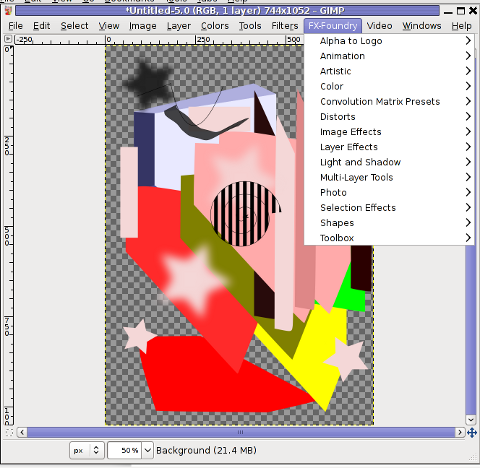
Once installed you will notice GIMP with a new menu on the main menus bar reading FX-Foundry :
GIMP FX Foundry extensionos package contains 124 scripts for additional graphics manipulation. The collection contains less scripts than the ones provided by gimp-plugin-registry. package has 156 scripts inside.
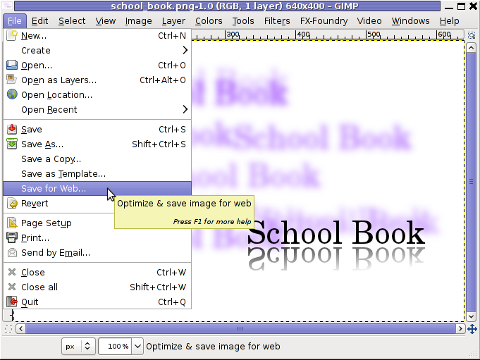
One of the most helpful GIMP addition from the package is the inclusion of Save for Web button under:
File -> Save for Web
Another very helpful .deb package which adds up to GIMP's design possibilities is gimp-data-extras .
gimp-data-extras adds 111 new GIMP Fill in Patterns , which can be used through the Blend Tool to Fill selected areas with color gradients.
Generally once installed this package will add to GIMP – an extra set of brushes, palettes, and gradients for The GIMP as you can read in the package description.
I was also quite stunned to find out the good old GIMP is capable of basic Video editting!!
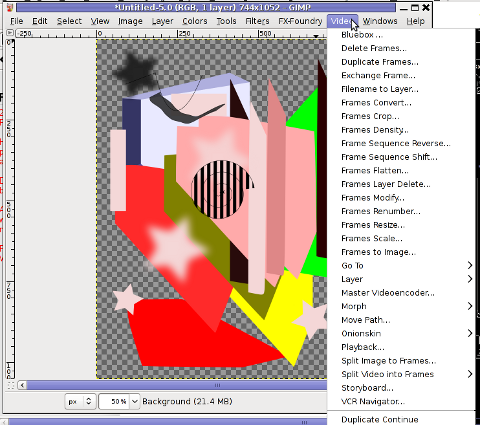
On Debian and Ubuntu there is a package called gimp-gap which once installed adds an extra Video menu.
I've not tested the GIMP video editting capabilities yet, however I intend to learn something about it immediately when I have some free time left. You see the enormous list of Video editting possibilities GIMP obtaines with gimp-gap which btw stands for (The GIMP Animation Package).
To install gimp-gap:
debian:~# apt-get install --yes gimp-gap
I've noticed also the following list of others useful GIMP additions (mainly helpful in Web, Brochure and Logo Graphic Design) to install them:
Here is the package description of the packages above command will install:
gimp-cbmplugs – plugins for The GIMP to import/export Commodore 64 files
gimp-data-extras – An extra set of brushes, palettes, and gradients for The GIMP
gimp-dcraw – GIMP plug-in for loading RAW digital photos
gimp-dds – DDS (DirectDraw Surface) plugin for the gimp
gimp-dimage-color – GIMP plugin to convert Minolta DiMAGE pictures to sRGB colour space
gimp-gap – The GIMP Animation Package
gimp-gluas – Lua environment plug-in for GIMP
gimp-gmic – GIMP plugin for GREYC's Magic Image Converter
gimp-gutenprint – print plugin for the GIMP
gimp-lensfun – Gimp plugin to correct lens distortion using the lensfun library
gimp-normalmap – Normal map plugin for GIMP
gimp-plugin-registry – repository of optional extensions for GIMP
gimp-resynthesizer – Gimp plugin for texture synthesis
gimp-texturize – generates large textures from a small sample
gimp-ufraw – gimp importer for raw camera images
flegita-gimp – Gnome Gimp scan plugin.
gtkam-gimp – gtkam gimp plugin to open digital camera pictures
mrwtoppm-gimp – GIMP-plugin to support Minolta DiMAGE 5/7/7i RAW images
Now after installing all this plugins and seeing all GIMP's power, I'm starting to wonder why are still people ranting Adobe PhotoShop is feature rich. That's all, enjoy the great new GIMP features. Happy picture editting 😉
Every now and then my gnome keyboard layout switcher hangs. When my keyboard switcher hangs I can't switch between my two defined languages English and my native Bulgarian
The hang up of the language switcher is makes switching between my two defined languages impossible until I logoff and login again or kill the current GNOME session with CTRL+ALT+BACKSPACE.
Sometimes logging off again is not necessery so I have to logoff and login to GNOME few times until finally the gnome keyboard layout switcher reacts to an issued change language via Alt+Shift or by clicking on it.
Unfortunately the gnome keyboard layout switcher is not available as a process so there is no way to simply kill -HUP the process responsible for it.
Just until today I couldn't find a way how to restart the gnome keyboard layout switcher when it hangs.
Now today I finally found a way to restart it without restarting the whole gnome session or killing completely the Xorg server.
To "fix" up the keyboard switcher when its not responding, I had to issue in gnome-terminal or via ALT+F2:
hipo@noah:~$ gnome-keyboard-properties
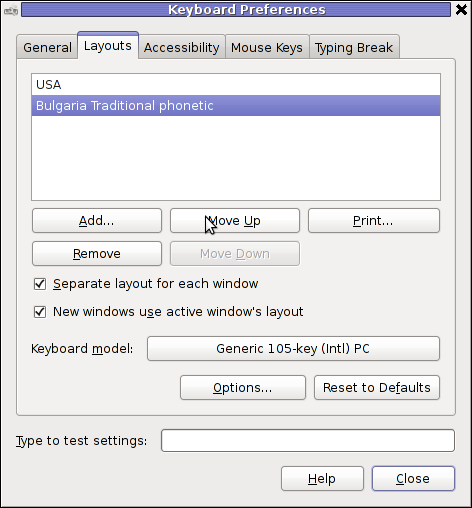
As you can see in the screenshot below, one has to press the Move Up button to switch the default order of languages. Once this is done the keyboard layout switcher starts working again. Once working I just used the move up once again to revert back my default language order as it used to be.
I'm not sure what exactly is causing the GNOME 2 keyboard layout switcher to hang (when it does), my guess is it is due to some kind of version incompitability between gnome versions or configurations specific to my computer. In the past I was running Debian Testing/Unstable and then downgraded back to Debian stable, probably this is the reason of the language switcher hangs.
I've not played audio CD for ages. Anyways I had to set up one computer with Linux just recently and one of the requirements was to be able to play audiocds. I was surprised that actually a was having issue with such as simple tasks. Here is how i come with this article.
If you encounter errors playing Audio CDs on any Linux distro in VLC or other players, you might need to apply the following fix.
I'm not sure if this packages are required, anyways having them installed is a good idea especially on computers which will have to support as much multimedia as possible.
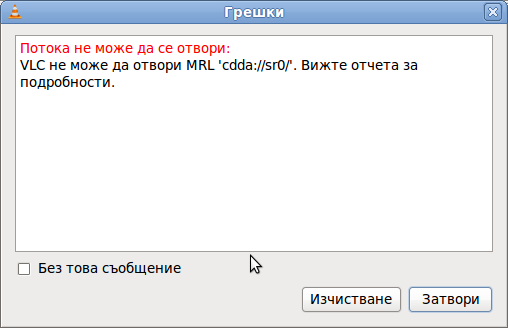
Trying to play a CD with VLC the result was not nice, you see in the picture above the error that poped up while trying it with VLC:
Due to wrong configuration of the play device VLC will be looking to read the audio cd from.
To succesfully play the audiocd invoke VLC command with a cdda///dev/sr0 argument like so:
hipo@xubuntu-desktop:~$ vlc cdda:///dev/sr0

...
To permanently fix the error you will have to edit ~/.config/vlc/vlcrc :
Inside ~/.config/vlc/vlcrc find the lines:
dvd=/dev/cdrom
Substitute the above line with:
dvd=/dev/sr0
Next find the line:
vcd=/dev/cdrom
Change the above line with:
vcd=/dev/sr0
Due to a bug in generating vlcrc , the dvd= might be set also to other messy unreadable characters (different from /dev/cdrom). This can also be the reason why it fails to properly read the disc.
If dvd= and vcd is set to a different unreadable characters delete them and substitute with /dev/sr0 .I've experienced this on Xubuntu Linux with a Bulgarian localization (probably the bug can be seen in other Linuxes when GNOME is installed in Russian, Chineese and other UTF-8 languages.
The strange error can be observed also in other players when the localization is set to someone's native language … Alternative solution is to install and use rhythmbox instead of VLC. Other program to play audio CDs called workman , you will have to get used to the interface which uses gtk1 and therefore obsolete. Putting aside the ugly interface it works 😉
One of my friends Windows 7 started returning errors while trying to open from My Computer the local Windows C, D and E drives. This error appeared immediately, after malware and registry fix up programs were run on the PC. The exact programs that lead his PC into the state of returning an error:
This file does not have a program associated with it for performing this action. Create an association in the Set Associations control panel
are:
a-squared
Registry Booster
This two programs by the way are doing quite a good job on fixing Windows XP and Windows Vista PCs which were cleaned up earlier with Malware Bytes and Avira , however it seems they’re not 100% still compatible with the Windows 7 registry database or some uncleaned malware or virus on the PC has post-messed up the registry file associations. As its always the case with Windows you don’t have a clear idea what’s going …
Anyways as said the PC was in a bad situation, where neither Windows Explorer nor in any mean the disk drives can be opened or red, hence there was need for a quick way to revert back the default Windows file association registry settings After some quick research online, I’ve found an archive containing default Windows registry values for file associations
Therefore to revert back all Windows 7 file extensions from Windows install time, I had to download the file All_Default_File_Extensions.zip , extract the archive with WinZip or WinRar and run each of archive contained .reg extension files. The .reg files had to be run with Administrator account. It takes a while and its a bit irritating until all of the .reg files are run and all the file association default Windows settings are reverted back but thankfully in the end the C drive opening error:
This file does not have a program associated with it for performing this action … is resolved. Cheers 😉


 These days, I'm playing with The GIMP. I've been a GNU / Linux, FreeBSD user for already 11 years now but as I'm doing mostly system administration and I don't have much expertise in Panting or Computer Graphical Design, I've never put much time to learn more in the interesting area of graphical design. Hence until just recently, Just until now, I've never spend time with the GIMP (GNU Image Manipulation Program) and never realized how powerful this great program is. The more I learn about GIMP functionalities and how it works the more it makes me determined to learn some basic web design 🙂