Why would anyone disable ACPI support on a server machine??
Well ACPI support kernel loaded code is just another piece of code constantly being present in the memory, that makes the probability for a fatal memory mess up leading to a fatal bug resulting in system crash (kernel panic) more likely.
Many computers ship with buggy or out of specifications ACPI firmware which can cause a severe oddities on a brand new bought piece of comp equipment.
One such oddity related to ACPI motherboard support problems is if you notice your machine randomly powering off or failing to boot with a brand new Linux installed on it.
Another reason to switch off ACPI code will would to be prevent the CPU FAN rotation from being kernel controlled.
If the kernel controls the CPU fan on high CPU heat up it will instruct the fan to rotate quickly and on low system loads it will bring back the fan to loose speed.
This frequent switch of FAN from high speed to low speed increases the probability for a short fan damage due to frequent changes of fan speed. Such a fan damage leads often to system outage due to fan failure to rotate properly.
Therefore in my view it is better ACPI support is switched off completely on servers. On some servers ACPI is useful as it can be used to track CPU temperature with embedded motherboard sensors with lm_sensors or any piece of hardwre vendor specific software provided. On many machines, however lm_sensors will not properly recognize the integrated CPU temperature sensors and hence ACPI is mostly useless.
There are 3 ways to disable fully or partially ACPI support.
- One is to disable it straight for BIOS (best way IMHO)

- Disable via GRUB or LILO passing a kernel parameter

- Partial ACPI off-ing - /disabling the software that controls the CPU fan/
1. Disable ACPI in BIOS level
Press DEL, F1, F2, F10 or whatever the enter bios key combination is go through all the different menus (depending on the vios BENDOR) and make sure every occurance of ACPI is set to off / disable whatever it is called.
Below is a screenshot of menus with ACPI stuff on a motherboard equipped with Phoenix AwardBIOS:
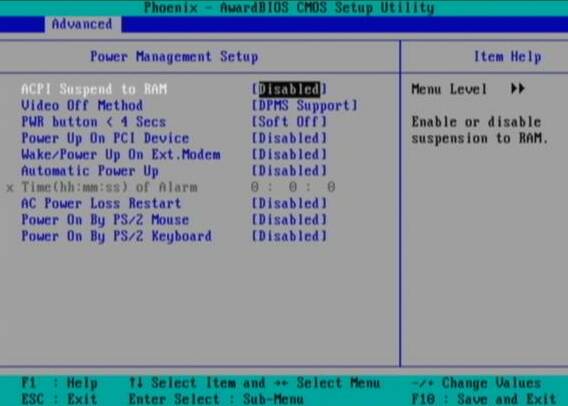
This is the in my opinon best and safest way to disable ACPI power saving, Unfortunately some newer PCs lack the functionality to disable ACPI; (probably due to the crazy "green" policy the whole world is nowdays mad of).
If that's the case with you, thanksfully there is a "software way" to disable ACPI via passing kernel options via GRUB and LILO boot loaders.
2. Disabling ACPI support on kernel boot level through GRUB boot loader config
There is a tiny difference in command to pass in order to disable ACPI depending on the Linux installed GRUB ver. 1.x or GRUB 2.x.
a) In GRUB 0.99 (GRUB version 1)
Edit file /etc/grub/menu.lst or /etc/grub/grub.conf (location differs across Linux distribution). Therein append:
acpi=off
to the end of kernel command line.
Here is an example of a kernel command line with ACPI not disabled (example taken from CentOS server grub.conf):
[root@centos ~]# grep -i title -A 4 /etc/grub/grub.conf

title Red Hat Enterprise Linux Server (2.6.18-36.el5)

root (hd0,0)

kernel /vmlinuz-2.6.18-36.el5 ro root=/dev/VolGroup00/LogVol00 console=ttyS0,115200n8

initrd /initrd-2.6.18-36.el5.img
The edited version of the file with acpi=off included should look like so:
title Red Hat Enterprise Linux Server (2.6.18-36.el5)

root (hd0,0)

kernel /vmlinuz-2.6.18-36.el5 ro root=/dev/VolGroup00/LogVol00 console=ttyS0,115200n8 acpi=off

initrd /initrd-2.6.18-36.el5.img
The kernel option root=/dev/VolGroup00/LogVol00 means the the server is configured to use LVM (Logical Volume Manager).
b) Disabling ACPI on GRUB version 1.99 +
This version is by default installed on newer Ubuntu and Debian Linux-es.
In grub 1.99 on latest Debian Squeeze, the file to edit is located in /boot/grub/grub.cfg. The file is more messy than with its predecessor menu.lst (grub 0.99).
Thanks God there is no need to directly edit the file (though this is possible), but on newer Linuces (as of time of writting the post), there is another simplied grub config file /etc/grub/config
Hence to add the acpi=off to 1.99 open /etc/grub/config find the line reading:
GRUB_CMDLINE_LINUX_DEFAULT="quiet"
and append the "acpi=off" option, e.g. the line has to change to:
GRUB_CMDLINE_LINUX_DEFAULT="quiet acpi=off"
On some servers it might be better to also disable APIC along with ACPI:
Just in case you don't know what is the difference between ACPI and APIC, here is a short explanation:
ACPI = Advanced Configuration and Power Interface
APIC = Advanced Programmable Interrupt Controllers
ACPI is the system that controls your dynamic speed fans, the power button behavior, sleep states, etc.
APIC is the replacement for the old PIC chip that used to come imbedded on motherboards that allowed you to setup interrupts for your soundcard, ide controllers, etc.
Hence on some machines experiencing still problems with even ACPI switched off, it is helpful to disable the APIC support too, by using:
acpi=off noapic noacpi
Anyways, while doing the changes, be very very cautious or you might end up with un-boot-able server. Don't blame me if this happens :); be sure you have a backup option if server doesn't boot.
To assure faultless kernel boot, GRUB has ability to be configured to automatically load up a second kernel if 1st one fails to boot, if you need that read the grub documentation on that.
To load up the kernel with the new setting, give it a restart:
[root@centos ~]# shutdown -r now

....
3. Disable ACPI support on kernel boot time on Slackware or other Linuxes still booting kernel with LILO
Still, some Linux distros like Slackware, decided to keep the old way and use LILO (LInux LOader) as a default boot loader.
Disabling ACPI support in LILO is done through /etc/lilo.conf
By default in /etc/lilo.conf, there is a line:
append= acpi=on
it should be changed to:
append= acpi=off
Next to load up the new acpi disabled setting, lilo has to be reloaded:
slackware:~# /sbin/lilo -c /etc/lilo.conf

....
Finally a reboot is required:
slackware:~# reboot

....
(If you don't have a physical access or someone near the server you better not 🙂 )
4. Disable ACPI fan control support on a running Linux server without restart
This is the most secure work-around, to disabling the ACPI control over the machine CPU fan, however it has a downside that still the ACPI code will be loaded in the kernel and could cause kernel issues possibly in the long run – lets say the machine has uptime of more than 2 years…
The acpi support on a user level is controlled by acpid or haldaemon (depending on the Linux distro), hence to disable the fan control on servers this services has to be switched off:
a) disabling ACPI on Debian and deb based Linux-es
As of time of writting on Debian Linux servers acpid (Advanced Configuration and Power Interface event daemon) is there to control how power management will be handled. To disable it stop it as a service (if running):
debian:~# /etc/init.d/acpid stop
To permanently remove acpid from boot up on system boot disable it with update-rc.d:
debian:~# update-rc.d acpid disable 2 3 4 5

update-rc.d: using dependency based boot sequencing

insserv: Script iptables is broken: incomplete LSB comment.

insserv: missing `Required-Start:' entry: please add even if empty.

insserv: warning: current start runlevel(s) (empty) of script `acpid' overwrites defaults (2 3 4 5).

insserv: warning: current stop runlevel(s) (2 3 4 5) of script `acpid' overwrites defaults (empty).

insserv: missing `Required-Start:' entry: please add even if empty.
b) disabling ACPI on RHEL, Fedora and other Redhat-s (also known as RedHacks 🙂 )
I'm not sure if this is safe,as many newer rpm based server system services, might not work properly with haldaemon disabled.
Anyways you can give it a try if when it is stopped there are issues just bring it up again.
[root@rhel ~]# /etc/init.d/haldaemon stop
If all is fine with the haldaemon switched off (hope so), you can completely disable it to load on start up with:
[root@centos ~]# /sbin/chkconfig --level 2 3 4 5 haldaemon off
Disabling ACPI could increase a bit your server bills, but same time decrease losses from downtimes, so I guess it worths its costs 🙂


More helpful Articles

Tags: acpi, Auto, code, config, cpu fan, cpu heat, cpu temperature, damage, Draft, fan speed, fatal bug, file, frequent changes, img, kernel panic, kernel panics, kernel parameter, level, lifespan, linux servers, low speed, machine, menu, mess, nbsp, oddity, option, piece, power, quot, root, server machine, software, specific software, support, system crash, system loads, system outage, temperature, temperature sensors, ttys








Mozilla/5.0 (X11; Linux x86_64; rv:15.0) Gecko/20100101 Firefox/15.0.1
This is rubbish.
View CommentView CommentDo you have any sources for your claims of kernel panics and hardware failures attributable to ACPI? I don’t think so.
On the other hand, disabling ACPI will drastically increase the heat generated by the whole computer, raising its internal temperature, which is the best-known way to shorten the lifespan of all its internal components, including CPUs, hard drives, VRMs, and fan too, because they will be spinning at full speed all the time (increased speed = increased friction, and therefore wear).
Mozilla/5.0 (compatible; MSIE 9.0; Windows NT 6.1; Trident/5.0)
Hi,
There are plenty of complains from old mailing lists. ACPI Support has never been too good in Free Software realm (as far as I know). On servers I really doubt what would be the purpose of just one another piece of memory pre-loaded software, which every now and then makes the server fan to change rotation cycles. Imagine you’re running a webserver and it is very loaded sometimes, and sometimes the load drops, imagine this happens frequently, in situation like this I’m quite sure ACPI will make the fan cool less at points and therefore on high loads it will be easier for server to be overloaded due to overheat. Maybe my logic is wrong somewhere, but this is how I think. Besides that I don’t think disabling ACPI will increate oseverall heat? Why would that be? Maybe you’re right, pls explain why would disabling acpi increase heat?
Regards,
View CommentView CommentGeorgi
Mozilla/5.0 (X11; Linux x86_64; rv:12.0) Gecko/20100101 Firefox/12.0
What a misleading and outdated entry!
We’re running thousands (no exaggeration here) of Linux servers with ACPI enabled and at least in the last two years we haven’t have any incident which was ACPI related.
What’s more, if you follow this “tip”, you OS might not function properly as parts of it rely on ACPI.
To quote from http://doc.opensuse.org/products/draft/SLES/SLES-admin_sd_draft/cha.pmanage.html : “Some newer machines (especially SMP systems and AMD64 systems) need ACPI for configuring the hardware correctly. On these machines, disabling ACPI can cause problems.”
And who haven’t got a 64 bit machines, these days?
View CommentView CommentMozilla/5.0 (Windows; U; Windows NT 6.1; en-US; rv:1.9.2.3) Gecko/20100401 Firefox/3.6.3
Hi Walter,
Thanks for the tip. Maybe I was wrong it was my common logic and assumption about ACPI. If I was wrong or misleaded someone. By the way, I don’t use SuSE, so dont know the situation with it. Also I’m not sure SuSE is very good choice for servers.
Thanks again,
Best
View CommentView CommentGeorgi
Mozilla/5.0 (Macintosh; Intel Mac OS X 10_6_8) AppleWebKit/534.57.2 (KHTML, like Gecko) Version/5.1.7 Safari/534.57.2
Hi!
Do you know that the ACPI logo that you used is Copyright to the Animation Council of the Philippines (ACPI)? We the members of ACPI request that you use a different logo. This brings a negative connotation to our Association. It looks like Tux doesn’t support our Association.
Thank you!
– Joie
View CommentView CommentMozilla/5.0 (Windows NT 5.1; rv:19.0) Gecko/20100101 Firefox/19.0
Hi thanks for saying I didn’t know. I removed the logo from Tux. Hope now it is ok.
View CommentView CommentMozilla/5.0 (iPad; CPU OS 6_1_3 like Mac OS X) AppleWebKit/536.26 (KHTML, like Gecko) Version/6.0 Mobile/10B329 Safari/8536.25
Hi,
View CommentView CommentI'm running a server with the Ipfire core 67. The network sketch has 4 NICs.There's a situation that is driving me crazy. Two weeks after installation, one the NICs (the blue network segment) deactivates itself. I have tried editing the acpi kernel boot line and what happens is that with acpi=off the NIC doesn't deactivates but the internet conexion is down.with pci=noacpi, noapic and the noapic is the same thing, the Nic deactivates itself leaving the blue clients without conexion. The Ipfire console shows a <<disabling irq #18>> which is the nic that is being deactivated.
How can i disable this acpi option or daemon without interrupting the internet conexion of this blue Nic?
thank you
Mozilla/5.0 (Windows; U; Windows NT 6.1; en-US; rv:1.9.2.3) Gecko/20100401 Firefox/3.6.3
Hi Willbert,
Try to disable ACPI support on BIOS level and see if it helps. I hope this solves it. Otherwise you can try to also disable any loaded modules in kernel related to ACPI, I guess one of this 2 might solve your situation. Also if you have some embedded sound card / modem or whatever you don’t need on system make sure you disable it from BIOS.
Regards,
View CommentView CommentGeorgi
Mozilla/5.0 (Windows NT 6.1; WOW64; rv:22.0) Gecko/20100101 Firefox/22.0
Hello there, You’ve done an incredible job. I will definitely
View CommentView Commentdigg it and personally suggest to my friends.
I am sure they’ll be benefited from this site.
Mozilla/5.0 (compatible; MSIE 9.0; Windows NT 6.1; WOW64; Trident/5.0)
If your exercise routine primarily concentrates of muscle mass growth, then this
article has details which will be useful for you. You may need to change your
diet and also exercising to get the final results you want.
Check into locations and concentrate on areas of your current exercise routine training that you just really feel you could utilize help with.
Aim for a higher amount of reps with medium-high intensity weight if
you teach. For each and every individual workout
you need to do, attempt to do some ten or fifteen reps,
resting below one minute in the middle every set.
This leads to lactic acidity to develop within your muscle tissues, helping to make you “notice the shed” while exercising progress.
Should you be looking to build muscle tissue, it is important to try to eat caloric-dense food on the perfect
time. The optimum time to nibble on your heaviest meal through the day is once you
have accomplished your muscle-building exercise program. It is actually at the moment the power needs of your
body are at maximum degrees given that your body needs the nutrition to
fix and build muscle groups. If you consistently try to eat some other calorie-heavy meals every couple of hrs, you can expect to
offer a chance for the body to incorporate much more muscle tissue.
Crank up some songs. Research shows that playing audio you adore when you are
lifting will help you do more reps than not paying attention to any music by any means or not listening to the songs that you prefer.
Furthermore, having headphones might help distract you
against having a discussion with others which will defer your training session.
It is quite vital that you stand properly when doing ranking
workout routines, including overhead presses and squats.
These workout routines call for a form of fitness stance. To
experience this, you ought to stand along with your feet at concerning the size
of your shoulder blades. Then, a bit stage your toes
outward, flex the knees, and arch your spine.
Make sure that your vision are seeking frontward.
A 60 second workout is the maximum span for maximum results.
Beyond 60 minutes, the body commences issuing the stress hormone, cortisol.
Cortisol diminishes your male growth hormone degrees, which just waste materials your efforts to
improving your muscle mass. An excellent approach to making sure you maximize your routines is usually to always keep workout routines at less than one
hour long.
Avoid comparing you to ultimately other folks at the health club.
It can be useful to see others to discover their type, new workout routines, or new kinds of equipment, but immediate comparing is just not valuable.
The reason being everybody has another body type what really works might not work for other people.
Focus on your body extra fat and evaluate it frequently.
Try not to be disheartened if you find not important weight reduction when muscle building,
because your bodyweight might not alter a lot
by using a bodyweight and muscle building regimen.
Your system body fat is actually a much better way of measuring your overall health rather than weight.
Ensure that you are eating the amount of calorie consumption that
your body needs. There are many of on-line calculators that you can use to find out caloric needs dependent on
your goals. Use one or two of the calculators then change your diet plan
accordingly, including the proper levels of carbs, healthy proteins along with other vitamin supplements to construct your own muscles.
Work your own muscles to weakness to get the best is a
result of your workouts. Keep nothing at all around the table.
When finishing some exercise routines, maintain pushing your self
till you are not able to complete yet another force-up or elevate the nightclub yet another time.
You can then begin to use weightier weights and doing less repetitions to boost muscles dimensions.
Making a smart agenda for your muscles developing workouts will keep the muscles increasing and keep
you from injuries. It is recommended that beginner muscle tissue home builders work out only two times
every week, when people that have practical experience
is capable of doing so three times per week.
When you go through within the over article, there are various ways to enhance your
View CommentView Commentmuscles. This informative article supplied some good recommendations
for you to adhere to. Try picking the ones that you believe
can help you. Mix it and test permutations to view the direction they
sense.
Mozilla/5.0 (X11; Linux x86_64) AppleWebKit/537.36 (KHTML, like Gecko) Chrome/44.0.2403.89 Safari/537.36
well..
my laptop (2013) is getting so hot that after a while i get artifacts on the screen… but my fan never goes fullspeed.
after disabeling acpi (centos7) my fan is going fullspeed at times when it is getting hot.
downside is that the fan makes a lot of noise but upside is that i dont have to shut down my laptop to let it cool off.
View CommentView CommentMozilla/5.0 (Windows NT 6.1; Win64; x64) AppleWebKit/537.36 (KHTML, like Gecko) Chrome/68.0.3427.0 Safari/537.36
obviously like your web-site however you have to take a look at the spelling on quite a few of your posts. Several of them are rife with spelling issues and I find it very bothersome to tell the truth on the other hand I'll surely come again again.
giấy in ảnh 2 mặt recently posted…giấy in ảnh 2 mặt
View CommentView CommentMozilla/5.0 (Windows NT 5.1; rv:52.0) Gecko/20100101 Firefox/52.0 SeaMonkey/2.49.4
Great article,
useful for those who rent dedicated servers with buggy ACPI.
thanks
View CommentView Comment